Sub Heading E.g. The art of making Sprite Sheets with the smoothest movement possible
TARGET DURATION:
Tip: You will be able to estimate your video’s length by how long it takes you to read your narration.
e.g 10-12 minutes
AUDIENCE:
E.g Animators who want to tighten up character movement and might have an interest in the video series we have to offer.
GOAL:
Tip: Outline the goal for
Your Audience
You
E.g To get viewers to quickly create sprite sheets with snappy and smooth movements using CTA3. If they learn from this video, then maybe they might want to subscribe to our youtube channel because we produce meaningful content
Narration:
{Narration script for video goes here}
Tip:
Remember to pause and breathe at the end of your sentences when recording.
Tell your audience the duration of your video.
Don’t Forget your call to action (conversion point) at the end.
Tutorial tips:
Write your narration as you prep for your tutorial
Use Bolded text for actions,
Use Italics for Menu items, tech terms, and jargon
Ask yourself :what does the audience need?
Pick out the most important or aesthetically pleasing features in your demonstration
Why am I doing this video? Be very specific -How can my main subject benefit the audience e.g “to show how you can easily create sprite animations that are realistic and seamless.” Arrive at reasons to sell your main point.
Who
Who is my audience?’ How much of an expert is my audience? How familiar are they with the subject matter? Terminology – Will my audience understand my technical terms? Always use the simplest and easiest lingo Why did they look for my content? Did I direct them to this video from the classroom? Ideation – Are they browsing and looking for ideas? Instructions – Are they trying to figure out how to do something by looking for a method or tutorial? Advice – Are they trying to decide on whether they should be doing what you say? Buy in – are they trying to decide whether to buy or convert to what I’m selling?
What’s my video’s content?
Am I making a tutorial ? marketing a product/service?
TutoriaL (Remove this Section If it is not applicable)
Outline what procedure you’d like to show, If it’s an introduction to the main features, stick to the main features, don’t outline all items on the interface. Identify call to action – sign up, subscribe, watch the next video etc.
Marketing (Remove this Section If it is not applicable)
List main points in order of significance. Identify call to action – sign up, subscribe, watch the next video etc.
Explanatory Video (Remove this Section If it is not applicable)
Briefly describe the explanation. Identify call to action – sign up, subscribe, watch the next video etc.
To show how to configure Flowgorithm to use and display the proper conventions for flow chart symbols
Why
To ensure that students configure flowgorithm to show standard flowchart convention as expected by NCSE and CSEC
Who
Form 3, 4 students with a basic understanding of algorithms and looping: Pre-requisites: Algorithm, flowchart , while loop Students will be directed to watch this video by me after I instruct them to install flowgorithm. Some may be browsing my videos on youtube, so the idea is to convert them to use flowgorithm with the required configuration.
What’s my video’s content?
Am I making a tutorial? marketing a product/service? Explanatory video?
Tutorial
Change the default chart style for flowgorithm Click on Edit Click on Choose Chart Style Choose Classic from the dropdown list Click OK
Video Script:
Using the Correct Flow-Chart Symbols in Flowgorithm
Ensuring that you use the proper conventions expected by CXC and NCSE
TARGET DURATION:
1 minute
AUDIENCE:
Form 2 and 3 students who have been introduced to flowgorithm by previous demonstration in the classroom
GOAL:
For students: To ensure that students know how to configure flowgorithm for use in their IT SBA.
For me: To strengthen trust between my students and I, To set the tone that I am their subject matter expert in a non invasive manner, letting my content speak for itself; To get my students to look forward to my next video because it gets to the point .
Narration:
Welcome students to a quick minute tutorial on how to configure flowgorithm for use in CXC and NCSE examinations.
Flowgorithm is an awesome graphical programming language that you can use to generate flowcharts , trace tables and actual program code.
If you’re not already using flowgorithm , you should be , or at least be using some equivalent solution.
However, Flowgorithm has one main drawback out of the box – it does not use the diamond shape for looping, as is expected by CXC CAPE and CSEC; and also NCSE. Instead it uses this shape: a sort of diamond shape that’s been flattened vertically at the ends . We need to make sure that it uses the diamond shape, also know as a rhombus.
We can fix this problem in 4 easy steps:
Click on Edit
Click on Choose Chart Style
Choose Classic from the dropdown list under chart style
And Click OK.
That’s it.
There are some other issues that you’ll encounter when using flowgorithm – one issue is very obvious in this video. Did you catch it?
I’ll give you a hint, it’s got something to do with the arrows in the loop. How is it different from the loops in your CXC text book?
In any case, I’ll be covering how to manage this issue and others in another video.
Until next time , Bye!
Storyboard
In our next post, I’ll provide the templates with some inline instructions that you can use when creating your videos.
The video script contains the narration or text that is used in the video, as well as a storyboard that will be used to show the sequencing of events in relation to the narration/text.
Although this is all that is needed to in this document, it is useful to also include the video rationale. This is useful because it allows for our video producer to choose appropriate source video clips from stock sites, and/or create appropriate graphics and/or video recordings that have a high level of relevance to our video production.
Recall the video that was created:
Below is the Video Script and rationale that was used:
Video Title: Football In two Sentences
TARGET DURATION:
Less than 30 seconds if possible
AUDIENCE:
Experts and beginner
GOAL:
Goals for me:
To get more people interested in football.
To create a video that is attractive and short so that the entire video is watched
To motivate the younger audience to share the video on social media
Goals for my audience:
To start conversations on social media that will educate newcomers about the sport.
To spread the word on football (increased awareness and popularity)
To entertain the audience with a crafty and quirky video.
Narration:
No narration is used. Only text on screen. See storyboard
Storyboard
Visual
Narration/Text
Title screen with catch music is shown 2-5 seconds
Football in Two Sentences
Display video of a football with some sort of slow moving graphics.
Football is a team sport played y two opposing teams.
Show a live , exciting video of a goal being sored and the jubilation felt from scoring the goal. (The screams of the crowd should be audible over background music)
Show a timelapse (sped up video) of a field with players playing the sort from a distance.
The object of the game is to get the football into the other team’s goal without using your hands.
A video rationale document is structured description of your video’s purpose, the intended audience, separate goals for you and your audience and the main supporting information that you need to include in your video’s content.
And our video that was created was :
The example video rationale is shown below:
Video Title: Football In two Sentences
TARGET DURATION:
Less than 30 seconds if possible
AUDIENCE:
Experts and beginner fans
Newcomers
Children around 13 years old in the UK
GOAL:
Goals for me:
To get more people interested in football.
To create a video that is attractive and short so that the entire video is watched
To motivate the younger audience to share the video on social media
Goals for my audience:
To start conversations on social media that will educate newcomers about the sport.
To spread the word on football (increased awareness and popularity)
To entertain the audience with a crafty and quirky video.
After considering our Video rationale, we no move onto the final stage of planning, which is the creation of the video script.
A video brief structured description of your video’s purpose, why you are creating the video, and your intended audience.
If we spend time adding detail to our video brief, we can expand it to produce a justification for our video or video rationale document
A video rationale document is structured description of your video’s purpose, the intended audience, separate goals for you and your audience and the main supporting information that you need to include in your video’s content.
This is best understood by example. In a previous tutorial, we created this video:
Although the video seems mundane, it was created with a purpose that is not or never will be realized by the audience. The full brief is shown below:
What’s My video’s purpose?
To cleverly describe the sport of football (soccer) a briefly as possible.
Why
I want non players and newcomers to the sport to feel welcomed and understand that the sport is not complex, making the sport easier to be tolerated or adopted by different cultures.
I want to start conversation in social media about football from experts who find my explanation to simplistic, that way newcomers can benefit from an inclusive conversation.
Who
People who know nothing about football People who know a lot , expert fans and players.
As you can see, the purpose of the video is rather abstract, as the video itself simply describes football in 2 sentences.
A storyboard is a planning tool that shows the sequence of of events that you wish to produce in your video along with the accompanied narration and or visuals.
To create a a simple storyboard from source files, we use the following template:
Visual
Narration/Text
An example of a storyboard showing four events using this template is shown below
Figure 1 – An example of a simple storyboard.
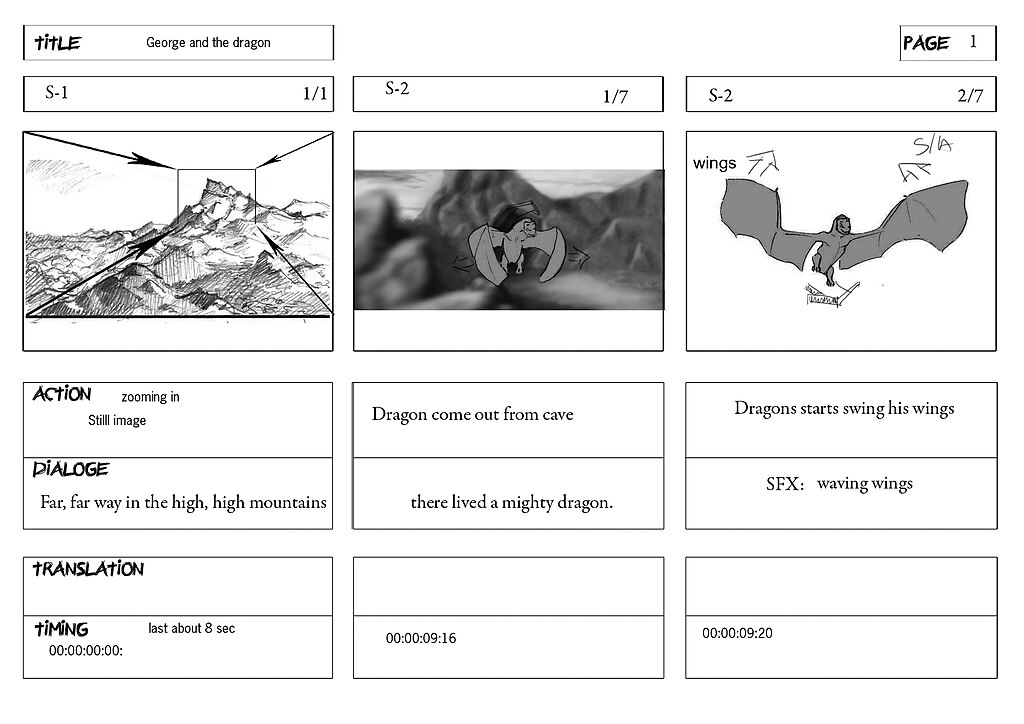
Storyboards can become very complex depending on the nature of the video being produced. An example of a single event for an animated movie is shown below:
One can use the storyboard as tool in isolation to create videos, but it worth considering your purpose and goals of your video by creating a video brief.
A multiplexer is a combinational circuit having many inputs which allows for the outputting a single data input at a time by using selection input lines. A multiplexer has 2ndata input lines , nselect input lines and a single output.
Discussion by analogy : A Television remote control used to access 4 channels
Teacher describes a remote control with 2 buttons that can be toggled on and off to switch between 4 channels
A 4 to 1 multiplexer
The truth table is shown below:
s1
s2
Output at F
0
0
x1
0
1
x2
1
0
x3
1
1
x4
Note that the data from any input line can be either a 0 or 1 instantaneously depending what the input at a the time. For example, let us consider the situation where over the next 4 cycles of execution on a cpu that
dataline x1 produces 0011 on each cycle respectively,
dataline x2 produces 1100 on each cycle respectively; and
during cycles 1 and 2, s1 and s2are 0 and 0 respectively
during cycles 3 and 4, s1 and s2are 0 and 1 respectively
The resulting output at f over the four cycles are 0000.
That is, two bits of data from x1, then two bits of data from x2.
In sequence , we selected x1 for 2 consecutive cycles, then x2 for another 2 consecutive cycles.
Special Note on Spelling: MultiplexEr or MultiplexOr ?
Using the Oxford English Dictionary, the original spelling is multiplexer, as evidenced by it’s widespread use. However it’s use in quotation is as early as 1961, the spelling as multiplexor appeared in quotation in 1957.
Despite this, It’s generally accepted that the original spelling is multiplexer, and multiplexor should be considered a variation on the.
Teacher draws a SR latch using NOR gates with top gate as g1 and bottom gate as g2.
Teacher draws a truth table for quick reference:
A
B
A NOR B
0
0
1
0
1
0
1
0
0
1
1
0
Scenario, Circuit Startup S=0, R=0 , Q=0 (Q’ is irrelevant and can be proven in a later scenario)
Input G2 becomes 0,
Q’ becomes 1
Input G1 becomes 1
Q stays at 0 , circuit is stable in a consistent state.
Scenario: circuit in previous state, S becomes 1, r stays at 0, Q was 0 and Q’ is 1
Scenario: Same as previous state, however S returns to 0. (Memory is Achieved)
Same as previous State, but R is set to 1
Same as previous state but R returns to 0
CHAOS!!! S and R set to 1.
Media Attrbution
No machine-readable author provided. Arturo Urquizo assumed (based on copyright claims)., CC BY 3.0 <https://creativecommons.org/licenses/by/3.0>, via Wikimedia Commons




 Island Class
