
See the file produced in class here:
https://drive.google.com/drive/folders/1UrqLcETLHFoj7kJoD3Yi0E0givstGu8d?usp=drive_link
Video
© 2023 Vedesh Kungebeharry. All rights reserved.
See the file produced in class here:
https://drive.google.com/drive/folders/1UrqLcETLHFoj7kJoD3Yi0E0givstGu8d?usp=drive_link
© 2023 Vedesh Kungebeharry. All rights reserved.
See the following video on a basic introduction to tracking changes.
© 2023 Vedesh Kungebeharry. All rights reserved.
Download this tutorial file and use it to practice the skills shown in the video below:
https://youtu.be/0I3PCQSJ99Y
© 2023 Vedesh Kungebeharry. All rights reserved.
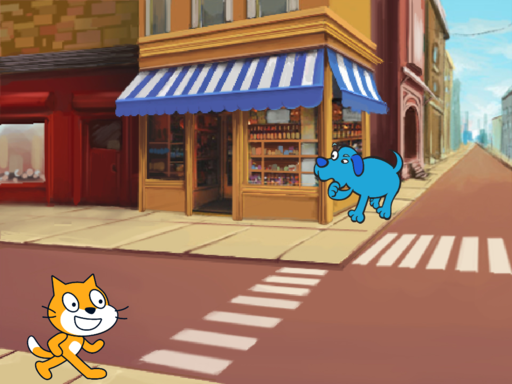
Now you have set up the sprites and costumes for the cat crossing the street scenario in Scratch. You can continue by adding scripts to animate the sprites and make the cat look left and right before crossing the street.
Follow along with the video below:
https://youtu.be/q4TzNKMy63s
Scratch project: https://scratch.mit.edu/projects/848541187


© 2023 Vedesh Kungebeharry. All rights reserved.
See video:
https://youtu.be/aImIl-d5F9A
© 2021 Vedesh Kungebeharry. All rights reserved.
SD Cards (Secure Digital Cards) are a popular form of portable flash memory storage because of it’s small size , speed and durability. It’s used widely in digital video/photography to store media, and as expansion storage for other smart devices including phones , tablets etc.
It was created by a group of companies and has now become a standard for portable data storage.

SD Card readers are devices that allow for SD Cards to be read by the computer system and can be internal (built into) or externally connected via USB ports.
Below: An external SD Card Reader with an inserted Micro SD Card

Below: An internal SD Card Reader built into the computer’s system unit.

Because of it’s widespread use, it has become desirable to include SD card readers in newer computer systems to facilitate easier data transfer from device to device.
A common task that a user would face would be copying their media from their digital camera to their pc. In the past, this meant that the user would have to install the camera’s software and drivers on the pc, then connect a cable from the camera to the pc to access the media.
This process changes when a sd card reader is built in or connected to a computer, the user simply removes the sd card from the digital camera and inserts it into the sd card reader, where the media is immediately accessible as using any other portable secondary storage device.
Original: 毛抜きDerivative work: Tkgd2007, CC BY-SA 3.0, via Wikimedia Commons
Dineshkumar Nallaveerappan, CC BY-SA 4.0, via Wikimedia Commons
liewcf, CC BY-SA 2.0, via Wikimedia Commons
© 2023 Vedesh Kungebeharry. All rights reserved.
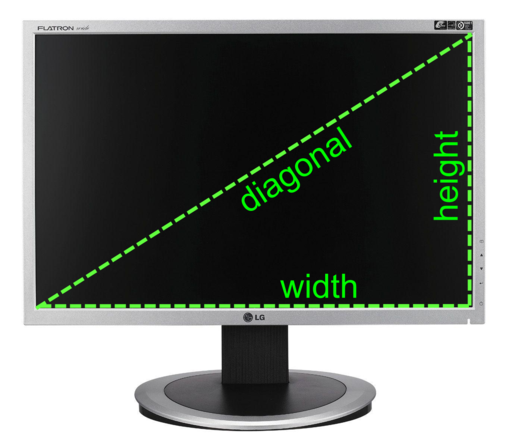
Screen sizes are measured along the diagonal of the screen and is usually quoted in inches. For example, a typical computer monitor or laptop screen may be 15” in size.
Screen resolution refers to the quality and level of detail that can be displayed on the screen. The screen is made up of a matrix of individual dots that can be coloured differently. Each dot is know as a picture element or pixel for short.
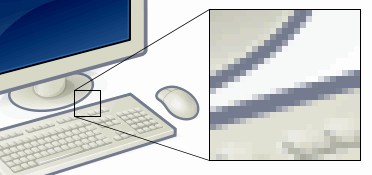
Example of pixels. Shows a zoomed section of an image to demonstrate how it is made up of pixels.
Maximizing the number of dots in a unit area of the screen will result in a sharper image with more detail , or as we say, a higher resolution image.
A monitor’s screen resolution is denoted as horizontal pixels x vertical pixels. e.g 1920 * 1080
It’s possible for a monitor with large screen to have a small resolution, to the average person, the screen may display images which are blocky, where the pixels are discernable and the image is not smooth.
It’s also possible to have a very small screen have a high resolution, as in the case of a high end smartphone.
Size and resolution consideration depends on where the screen needed, for example, having a large screen with a low resolution at a train station or airport is feasible since a lot of people can easily view the screen at once , however , we do not require the need to display detailed images, just formatted text or cursive fonts.

On the other side of the spectrum, a graphic artist travelling on a long train ride may opt to get his/her/them/they/us work done on a portable tablet computer which has a small but very high resolution stylus touch screen to allow for fine and detailed designs to be viewed while being created.
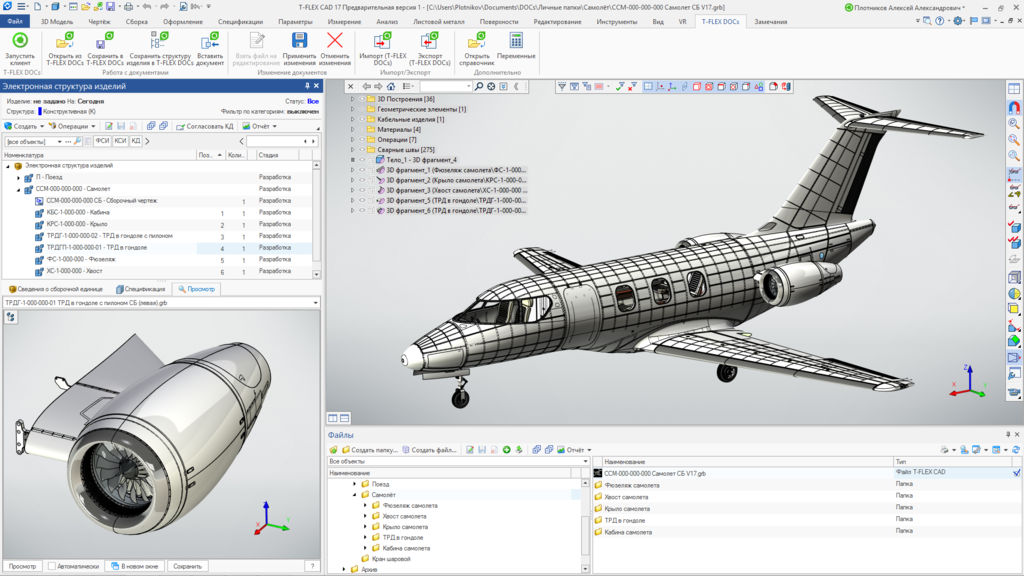
florisla, CC BY-SA 2.0, via Wikimedia Commons
ed g2s • talk, CC BY-SA 3.0, via Wikimedia Commons
MaedaAkihiko, CC BY-SA 4.0, via Wikimedia Commons
TopSystemsLTD, CC BY-SA 4.0, via Wikimedia Commons
© 2023 Vedesh Kungebeharry. All rights reserved.
.
When developing a solution to a problem in program code, we usually aim to write a bit of code that implements part of the solution and run it to see if works.
Bugs can start here, they manifest as errors that prevent your code from being compiled or executed out right, or produce incorrect results.
It’s important to note in our context that programs written in source code must be translated to machine code , which is directly executable by your computer’s CPU.
The translation can take place
The errors or bugs experienced while we develop our code can be classified into three types:
Teacher Demonstration In class: bugs in Flowgorithm
© 2023 Vedesh Kungebeharry. All rights reserved.
Students are arranged into groups of two.
Student 1 – writes instructions for student 2 to perform a simple task. Student 2 is not allowed to see the instructions as they are written.
Student 2 – Performs the task according to the given instructions.
Tasks include
Drawing
Dancing
Do the floss[1]
Were the instructions precise?
Instruction: Students are instructed to rewrite the instructions in a concise and precise manner with the expectation that the recipient of the instruction is motivated to achieve the goals of the instruction; i.e. the recipient understands the intent of the instructions and is not subject trivial misinterpretation which can lead to faults.
When solving a problem the following the steps to be followed:
See the plan for next class discussion here: https://islandclass.org/2021/05/19/problem-solving-discussion/
Visit scratch.mit.edu and create an account for class next week.
[1] https://metro.co.uk/2018/04/18/floss-dance-created-everyone-7476359/
© 2022 Vedesh Kungebeharry. All rights reserved.
 Island Class


