Flowgorithm is an awesome graphical programming language that you can use to generate flowcharts , trace tables and actual program code.
If you’re not already using flowgorithm , you should be , or at least be using some equivalent solution.
Flowgorithm ,however, has one main drawback out of the box – It does not use the convention and regular shapes expected by CXC CAPE and CSEC; and NCSE.
See both images below:
Wrong shape/convention used
Correct shape used!
You MUST configure flowgorithm to fit the expected conventions. Here are the steps:
Create an Online website using the service
provided by http://wix.com
Your website must contain coherent and
consistent information on a topic of you choosing. Ensure that your chosen
topic which is suitable for a student you age and one that your parents will be
proud of.
Include a suitable layout, and pages for “About”,
“Contact”, and a Homepage.
A modem converts a computer’s digital signal to an analogue signal for transmission over a network; and converts analogue signals from a network back to digital signals.
Converting digital to analogue is called modulation.
Converting analogue to digital is called demodulation.
The word modem is short for modulator demodulator.
Information technology systems produce data that is usually recorded or stored. This information is used to make strategic decisions to capitalize on opportunities, and tactical decisions to improve efficiency.
As time passes on, some of the older recorded data becomes less useful in decision making and is accessed infrequently. In this case, we make an archive of this data.
Definition: An archive is a historical copy of information that is important to an organization.
Archives can be used to look back on past decision making, or to gain a better understanding of an organization’s history.
Computer output on microfilm and magnetic tape can be used for archival purposes.
File access
The data is usually stored onto the tape in the order it was exported from the original system, and may be to some extent in sequential form.
However, after many years the original system’s data structure may change and differs from the sequence on tape.
This means that when searching for a record for research purposes, all the data must be examined because the tape’s data structure may be forgotten or unknown; thus making it a serial access medium.
View the video below before studying the notes below. The video is not tailored specifically to our notes, however it builds a good context for proper use of information sources.
Information is used to make decisions that can impact the long term welfare of organizations or society as a whole. Information that has been retrieved electronically must be evaluated to be reliable.
On the lowest level of evaluation, we should consider the following criteria:
authenticity,
currency,
relevance,
bias
Authenticity (or Credibility)
This refers to the integrity of information or how correct the information is. Usually, we try to verify gathered information against other sources to establish that the information is accurate.
Credibility refers to the amount of trust we place in an information source being correct.
Established authorities are good sources of verification, e.g Organizations, experts in the field etc.
Accuracy
This refers to the correctness of discrete items in the information source and how complete the information is for it’s application.
Reliability
This refers to how consistent the information source is over time. For example, when monitoring temperatures related to climate change we may want to record the temperatures at consistent time intervals. Even though each individual recording may be accurate and precise, the lack of regular recordings can make the information unreliable when determining trends associated with temperature.
Currency (or Timeliness)
Information should be current, and recent enough to make problem solving and decision making reasonable and reliable.
In problem solving and decision making, all information is considered to have a life span for which it is appropriate.
Relevance
Information gathered should be relevant to the topic being researched and free from extraneous, cosmetic, and irrelevant details.
It should be appropriate for the tasks of problem solving and decision making.
Bias
Gathered information should be free from bias, i.e the information is objective and free from preconceptions.
A reputable institution should support source without bias in the information.[1]
Recall that data can be processed to produce information.
Information Sources
When searching for information, we may acquire our research from various sources.
Sources of information emerge from:
Interview experts in a field; people related to your research.
Books, Newspapers, magazines and journals.
Computer databases, company databases.
Websites on the internet.
Document Types
Most of the time, we can gather data and information from various documents.
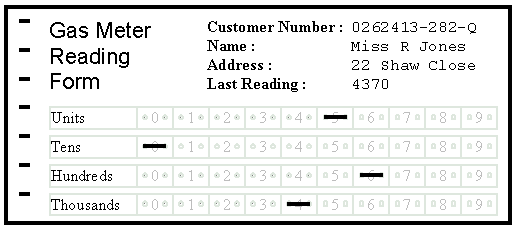
Turnaround documents
This is a document produced by a computer that can be used to record information by a human. The document with its new information can then be input into the computer system for further processing.
OMR and OCR are technologies that are widely applied in this process.
Definition: Data are raw facts and statistics that have been gathered as input for processing.
Definition: The output of data processing is information; i.e the results of data processing.
Example: The heights of each student in a class can be gathered as data for analysis. e.g
150, 160, 150, 161 etc.
The data can be analyzed or processed to determine the height of the tallest student and the average height of students in the class. The processed values are called information.
Integrated software was a term that was born out of the evolution software developed in specialized industries.
It was possible to have one application existing for years alongside new applications that were acquired or created to meet the needs of new user tasks. It is a quite common occurrence that data produced in one application is required to be used in another new application. For example, data produced by a payroll application would be needed in another accounting application.
Traditionally this data conversion was sometimes done my employees of the organization, but this process was prone to human error. It is a better practice to create new applications that can work with data and information produced by older applications. In this way human error is eliminated and the applications can share data with each other. (Note that old applications can sometimes be upgraded to produce data for new applications)
When the data is standardized in this way , we say the applications are Integrated, hence the term Integrated software.
Definition: Integrated Software refers to 2 or more applications that can share data with each other.
Two Examples include the following suites: Microsoft office (Word ,excel etc) , Adobe Creative Cloud (Illustrator, Photoshop etc)



 Island Class