Mini IA Example – A library catalog

In this post, we build on the menu system shown here:Mini Internal Assessment Example

Download the code here.

Screen Shots

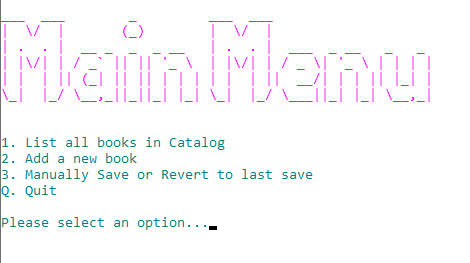
The main Menu
Listing All books
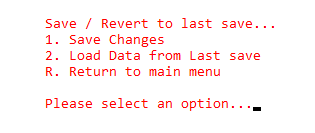
Save Data sub menu

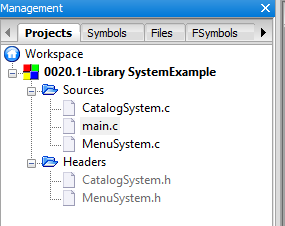
Project organization

Code is split into various C and Header files as shown in the screen capture below:

LibrarySystemExample-Files

See the Contents of the code files below:

main.c

/*
This program demonstrates how a menu driven
system can be used to trigger functions used
to maintain a simple library catalog.

Data is loaded to and from a binary file.

Date    :   16th November 2019
Author  :   Vedesh Kungebeharry
*/

#include "MenuSystem.h"
#include "CatalogSystem.h"


//function declarations
void initialization();
void exitProgram();


int main()
{

    initialization();
    runMainMenu();
    exitProgram();


    return 0;
}


void initialization()
{
    menuInitialization();
    loadCatalogFromFile();
}

void exitProgram()
{
    saveCatalogToFile();
    exitProgramMenu();
}


CatalogSystem.h

#include <stdbool.h>
#ifndef CATALOGSYSTEM_H_INCLUDED
#define CATALOGSYSTEM_H_INCLUDED
//#include "CatalogSystem.c"

//structures
typedef struct BookStructure
{

    char    Title [50];
    char    Author [50];
    int     Year;
    bool    isOnLoan;
    bool    hasData;
} Book;


//function declarations
void printBookByLocation(int location);
void printBook(Book b);
int  findBook(char searchQuery[]);
void printAllBooks();
int  addBook(Book newBook);

//file function declaration
void saveCatalogToFile();
bool loadCatalogFromFile();

//functions for testing
void setupDummyData();

#endif // CATALOGSYSTEM_H_INCLUDED

CatalogSystem.c

#include <stdio.h>
#include <stdlib.h>
#include <stdbool.h>
#include <string.h>
#include "CatalogSystem.h"

#define maxSize 1000

//constants
const char catalogFilename[50] = "catalog.bin";

//global variables
Book catalog[maxSize];
int count = 0;
FILE *datafilePtr;

//prints a book stored at a given index in the catalog array
void printBookByLocation(int location)
{
    printBook(catalog[location]);
}

void printBook(Book b)
{
    if (b.hasData)
    {
        printf("Title:\t%s\n",b.Title);
        printf("Author:\t%s\n",b.Author);
        printf("Year:\t%d\n",b.Year);
        printf("Loaned? : \t%s\n\n",b.isOnLoan?"Yes":"No");
        //printf("hasData: \t%s\n\n", b.hasData?"Yes":"No");


    }
    else
    {

        printf("\nNo book found at current index location...\n");
    }

}

int addBook(Book newBook)
{
    newBook.hasData=true;
    catalog[count]=newBook;//place book in next
                          //empty location in the array
    count++;//increment count to point to the
            //next empty location.

    return count-1;
}

void printAllBooks()
{
    if(count==0)
    {
        printf("\nNo books in catalog\n");
    }
    else
    {
        for (int i = 0; i<count;i++)
        printBook(catalog[i]);

    }

}

//finds a book by searching for titles that contain a substring of the query.
//this function finds the first positive result only
int findBook(char searchQuery[])
{
    for( int i = 0; i<count; i++)
    {
        char currentBookTitle[50];
        char lowercaseSearchQuery[50];
        strcpy(currentBookTitle,catalog[i].Title);
        strcpy(lowercaseSearchQuery,searchQuery);

        strlwr(currentBookTitle);
        strlwr(lowercaseSearchQuery);

        if(strstr(currentBookTitle, lowercaseSearchQuery))
            return i;

    }

    return -1;
}

void saveCatalogToFile()
{
    datafilePtr = fopen(catalogFilename,"wb");
    if (datafilePtr == NULL)
    {
        //unable to create file
        printf("Error creating file to save data\n");
        exit(1);
    }
    else
    {
        fwrite(&count,sizeof(int),1,datafilePtr) ;
        for(int i = 0; i<count; i++)
        {
           fwrite(&catalog[i],sizeof(Book),1,datafilePtr) ;
        }
    }
    fclose(datafilePtr);

}

bool loadCatalogFromFile()
{
    datafilePtr = fopen(catalogFilename,"rb");
    if (datafilePtr == NULL)
    {
        //unable to create file
        printf("Datafile not found...Catalog empty\n");
        printf("A new save file will be created during exit or manual save....\n");
        return false;
    }
    else
    {
        fread(&count,sizeof(int),1,datafilePtr);
        for(int i = 0; i<count; i++)
        {
           fread(&catalog[i],sizeof(Book),1,datafilePtr) ;
        }
    }
    fclose(datafilePtr);
    return true;

}


void setupDummyData()
{
    Book a=
            {
                .Title = "ATitle",
                .Author = "AAuthor",
                .Year = 2006 ,
                .isOnLoan=false
            };
    Book b=
            {
                .Title = "BTitle",
                .Author = "BAuthor",
                .Year = 2006 ,
                .isOnLoan=false
            };
    Book c=
            {
                .Title = "CTitle",
                .Author = "CAuthor",
                .Year = 2006 ,
                .isOnLoan=false
            };


    addBook(a);
    addBook(b);
    addBook(c);

    saveCatalogToFile();


}


MenuSystem.h

#ifndef MENUSYSTEM_H_INCLUDED
#define MENUSYSTEM_H_INCLUDED

//function declarations
void    menuInitialization();
void    showMainMenu();
void    showSaveLoadMenu();
void    runMainMenu();
void    runSaveLoadMenu();
void    pause();
void    printAllBooksUserInteraction();
void    AddNewBookUserInteraction();
void    exitProgramMenu();
void    SaveLoadUserInteraction();
void    ClearConsoleToColors(int ForgC, int BackC);
void    SetColor(int ForgC);


#endif // MENUSYSTEM_H_INCLUDED

MenuSystem.c

#include <time.h> // for pause()
#include <stdio.h>
#include <stdlib.h>
#include <conio.h>   //for getch()
#include <string.h>
#include <windows.h> //for SetColor()
#include "MenuSystem.h"
#include "CatalogSystem.h"

/*See: https://stackoverflow.com/questions/29574849/how-to-change-text-color-and-console-color-in-codeblocks

system("Color F0");
Letter Represents Background Color while the number represents the text color.

0 = Black

1 = Blue

2 = Green

3 = Aqua

4 = Red

5 = Purple

6 = Yellow

7 = White

8 = Gray

9 = Light Blue

A = Light Green

B = Light Aqua

C = Light Red

D = Light Purple

E = Light Yellow

F = Bright White


*/

//global static  variables
char choice;


/*
*initialize all instance variables and arrays here
*
*/
void menuInitialization()
{
    choice = '_';
}

//displays the main menu and accepts input
void runMainMenu()
{
    int pauseDuration = 2000;
    int sentinel=0;//used to break  out of our menu loop
    while (sentinel>=0)//loop menu here
    {
        showMainMenu();//display menu text

        choice = getch();//get a character from the input buffer

        system("@cls");// clear screen after getting input

        switch (choice)//based on the choice take the desired action
        {
            case '1':   printf("\nList all books\n");
                        printAllBooksUserInteraction();
                        break;

            case '2':   printf("\nAdd a new book...\n");
                        AddNewBookUserInteraction();
                        break;

            case '3':   SaveLoadUserInteraction();
                        break;

            case 'q':   printf("\nYou chose to quit\n");
                        sentinel=-1;//update the sentinel so that looping will cease
                        break;

            case 'Q':   printf("\nYou chose to quit\n");//cease if upper case
                        sentinel=-1;
                        break;
            default:
                        printf("\nYou have entered an option that is not in the menu\n");
                        pause(pauseDuration);
                        break;

        }
        if(sentinel>=0)//if we have continued regular execution , continue looping
        {
            system("@cls");//clear last screen
        }

    }


}

//shows and accepts input for the math sub menu
void runSaveLoadMenu()
{
    int pauseDuration = 2000;
    int sentinel=0;

    while (sentinel>=0)
    {

        showSaveLoadMenu();//show options

        choice = getch();//get a character from the input buffer

        system("@cls");//clear screen

        switch (choice)
        {
            case '1':   printf("\n\tSaving All Changes...\n");
                        saveCatalogToFile();
                        printf("\n\tSaving Complete...\n");
                        system("pause");
                        break;
            case '2':   printf("\n\tLoading last save...\n");
                        if(loadCatalogFromFile())//if a catalog datafile exists....
                            printf("\n\tLoading Complete...\n");
                        system("pause");
                        break;
            case 'r':   //printf("\n\tYou chose to quit\n");
                        sentinel=-1;
                        break;
            case 'R':   //printf("\n\tYou chose to quit\n");
                        sentinel=-1;
                        break;
            default:
                    printf("\n\tYou have entered an option that is not in the menu\n");
                    printf("\n\tReturning to the save menu in %.2lf seconds\n",pauseDuration/1000.00);
                    pause(pauseDuration);
                    break;


        }

        system("@cls");
    }

}

void showMainMenu()
{
    int animationDelayMS=50;
    system("color F1");//set background color to bright white
    SetColor(13);//change foreground color of text
    //Ascii art generated at:http://patorjk.com/software/taag/#p=display&h=1&v=1&f=Doom&t=Main%20Menu%20
    pause(animationDelayMS);printf("___  ___        _         ___  ___                     \n");
    pause(animationDelayMS);printf("|  \\/  |       (_)        |  \\/  |                     \n");
    pause(animationDelayMS);printf("| .  . |  __ _  _  _ __   | .  . |  ___  _ __   _   _  \n");
    pause(animationDelayMS);printf("| |\\/| | / _` || || '_ \\  | |\\/| | / _ \\| '_ \\ | | | | \n");
    pause(animationDelayMS);printf("| |  | || (_| || || | | | | |  | ||  __/| | | || |_| | \n");
    pause(animationDelayMS);printf("\\_|  |_/ \\__,_||_||_| |_| \\_|  |_/ \\___||_| |_| \\__,_| \n");
    SetColor(3);;//change foreground color of text
    pause(animationDelayMS);printf("\n\n1. List all books in Catalog\n");
    pause(animationDelayMS);printf("2. Add a new book\n");
    pause(animationDelayMS);printf("3. Manually Save or Revert to last save\n");
    pause(animationDelayMS);printf("Q. Quit    \n");
    pause(animationDelayMS);printf("\nPlease select an option...");
}

void showSaveLoadMenu()
{
    int animationDelayMS=100;
    SetColor(12);
    pause(animationDelayMS);printf("\n\tSave / Revert to last save...\n");
    pause(animationDelayMS);printf("\t1. Save Changes\n");
    pause(animationDelayMS);printf("\t2. Load Data from Last save\n");
    pause(animationDelayMS);printf("\tR. Return to main menu    \n");
    pause(animationDelayMS);printf("\n\tPlease select an option...");
}

//pauses execution
void pause(int milliseconds)
{
    clock_t now = clock();
    while(clock()< now+milliseconds);

}

void exitProgramMenu()
{
    printf("\nExiting program in 2 seconds...\n");
    pause(2000);

}

void printAllBooksUserInteraction()
{
    printf("\nPrinting all books\n");
    printAllBooks();
    system("Pause");

}

void SaveLoadUserInteraction()
{
 runSaveLoadMenu();
}

void AddNewBookUserInteraction()
{
    char    theTitle[50];
    char    theAuthor[50];
    int     theYear;

    Book newBook;

    printf("\nEnter the Book's Title...\n");
    fflush(stdin);
    gets(theTitle);

    printf("\nEnter the Author's Name...\n");
    gets(theAuthor);

    printf("\nEnter Year\n");
    scanf(" %d",&theYear);

    strcpy(newBook.Title,theTitle);
    strcpy(newBook.Author,theAuthor);
    newBook.Year=theYear;
    newBook.isOnLoan=false;

    int catalogLocation = addBook(newBook);
    SetColor(0);
    printf("\nNew Book Created:\n");
    printBookByLocation(catalogLocation);
    system("pause");

}
//See:https://stackoverflow.com/questions/29574849/how-to-change-text-color-and-console-color-in-codeblocks
void ClearConsoleToColors(int ForgC, int BackC)
{
    WORD wColor = ((BackC & 0x0F) << 4) + (ForgC & 0x0F);
               //Get the handle to the current output buffer...
    HANDLE hStdOut = GetStdHandle(STD_OUTPUT_HANDLE);
                     //This is used to reset the carat/cursor to the top left.
    COORD coord = {0, 0};
                  //A return value... indicating how many chars were written
                    //   not used but we need to capture this since it will be
                      //   written anyway (passing NULL causes an access violation).
    DWORD count;

                               //This is a structure containing all of the console info
                      // it is used here to find the size of the console.
    CONSOLE_SCREEN_BUFFER_INFO csbi;
                 //Here we will set the current color
    SetConsoleTextAttribute(hStdOut, wColor);
    if(GetConsoleScreenBufferInfo(hStdOut, &csbi))
    {
                          //This fills the buffer with a given character (in this case 32=space).
      FillConsoleOutputCharacter(hStdOut, (TCHAR) 32, csbi.dwSize.X * csbi.dwSize.Y, coord, &count);

      FillConsoleOutputAttribute(hStdOut, csbi.wAttributes, csbi.dwSize.X * csbi.dwSize.Y, coord, &count );
                          //This will set our cursor position for the next print statement.
      SetConsoleCursorPosition(hStdOut, coord);
    }
 return;
}

//See:https://stackoverflow.com/questions/29574849/how-to-change-text-color-and-console-color-in-codeblocks
void SetColor(int ForgC)
{
     WORD wColor;
     //This handle is needed to get the current background attribute

     HANDLE hStdOut = GetStdHandle(STD_OUTPUT_HANDLE);
     CONSOLE_SCREEN_BUFFER_INFO csbi;
     //csbi is used for wAttributes word

     if(GetConsoleScreenBufferInfo(hStdOut, &csbi))
     {
          //To mask out all but the background attribute, and to add the color
          wColor = (csbi.wAttributes & 0xF0) + (ForgC & 0x0F);
          SetConsoleTextAttribute(hStdOut, wColor);
     }
     return;
}


© 2020  Vedesh Kungebeharry. All rights reserved. 

CSEC Video Revision

CSEC INFORMATION TECHNOLOGY – YOUTUBE VIDEO LIST

 These videos were chosen for each topic because they cover the subject matter in a relevant context. They definitely were not created specifically for the CSEC Syllabus, however , they do address the fundamental concepts in real world scenarios.

 OBJECTIVE/TOPICLINK
Explain the concept of Information Technology;Definition and scope Information Technology.https://www.youtube.com/watch?v=Z0A7OMkYQf8
Distinguish among the major types of computer systems in terms of processing speed, storage and portabilityMajor types:(a)Super Computers (for example, Cray).(b)Mainframes (for example,IBM zEnterprise System).(c)Desktop systems.(d)Mobile devices (for example, laptops, notebooks, netbooks, smartphones, tablets and game consoles).(e)Embedded devices (for example,special-purpose systems such as controllers in microwaves, car ignition systems, answering machines).Types of computers:https://www.youtube.com/watch?v=uD0acIhi8xE

What is a super computer:https://www.youtube.com/watch?v=utsi6h7IFPs

Using Supercomputers:https://www.youtube.com/watch?v=yvbSX–LOko


Explain the functions of the major hardware components of a computer system;Major  components:  input, central  processing unit,Primary memory   (RAM and ROM),secondary storage, output.(a)Secondary  storage devices:  hard disk,magnetic   tape, flash   drive, memorycard, and optical disks (CD, DVD and Blu-Ray).(b)Units  of storage:  bits,bytes,  kilobytes,megabytes, gigabytes, terabytesData Processing (IPOS) Cycle:https://www.youtube.com/watch?v=j0XOLp_PbgA
Ram and Rom: https://www.youtube.com/watch?v=XY18amKzOvA
Storage: https://www.youtube.com/watch?v=OsEDJM9NuGA


Units: https://www.youtube.com/watch?v=HRmfXA4EUBs
Explain how the major hardware components of a computer system interrelate;Input processing output storage (IPOS) cycle.Covered in an earlier video:https://www.youtube.com/watch?v=j0XOLp_PbgA
Evaluate the relative merits of cloud storage and local storage;Definition of cloud and local storage.Assessment criteria: capacity, cost, accessibility; security issues.Cloud: https://www.youtube.com/watch?v=gu4FYSFeWqg
Select appropriate input/output devices to meet the needs of specified applications;Associate the following devices with suitable applications:(a)Input:Optical mark reader (OMR), character readers (OCR,MICR),mouse,joystick,barcode reader, document scanner,light-pen, touch terminals,voice response unit, Touch Screens (tablets, point of sale, ATM),keyboard,digital camera,biometric systems, sensors, remote control, sound capture,pointing  devices,webcam.(b)Visual output:Printers (laser, inkjet, dot matrix, thermal, plotters, 3D Printers),microfilm.(c)Audible output: speakers,headphones,earphones.Omr:https://www.youtube.com/watch?v=Yd8PWYCT7w8
OCR : https://www.youtube.com/watch?v=jO-1rztr4O0

Micr : https://www.youtube.com/watch?v=LX-FyRcdUmM
Mouse: https://www.youtube.com/watch?v=eccSwn9QVxo
printers:https://www.youtube.com/watch?v=JEVurb1uVFA

Explain the role of the different types of software in computer operation;System Software: Operating System, Utilities.Application software: general-purpose and special-purpose; integrated package; source: off the shelf, custom-written, and customized. 
Discuss the relative merits of the various types of user interface;Hardware: touch screens, specializedkeyboards.Software: command line, menu-driven, graphical user, touch. 
Evaluate the suitability of a given computer system for a specific purpose;Basic knowledge of system specification needed for purposes such as: to run a video game, web browsing, graphic design, video editing, and desktop publishing. Criteria:(a)Processing speed (CPU type and speed); (b)Memory (RAM);(c)Secondary storage (capacity and speed);(d)Types of software; and,(e)Input/Output devices.https://www.youtube.com/watch?v=eqrJmstbzu4
RAM:https://www.youtube.com/watch?v=PVad0c2cljo

Troubleshoot basic computer hardware problems;Cable problems (for example, loose cables).Monitor problems (for example, improperly adjusted monitor controls).Printer problems (for example, changing printer cartridges).Battery problems (for example, loose or dead battery). 
Distinguish between data and information;Data as raw unprocessed facts;information as processed data.Sources of data and information (people, places and things).Document types: turnaround document, human-readable and machine-readable forms; hard copy, and soft copy.Data and information https://www.youtube.com/watch?v=sIjSY05JE9Q
Evaluate the reliability of information obtained from online sources;Evaluation of information retrieved electronically for authenticity, currency, relevance, and bias.https://www.youtube.com/watch?v=EyMT08mD7Ds
Differentiate between validation and verification of data;Difference between validation and verification. 
Identify appropriate validation and verification checks given a particular scenario;Methods of validation: range check,reasonableness checks, data type checks, consistency checks, presence, format and length. 
Select appropriate file organisation for particular application.File access methods: sequential, serial, direct and random.Application areas: archiving, payroll file, real time systems. 
Distinguish among types of networks;Types of networks (local area network, metropolitan area network, wide area network, mobile network).(a) Concept of mobile network as radio- based common carrier.(b) Overview of mobile networks: from 2G to current. (Knowledge of the inner workings of mobile systems is NOT required)Wireless network technologies (for example, Bluetooth, Wi-Fi, hotspot).Level of privacy (intranet, extranet, Internet).Types: https://www.youtube.com/watch?v=4_zSIXb7tLQ
Mobile:https://www.youtube.com/watch?v=1JZG9x_VOwA


Explain the functions of the basic components of a network;Basic components and functions:(a) Transmission media:(i) Wired: twisted pair, coaxial, fibre; and,(ii) Wireless: infrared, microwave, satellite.(b) Switch, router, modem. (c) Network interface card/network adapter.Hub/switch/router https://www.youtube.com/watch?v=1z0ULvg_pW8
Topologies : https://www.youtube.com/watch?v=zbqrNg4C98U
Ethernet:https://www.youtube.com/watch?v=_NX99ad2FUA
Cable: https://www.youtube.com/watch?v=qQYiwmamq38
Wireless:https://www.youtube.com/watch?v=OxiY4yf6GGg


Assess the importance of mobile communication technologies as a component of modern communication networks;Suitability of mobile networks to various applications (for example, education, commerce, and journalism). 
Explain the interrelationship among keyWeb technology concepts.World Wide WebHypertext Markup Language.Hypertext Transfer Protocol.Hyperlinks.Web Server.Web Page.File Transfer Protocol.Web Browser.Uniform Resource Locator.Upload and download. www:https://www.youtube.com/watch?v=J8hzJxb0rpc
http:https://www.youtube.com/watch?v=hExRDVZHhig


© 2019  Vedesh Kungebeharry. All rights reserved.

Mini Internal Assessment Example

In this post , we observe some code which establishes a menu driven interface and shows we can implement data processing from the menus.

This code will be demonstrated in class.

See the code below:

#include <stdio.h>
#include <stdlib.h>
#include <stdbool.h>
#include <string.h>
#include <time.h>
/*
Demonstrates a 2 level menu with
a simple data processing cycle

When faced with the main menu, select 1 then 1 again to
execute the process of calculating area.


Author: Vedesh Kungebeharry
*/


//constants
const double Pi=3.14;


//global static  variables
char choice;


//function declarations
void    initialization();
void    showMainMenu();
void    showMathMenu();
void    runMainMenu();
void    runMathMenu();
void    pause();
void    exitProgram();
void    AreaOfCircleUserInteraction();
double  AreaOfCircle(double radius);

//main flow of control from process to process
int main()
{

    initialization();
    runMainMenu();
    exitProgram();

    return 0;
}


/*
*initialize all instance variables and arrays here
*
*/
void initialization()
{
    choice = '_';
}

//displays the main menu and accepts input
void runMainMenu()
{
    int sentinel=0;//used to break  out of our menu loop
    while (sentinel>=0)//loop menu here
    {
        showMainMenu();//display menu text

        choice = getch();//get a character from the input buffer

        system("@cls");// clear screen after getting input

        switch (choice)//based on the choice take the desired action
        {
            case '1':   printf("\nYou chose Option 1: Math Calculations\n");
                        runMathMenu();//displays the math sub menu and accepts input
                        break;
            case '2':   printf("\nYou chose option 2\n");
                        break;
            case '3':   printf("\nYou chose option 3\n");
                        break;
            case 'q':   printf("\nYou chose to quit\n");
                        sentinel=-1;//update the sentinel so that looping will cease
                        break;
            case 'Q':   printf("\nYou chose to quit\n");//cease if upper case
                        sentinel=-1;
                    break;
            default:
                    printf("\nYou have entered an option that is not in the menu\n");
                    break;


        }
        if(sentinel>=0)//if we have continued regular execution , continue looping
        {
            printf("\nreturning to main menu in 2 seconds...\n");
            pause(2000);
            system("@cls");
        }

    }


}

//shows and accepts input for the math sub menu
void runMathMenu()
{
    int sentinel=0;
    while (sentinel>=0)
    {
        showMathMenu();//show options

        choice = getch();//get a character from the input buffer

        system("@cls");

        switch (choice)
        {
            case '1':   printf("\nYou chose option 1: Area\n");
                        AreaOfCircleUserInteraction();//start interaction to calculate area
                        break;
            case '2':   printf("\nYou chose option 2\n");
                        break;
            case 'r':   printf("\nYou chose to quit\n");
                        sentinel=-1;
                        break;
            case 'R':   printf("\nYou chose to quit\n");
                        sentinel=-1;
                        break;
            default:
                    printf("\nYou have entered an option that is not in the menu\n");
                    break;


        }
        printf("\nreturning to Math menu in 2 seconds...\n");
        pause(2000);
        system("@cls");
    }

}

void showMainMenu()
{
    printf("1. Option 1: Math Calculations\n");
    printf("2. Option 2\n");
    printf("3. Option 3\n");
    printf("Q. Quit    \n");
    printf("\nPlease select an option...");
}

void showMathMenu()
{
    printf("1. Area of circle\n");
    printf("2. Volume of Circle\n");
    printf("R. Return to main menu    \n");
    printf("\nPlease select an option...");
}

//pauses execution
void pause(int milliseconds)
{
    clock_t now = clock();
    while(clock()< now+milliseconds);

}
//prompt user to enter data and output results
void AreaOfCircleUserInteraction()
{
    double area,radius=-999.99;
    printf("Enter the radius...");
    scanf(" %lf", &radius);
    area=AreaOfCircle(radius);
    printf("\nThe area of a circle of radius \t%.2lf is \t%.2lf\n\n",radius,area);
    system("pause");

}
//helper function to calculate area
double AreaOfCircle(double radius)
{
    return Pi*radius*radius;
}
//exit gracefully
void exitProgram()
{
    printf("\nExiting program in 2 seconds...\n");
    pause(2000);

}


Updates to this post

28th Sept 2023 – changed “This code will be demonstrated in class tomorrow.” to “This code will be demonstrated in class.”

© 2019  Vedesh Kungebeharry. All rights reserved. 

What is a problem?

A problem is defined as the “difference between the current state of things and a desired future state in an information processing system”

Example


CURRENT STATE:

A score taker for a football game could be using a paper based information processing system consisting of

Hardware:

  • A notebook
  • Pencil

Data management:

  • Ruled lines forming a table in the notebook,
  • Columns for scores, fouls, Events etc
  • Calculations such as cumulative minutes or penalties in the game (these are calculated mentally by the score taker and recorded during the progression of the game.)

Inputs :

  • Goals scored,
  • Scorer’s name
  • Team scoring


  • Fouls
  •  Attacking player name , victim name
  • Minute of foul

Outputs (to officials and score board operator):

  • Scores
  • Fouls
  • Minutes

Desired future state:

Input:

  • Scores along with player’s Number entered manually
  • Fouls with attacker and victim names number manually via keyboard

Processing:

  • Store player’s names from looking up numbers
  • Automatically timestamp goals and fouls

Output:

  • Statistics directly to website and scoreboard.

© 2019  Vedesh Kungebeharry. All rights reserved.

The Importance of algorithms

In our discussion, we consider well defined precise algorithms (in flowcharts or pseudocode) as compared with narrative algorithms.

Some of the reasons why algorithms are beneficial or important to the problem solving process are:

  1. Algorithms serve as a blueprint for other programmers to follow

  2. When problems are complex, an algorithm’s precise structure allows for an accurate development of a solution in parts.  This documentation (the algorithm itself) is useful since it is difficult for  the problem solver to remember many sub-processes , procedures and inputs/outputs to the problem.

  3. Because algorithms are intended for a computer system and programming language, it allows us to design for that particular programming language’s structure and for efficiency ,given    the limitations of system resources.

    For example, an algorithm which processes DNA sequence information for matching DNA strands together (see Longest common sub sequence) can be developed strictly for solving the problem without considering system resources.   In this case the algorithm still resembles programming language. 

    Usually in this type of general solution, array sizes are allowed to be very large or of infinite size. If memory becomes a constraint, we can now modify the algorithm to use say, array sizes at a maximum of  1000 to allow for the intended program to run within the limitation of our system resources.

  4. Algorithms are easily testable when using dry runs and trace tables.

© 2019  Vedesh Kungebeharry. All rights reserved.

Decimal to binary

Task: Create an algorithm which accepts a decimal integer and outputs it’s binary equivalent.

This algorithm was designed and implemented in Flowgorithm:

See the video below for an explanation of how the algorithm works:

Decimal to binary algorithm explained

The code in C is shown below:


Copy and paste from here:

#include <stdio.h>
#include <stdlib.h>
#include <string.h>//library needed for string operations

int main()
{
    //declare and identify integers
    int number, remainder;

    //declare, identify and initialize all strings
    char  result[20]="";
    char  remainderString[20]="";


    //initialize all other variables
    number=-1;
    remainder=-1;

    //get input
    printf("Enter a number in decimal\n");
    scanf("%d", &number);
    printf("\n");

    while (number!=0)
    {
        remainder=number%2;

            /* #Implementation_Result

                Here we implement the following:

                    result=remainder + result
            */

            //first convert the remainder to a string,
            //and store the converted data in "remainderString"
            itoa(remainder,remainderString,10);

            //add "remainderString" to "result" in that order.
            //the result of the concatenation is stored in "remainderString"
            strcat(remainderString,result);

            //now copy our data so far back to "result"
            strcpy(result,remainderString);
            /*End #Implementation_Result*/


        number=number/2;

    }

    printf("The binary Result is %s \n",result);
    return 0;
}

© 2019  Vedesh Kungebeharry. All rights reserved. 

Spreadsheet Functions

Functions

A function is a predefined formula provided by a spreadsheet application.

Functions are written in the following format:

                =FunctionName(parameter1, parameter2, …, parameterN) 

e.g

=sum(e3, d4, r5),

=max(a5,a27,b44)

=SUM(D3,D4,D5,F3:F4)

a function with a single parameter is shown below:

                =FunctionName(parameter)

e.g.

=SUM(F3:F4)  (note this is 1 parameter, a range)

=ABS(-44)

Note that a function’s  actions can be accomplished with a formula:

e.g =SUM(D3:F3) becomes =D3+E3+F3

Absolute addressing – prevents a cell’s row number or column letter from being updated when a formula is copied to another cell.

e.g          $C4        – prevents the column letter from being updated

                C$4        – prevents the Row number from being updated

                $C$4      – prevents both column letter and row number from being updated.

Secret tip!!!!!!!!  – use F4 to set a cell’s address to absolute addressing.

Class Demo

Download the excel file here:

https://drive.google.com/file/d/1NNSBoalQj278kbyctaYaaw5M1OII8tto/view?usp=sharing

StudentRoll NoMathFrenchSpanishTotalsAverageBonus ScorePass/Fail?
Jim1105520710Work harder
Mary2752051003350Good Job
Tobias Reiper3125 17913Work harder
Mario4135523812Work harder
Bonus50%
Student Number4
  
Max Average33
Min Average7
  
# Marks < 303
Number of spanish marks entered3
Number of spanish marks Missing1

Sheet with formulas

StudentRoll NoMathFrenchSpanishTotalsAverageBonus ScorePass/Fail?
Jim11055=SUM(C3:E3)=AVERAGE(C3:E3)=(1+$B$10)*G3=IF(G3<30, “Work harder”, “Good Job”)
Mary275205=SUM(C4:E4)=AVERAGE(C4:E4)=(1+$B$10)*G4=IF(G4<30, “Work harder”, “Good Job”)
Tobias Reiper3125 =SUM(C5:E5)=AVERAGE(C5:E5)=(1+$B$10)*G5=IF(G5<30, “Work harder”, “Good Job”)
Mario41355=SUM(C6:E6)=AVERAGE(C6:E6)=(1+$B$10)*G6=IF(G6<30, “Work harder”, “Good Job”)
Bonus0.5
Student Number=COUNT(B3:B6)
  
Max Average=MAX(G3:G6)
Min Average=MIN(G3:G6)
  
# Marks < 30=COUNTIF(G3:G6, “<30”)
Number of spanish marks entered=COUNTA(E3:E6)
Number of spanish marks Missing=COUNTBLANK(E3:E6)

Homework:

Give examples of the following functions:

Sum, average, max, min , count, counta, countif , date , if 

© 2019  Vedesh Kungebeharry. All rights reserved. 

Pivot tables. [Size – 9 mb]

This post contains a gif 
image that is 
approximately 
9 MB in size.

Introduction…

You’re going to wish that your teachers started excel with a pivot table instead of teaching you formulas and filters, some of which can be complex to understand and difficult to put into practice. I guess teachers know that our absolute addressing lab class would be interrupted with , “You should’ve just used a pivot table!”

What are they and what do they do?

Pivot tables are new tables that are created from an existing table that contain custom summary features for your original table’s data.

For example, consider the following data:

Employee #NameRegion Sales Commission For January# Items Sold
1Roly BasimaAmericas18501
2Louna RebaAfrica28307
3Cole KhayriyyaCaribbean10505
4Khalida FuadCaribbean22807
5Perlie ShanelleAsia15103
6 Briscoe Benjamin Asia16001
7Misha StreetAmericas46008
8Janice KemplinCaribbean18302
9Aracelis OylerAfrica29304
10Alvina CoppolaAfrica17707

Figure 1 – Raw data (note that all data was randomly generated.)

You could quickly arrive at a summary view:

Pivot table showing a summary of our data.

This takes about 20 seconds and requires no knowledge of formulas.

The proof is shown in the gif below:

Inserting a Pivot Table in less than 20 seconds.

Creating a pivot table from our data

  1. Copy and paste the data from the table above (Figure 1) into a new excel workbook. The result is shown below:

2. Select all the data that will be used to create your pivot table:

3. Click on the insert tab on the ribbon, and choose Recommended Pivot Tables :

4. Choose a suggested pivot table that you’d like to insert. In this example, we chose the third one. Click “Ok” to insert the table.

5. After Clicking on “Ok” (from step 4), Excel inserts your pivot table on a new sheet. See the result below:

Resulting pivot table

Making sense of your pivot table by manipulating it’s rows, columns and values.

A demonstration of how to manipulate the pivot table in the video below:

Using a pivot table effectively.

Download the finished tutorial from the video here:

Here is a link to the Pivot table tutorials provided by Microsoft office:

https://drive.google.com/drive/folders/1AUjWnMFhnetVlmyztoESdQI4_L–y2q6

A pivot table’s purpose

A pivot table can help you to make strategic decisions based on your operational data. In our example above, we look at some sale information for the month of January (Operational Data) and create a summary (Strategic Data) to make strategic decisions.

Strategic decisions are made by the leaders of your organization (by you if you’re the leader) and affects how you approach your next set of goals.

From our example, we see that the largest commissions are paid to our sales people in the African continent who also sold the most items in January. Using that information, we may want to communicate with our sales force in Africa to determine the causes and try to apply their methods fro success in other regions.

Our assumption becomes, “Our African Sales force seems to be motivated and practice good methods in selling our products. We must investigate if this is true by comparing their methods to other regions.”

From the assumption above, we can now make our first strategic decision:

  1. Monitor sales in Africa to see if the trend continues

If we find our assumption to be true we can now make the following strategic decisions and plan:

2. Learn the best practices from our African Sales Force

3. Start a training program for our entire company scheduled to run in the month of July .

In class exercise

Describe any other scenario that can result after analyzing the pivot table from our example.

References

https://scraperwiki.com/2014/07/the-history-of-pivot-table/

Random name generators for names used in example:

https://www.behindthename.com/random/

http://listofrandomnames.com/index.cfm?generated

© 2019  Vedesh Kungebeharry. All rights reserved.