
See video below:
https://youtu.be/fiv75dM_VXE
© 2023 Vedesh Kungebeharry. All rights reserved.
See video below:
https://youtu.be/fiv75dM_VXE
© 2023 Vedesh Kungebeharry. All rights reserved.
Client server
The url https://www.buythings.com would be preferred since this http protocol includes SSL (Secure sockets layer) or TLS (Transport layer security) which encrypts all HTTP information such that only the sender and the receiver can decipher the information. This is more secure, especially in the case where the http information can be intercepted by malicious entities on the network, they won’t be able to read the sensitive payment information that can be used defraud the online shopper.
A process is a running program.
The PCB stores metadata necessary for managing the process, e.g. process id, process state, memory allocation addresses, scheduling info (priority, time slice), pointers to it’s resources (files, other processes).
Paging is were each process in an OS is allocated memory in units called pages for easier coordination and management by the operating system. The pages can be stored physically in memory , or stored on the hard disk (in the case that the process is not running at that time). If a process is stored on the disk and needs to be run, a page fault is generated so that the process is swapped back into the physical memory for processing.
Thrashing occurs when memory resources become limited by the amount of running processes. The need for physical memory can be exceeded, thus multiple processes that are in waiting state are stored as pages on disk. For continued running of the system, processes are constantly swapped in and out of physical memory, an execution which spends a lot of time on the cpu when compared to running the processes themselves.
Too little physical memory is available for a system that needs to run a lot of processes.
© 2023 Vedesh Kungebeharry. All rights reserved.
SD Cards (Secure Digital Cards) are a popular form of portable flash memory storage because of it’s small size , speed and durability. It’s used widely in digital video/photography to store media, and as expansion storage for other smart devices including phones , tablets etc.
It was created by a group of companies and has now become a standard for portable data storage.

SD Card readers are devices that allow for SD Cards to be read by the computer system and can be internal (built into) or externally connected via USB ports.
Below: An external SD Card Reader with an inserted Micro SD Card

Below: An internal SD Card Reader built into the computer’s system unit.

Because of it’s widespread use, it has become desirable to include SD card readers in newer computer systems to facilitate easier data transfer from device to device.
A common task that a user would face would be copying their media from their digital camera to their pc. In the past, this meant that the user would have to install the camera’s software and drivers on the pc, then connect a cable from the camera to the pc to access the media.
This process changes when a sd card reader is built in or connected to a computer, the user simply removes the sd card from the digital camera and inserts it into the sd card reader, where the media is immediately accessible as using any other portable secondary storage device.
Original: 毛抜きDerivative work: Tkgd2007, CC BY-SA 3.0, via Wikimedia Commons
Dineshkumar Nallaveerappan, CC BY-SA 4.0, via Wikimedia Commons
liewcf, CC BY-SA 2.0, via Wikimedia Commons
© 2023 Vedesh Kungebeharry. All rights reserved.
Screen sizes are measured along the diagonal of the screen and is usually quoted in inches. For example, a typical computer monitor or laptop screen may be 15” in size.
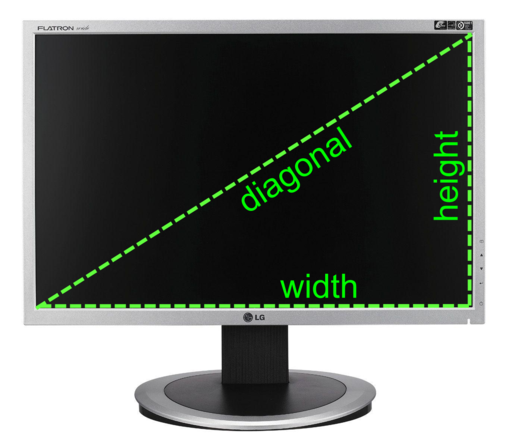
Screen resolution refers to the quality and level of detail that can be displayed on the screen. The screen is made up of a matrix of individual dots that can be coloured differently. Each dot is know as a picture element or pixel for short.
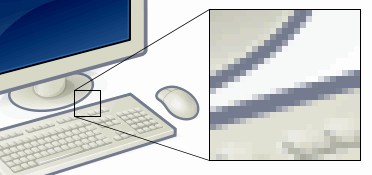
Example of pixels. Shows a zoomed section of an image to demonstrate how it is made up of pixels.
Maximizing the number of dots in a unit area of the screen will result in a sharper image with more detail , or as we say, a higher resolution image.
A monitor’s screen resolution is denoted as horizontal pixels x vertical pixels. e.g 1920 * 1080
It’s possible for a monitor with large screen to have a small resolution, to the average person, the screen may display images which are blocky, where the pixels are discernable and the image is not smooth.
It’s also possible to have a very small screen have a high resolution, as in the case of a high end smartphone.
Size and resolution consideration depends on where the screen needed, for example, having a large screen with a low resolution at a train station or airport is feasible since a lot of people can easily view the screen at once , however , we do not require the need to display detailed images, just formatted text or cursive fonts.

On the other side of the spectrum, a graphic artist travelling on a long train ride may opt to get his/her/them/they/us work done on a portable tablet computer which has a small but very high resolution stylus touch screen to allow for fine and detailed designs to be viewed while being created.
florisla, CC BY-SA 2.0, via Wikimedia Commons
ed g2s • talk, CC BY-SA 3.0, via Wikimedia Commons
MaedaAkihiko, CC BY-SA 4.0, via Wikimedia Commons
TopSystemsLTD, CC BY-SA 4.0, via Wikimedia Commons
© 2023 Vedesh Kungebeharry. All rights reserved.
.
1. Write a paseudocode algorithm when given a number X, outputs the binary equivalent. [3 marks]
2. using a similar method demonstrated in class today, show the 8bit twos complement subtraction of 7 and 6. [3 marks]
3. Show the octal representation of 6 and 3. [4 marks]
© 2023 Vedesh Kungebeharry. All rights reserved.
Using a 4 bit twos complement system, what’s the
That can be represented?
Notice that +ve numbers have a MSB of 0 and –ve numbers have a MSB of 1.
Therefore,
the largest magnitude +ve number is 01112 which is 7, and,
the largest magnitude –ve number is 1000 which is -8.
© 2023 Vedesh Kungebeharry. All rights reserved.
Class:
In twos complement the MSB is taken to be -ve
Using a 4 bit twos complement system, what’s the
That can be represented?
© 2023 Vedesh Kungebeharry. All rights reserved.
When developing a solution to a problem in program code, we usually aim to write a bit of code that implements part of the solution and run it to see if works.
Bugs can start here, they manifest as errors that prevent your code from being compiled or executed out right, or produce incorrect results.
It’s important to note in our context that programs written in source code must be translated to machine code , which is directly executable by your computer’s CPU.
The translation can take place
The errors or bugs experienced while we develop our code can be classified into three types:
Teacher Demonstration In class: bugs in Flowgorithm
© 2023 Vedesh Kungebeharry. All rights reserved.
This is a video from class yesterday and my audio subsystem failed because it was in use by another application.
Debugging in Context – Finding the average of an unknown amount of numbers
I still added it to the post below:
[1] Structured programming is a programming paradigm that emphasizes the use of a structured control flow in algorithms and programs. It is based on the idea that an algorithm or program should be broken down into smaller, self-contained blocks of code, or “constructs,” that can be easily understood and maintained.
There are several constructs commonly used in structured programming, including:
Sequential control, also known as sequence statements, is a construct used in programming to specify that a set of statements should be executed in a specific order, one after the other.
Here is an example of sequential control in C:
#include <stdio.h>

int main()
{
    // Sequence of statements
    printf("Hello, world!\n");
    printf("I am learning C programming.\n");
    printf("This is a sequential control example.\n");

    return 0;
}
In this example, the statements printf(“Hello, world!\n”);, printf(“I am learning C programming.\n”);, and printf(“This is a sequential control example.\n”); are executed in sequence, one after the other. The first statement is executed first, followed by the second statement, and so on.
Sequential control is a basic construct used in many programming languages and is often used to specify a simple sequence of statements that should be executed in order.
Selection control, also known as selection statements, is a construct used in programming to specify that a certain set of statements should be executed only if a certain condition is met.
There are two main types of selection statements in C: if statements and switch statements.
Here is an example of an if statement in C:
#include <stdio.h>

int main()
{
    int a = 5;
    int b = 10;

    // If statement
    if (a < b)
    {
        printf("a is less than b\n");
    }
    else
    {
        printf("a is not less than b\n");
    }

    return 0;
}
In this example, the if statement checks the condition a < b. If the condition is true, the statement printf(“a is less than b\n”); is executed. If the condition is false, the statement printf(“a is not less than b\n”); is executed instead.
Selection control is a useful construct for making decisions and branching the flow of an algorithm or program based on certain conditions. It is widely used in many programming languages.
There are several types of if statements that can be used in programming:
if (condition)
{
    // statements to be executed
}
2. if–else statement: This form of the if statement is used to execute a different set of statements if the condition is false. It has the following syntax:
if (condition)
{
    // statements to be executed if condition is true
}
else
{
    // statements to be executed if condition is false
}
3. cascading if or if–else if–else statement:
Cascading if statements, also known as “chained if statements” are a series of if statements that are connected using the else if construct.
This form of the if statement is used to test multiple conditions and execute different sets of statements based on the results. It has the following syntax:
if (condition 1)
{
    // statements to be executed if condition 1 is true
}
else if (condition 2)
{
    // statements to be executed if condition 2 is true
}
...
else if (condition n)
{
    // statements to be executed if condition n is true
}
else
{
    // statements to be executed if all conditions are false
}
Here is a table showing when you might want to use a simple if statement, an if–else statement, or an if–else if–else statement:
| Statement | When to use |
| Simple if | – When you want to execute a single statement or block of statements if a certain condition is true |
| – When you only need to check one condition | |
| – When you don’t need to execute any statements if the condition is false | |
| if-else | – When you want to execute a different set of statements if the condition is false |
| – When you only need to check one condition and have two possible outcomes | |
| if-else if-else | – When you want to check multiple conditions and execute different sets of statements based on the results |
| – When you have multiple possible outcomes and need to check multiple conditions | |
| – When you want to specify a default action to be taken if all conditions are false |
Nested if statements are if statements that are placed inside the block of another if statement. They are used to test multiple conditions within the same block of code.
Here is an example of nested if statements in C:
#include <stdio.h>

int main()
{
    int a = 5;
    int b = 10;

    // Nested if statements
    if (a < b)
    {
        if (a % 2 == 0)
        {
            printf("a is even and less than b\n");
        }
        else
        {
            printf("a is odd and less than b\n");
        }
    }
    else
    {
        printf("a is not less than b\n");
    }

    return 0;
}
In this example, the inner if statement tests the condition a % 2 == 0 and the outer if statement tests the condition a < b. The inner if statement is executed only if the outer if statement’s condition is true.
Nested if statements can be useful for testing multiple conditions within the same block of code and allowing for more complex decision-making in algorithms and programs. However, they can also make code more difficult to read and understand, so it’s important to use them judiciously.
A switch statement is a control flow construct used in programming to specify multiple branching statements based on the value of an expression. It is often used as an alternative to a series of if–else statements, particularly when there are multiple possible outcomes and a large number of conditions to check.
Here is an example of a switch statement in C:
int main()
{
    int a = 5;

    // Switch statement
    switch (a)
    {
        case 1:
            printf("a is 1\n");
            break;
        case 2:
            printf("a is 2\n");
            break;
        case 3:
            printf("a is 3\n");
            break;
        default:
            printf("a is not 1, 2, or 3\n");
    }

    return 0;
}
In this example, the switch statement checks the value of the variable a. If the value of a is 1, the statement printf(“a is 1\n”); is executed. If the value of a is 2, the statement printf(“a is 2\n”); is executed. If the value of a is 3, the statement printf(“a is 3\n”); is executed. If the value of a is none of these, the statement printf(“a is not 1, 2, or 3\n”); is executed.
Switch statements can be more efficient than a series of if–else statements when there are many possible outcomes, as they use a faster lookup method to determine which branch to take. However, they are generally less flexible than if–else statements and can only be used with a limited set of data types.
Here is a table comparing the if statement and the switch statement:
| if statement | switch statement | |
| Syntax | if (condition) { statements; } | switch (expression) { case value: statements; break; … default: statements; } |
| Data types | Can be used with any data type | Can only be used with certain data types (integer, character, and enumerated types) |
| Multiple conditions | Can test multiple conditions using if–else if–else | Can test multiple conditions using case and break |
| Range of values | Can test for any range of values | Can only test for specific values or ranges |
| Efficiency | May be less efficient than a switch statement when there are many possible outcomes | May be more efficient than an if statement when there are many possible outcomes |
| Flexibility | More flexible than a switch statement | Less flexible than an if statement |
In general, you might use an if statement when you need to test multiple conditions or check for a range of values, or when you are working with data types that are not supported by switch statements. You might use a switch statement when you have a large number of possible outcomes and want to take advantage of its faster lookup method, or when you are working with integer, character, or enumerated data types.
Iteration constructs, also known as looping constructs, are programming constructs that allow a set of statements to be repeated multiple times. There are several types of iteration constructs in most programming languages, including for loops, while loops, and do–while loops.
Iteration constructs are useful for repeating a set of statements multiple times and are widely used in many programming languages. They can be used to iterate through data structures such as arrays and lists, or to perform tasks repeatedly until a certain condition is met.
There are several types of iteration constructs that are commonly used in programming:
{
//statements to be executed
}
The initialization statement is executed before the loop starts. The condition is tested at the beginning of each iteration. If the condition is true, the statements in the loop are executed. If the condition is false, the loop is terminated. The increment statement is executed at the end of each iteration.
Here is an example of a for loop in C:
#include <stdio.h>

int main()
{
    int i;

    // For loop
    for (i = 0; i < 10; i++)
    {
        printf("%d\n", i);
    }

    return 0;
}
In this example, the for loop iterates 10 times, starting at 0 and ending at 9. On each iteration, the value of i is printed to the screen.
while (condition)
{
// statements to be executed
}
The condition is tested at the beginning of each iteration. If the condition is true, the statements in the loop are executed. If the condition is false, the loop is terminated.
Example:
#include <stdio.h>

int main()
{
    int i = 0;

    // While loop
    while (i < 10)
    {
        printf("%d\n", i);
        i++;
    }

    return 0;
}
This while loop iterates 10 times, starting at 0 and ending at 9. On each iteration, the value of i is printed to the screen, and then i is incremented by 1.
do
{

// statements to be executed

}while (condition);
The statements in the loop are executed first, and then the condition is tested. If the condition is true, the loop is repeated. If the condition is false, the loop is terminated.
Here is a simple example of a do–while loop in C:
int main()
{
    int i = 0;

    // Do-while loop
    do
    {
        printf("%d\n", i);
        i++;
    }
    while (i < 10);

    return 0;
}
Each of these iteration constructs has its own use cases and can be useful in different situations. for loops are useful when you know how many times you want to iterate in advance, while loops are useful when you want to iterate as long as a certain condition is true, and do–while loops are useful when you want to execute the statements in the loop at least once before testing
Bounded iteration is a type of iteration that has a fixed number of iterations. An example of bounded iteration is finding the sum of the numbers in an array.
Here is an example of bounded iteration in C to find the sum of the numbers in an array:
#include <stdio.h>

int main()
{
    int numbers[5] = {1, 2, 3, 4, 5};
    int sum = 0;
    int i;

    // Bounded iteration
    for (i = 0; i < 5; i++)
    {
        sum += numbers[i];
    }

    printf("Sum: %d\n", sum);

    return 0;
}
In this example, the for loop iterates 5 times, starting at 0 and ending at 4. On each iteration, the value of numbers[i] is added to the sum variable. At the end of the loop, the value of sum is printed to the screen.
Unbounded iteration is a type of iteration that has an unknown number of iterations. An example of unbounded iteration is a guessing game where the player keeps guessing a number until they guess the correct answer.
Here is an example of unbounded iteration in C to implement a guessing game:
#include <stdio.h>
#include <stdlib.h>
#include <time.h>

int main()
{
    int secret = rand() % 100; // Generate a random number between 0 and 99
    int guess;

    // Unbounded iteration
    while (1)
    {
        printf("Guess a number: ");
        scanf("%d", &guess);

        if (guess == secret)
        {
            printf("You guessed the secret number!\n");
            break;
        }
        else if (guess < secret)
        {
            printf("Your guess is too low.\n");
        }
        else
        {
            printf("Your guess is too high.\n");
        }
    }

    return 0;
}
In this example, the while loop iterates indefinitely until the player guesses the correct number. On each iteration, the player is prompted to enter a guess, and the value of the guess is checked against the secret number. If the guess is correct, the loop is terminated and a message is printed to the screen. If the guess
Here is a table comparing the different iteration constructs:
| for loop | while loop | do-while loop | |
| Syntax | for (initialization; condition; increment) { statements; } | while (condition) { statements; } | do { statements; } while (condition); |
| Testing condition | At the beginning of each iteration | At the beginning of each iteration | At the end of each iteration |
| Termination | When the condition is false | When the condition is false | When the condition is false |
| Number of iterations | Fixed number of iterations | Unknown number of iterations | Unknown number of iterations |
| Use cases | When you know how many times you want to iterate in advance | When you want to iterate as long as a certain condition is true | When you want to execute the statements in the loop at least once before testing the condition |
Each of these iteration constructs has its own use cases and can be useful in different situations. for loops are useful when you know how many times you want to iterate in advance, while loops are useful when you want to iterate as long as a certain condition is true, and do–while loops are useful when you want to execute the statements in the loop at least once before testing the condition.
A sentinel value is a special value that is used to indicate the end of a sequence of data. It is often used in combination with iteration constructs, such as while loops or do–while loops, to allow the loop to terminate when the sentinel value is encountered.
Here is an example of using a sentinel value in a while loop in C to read a sequence of numbers from the user and sum them up:
#include <stdio.h>

int main()
{
    int sum = 0;
    int number;

    printf("Enter numbers to sum, or -1 to stop: ");
    scanf("%d", &number);

    // While loop with sentinel value
    while (number != -1)
    {
        sum += number;
        scanf("%d", &number);
    }

    printf("Sum: %d\n", sum);

    return 0;
}
In this example, the while loop iterates as long as the value of number is not -1. On each iteration, the value of number is added to the sum variable and then the user is prompted to enter another number. When the user enters -1, the loop is terminated and the value of sum is printed to the screen.
Sentinel values can be useful in situations where the number of data items is unknown or variable, as they allow the loop to terminate when the end of the data is reached. However, it is important to choose a sentinel value that cannot occur as a valid data item in order to avoid any confusion.
[1] TA-Note
 Island Class


