2015 U2 Q5

Introduction

This question tested the following topics/items:

  • Client/Server Network Architecture
  • Peer-to-Peer (P2P) Network Architecture
  • Advantages and Disadvantages of Network Types
  • Network Security
  • Firewalls
  • Firewall Configuration and Maintenance
  • Security Patches and Updates
  • Network Protocols
  • Fiber Distributed Data Interface (FDDI)
  • Ethernet Protocol
  • Network Topologies (Token Ring, Star)
  • Physical Media in Networking (Fiber Optics, Copper Cables)
  • Open Systems Interconnection (OSI) Model
  • Transport Layer Responsibilities
  • Network Layer Responsibilities
  • Data Segmentation and Reassembly
  • End-to-End Communication
  • Error Detection and Correction
  • Data Flow Control
  • Packet Routing and Forwarding
  • IP Addressing
  • Wireless Networks
  • Advantages of Wireless Connectivity
  • Wireless Router Setup and Configuration
  • Mobile Data Communication
  • General Packet Radio Service (GPRS)
  • Cellular Network Technology
  • Applications of GPRS (e.g., POS Systems, MMS, Tracking)
  • Network Performance and Efficiency Considerations
  1. Introduction
  2. Part a)
  3. Part b) i)
  4. Part b) ii)
  5. Part c)
  6. Part d)
  7. Part e)
  8. Part f) i)
  9. Part f) ii)

Part a)

A client server network has one or more computer nodes providing all the services needed by all other client computers.  E.g web server, ftp server etc.

Hardware and resources are easily configured.

Servers can be administered to allow connection only to authorized computers on the network thus benefit from better security.

The sever can easily undergo regular backups easily since all data is centralized.

For P2P each computer on the network can act as a server for all others on the network.

Each node on the P2P is not guaranteed to be powerful, and mostly have the average power as clients.

This configuration is difficult to keep secure, additional third party software is usually required to implement security.

P2P networks add strain on the network as more peers are added to the network since sometimes one node would be responsible for routing a lot of traffic to all others. It is impractical to attempt backup on this network configuration.

Part b) i)

A firewall is a hardware and/or software security measure which protects against external network threats in the form of unauthorized connections or attacks. It also filters connections within the network to prevent malicious activity.

Part b) ii)

New computer threats emerge every day, and thus the firewall must apply frequent updates which protect against new computer threats.

Part c)

Fddi uses fibre optic cables , and transfers data using token ring topology, and can be much faster over long distances (200 Km). The ring technology includes additional rings in the event that one ring fails, another exists to carry on data communication.

Ethernet mainly uses copper wires, and transfers data using packet switching (Star Topology), over shorter distances (100 m) and is slower than FDDI. Ethernet does not typically have backup lines to help prevent network failure.

Part d)

The Transport layer is responsible for segmenting packets and reliable communications across the transport layer by implementing end to end communication with error checking and data flow control (speed changes between networks)

The network layer is responsible for efficiently routing data from network to network by choosing the best paths using IP protocol which gives each node on the network a unique IP address.

Part e)

  • It is convenient, the wireless signals penetrate walls and floors in all directions. Cable installation from floor to floor is not required.
  • It allows for additional mobility within the range oof connection
  • Overall, It is cheaper, since wired cables are not needed to be used.

Part f) i)

It is designed to provide wireless network connectivity over a cellular network so that traditional network tasks, e.g. connecting to the internet, can be facilitated. It was developed for wireless POS systems, MMS, tracking and navigation , wireless electricity meters , etc.

Part f) ii)

  • Allowing for wireless POS payments over the cell network when purchasing groceries without needing a phone line.
  • Allowing the electric company to carry out wireless meter readings without having to perform a physical house visit to read the meter.

© 2023  Vedesh Kungebeharry. All rights reserved. 

2018 U2 Q5

Introduction

This question tested the following operating system concepts:

Concept1Description
Program vs. ProcessDifferentiation between a program (a set of instructions on storage) and a process (an executing program with allocated resources in the CPU and memory).
Process States and TransitionsUnderstanding the various states a process can be in (running, ready, waiting, finished) and the reasons for transitions between these states.
DeadlockComprehension of the condition where two or more processes are waiting indefinitely for each other to release resources.
Multitasking vs. MultiprocessingDistinction between multitasking (managing multiple tasks by time-sharing a single CPU) and multiprocessing (managing tasks across multiple CPUs for parallel execution).
Virtual MemoryDiscussion on why modern computers use virtual memory, how it works through paging and swapping, and the disadvantages of excessive reliance on virtual memory, such as thrashing.
  1. Introduction
  2. Part a)
  3. Part b) i)
  4. Part b) ii)
  5. Part b) iii)
  6. Part c)
  7. Part d)
    1. Further explanation
  8. Part e) i)
  9. Part e) ii)
  10. Part e) iii)
  11. Footnotes

Part a)

A program is a set of computer instructions that is stored on secondary storage, and a process is a program that is currently being executed on the cpu, it’s instructions and data are stored in main memory – RAM and registers in the CPU.

Part b) i)

It’s time on the CPU has expired.

Part b) ii)

It is waiting on data from an IO operation and cannot continue until it receives the data.

Part b) iii)

The process has completed all of its instructions and no longer needs any of it’s previous system resources.

Part c)

P1 is using d1,

P2 is using d1,

Eventually p1 needs d2 also, it is put into a waiting state.

P2 needs d1, but d1 is in use by p1 and p1 is waiting on p2 to release d2.

P2 will be put into a waiting state

Both process are waiting on each other and will not release the DVD resources that they are allocated, thus neither process can complete and thus we say they are deadlocked.

Part d)

Windows 10, is a multitasking operating system, tasks share time on the CPU.

Linux is a multiprocessing operating system allowing for the running of separate tasks on separate CPUs, thus achieving higher performance.

Further explanation

All present-day operating systems support multitasking and multiprocessing, there are cases where multiprocessing may not be used, e.g where an embedded system is designed for specific task that doesn’t require much processing power.

Part e) i)

Sometimes many processes need to be run simultaneously, and the needs for physical memory can exceed the actual memory that is available.

Part e) ii)

Multiple page frames are created for each process. Ideally, the currently running’s process’s frames are stored in physical ram, and all other ready or waiting processes are stored in ram. As more processes are run which exceed the physical ram capacity, the page frames for the ready and waiting processes are swapped out of physical ram onto the page file on the hard disk to accommodate running processes. When a running process is put into waiting/ready state, it may be put on the virtual page file, and  the next process to be run can be put from the virtual page file back into the physical ram to be run.

Part e) iii)

The system can operate inefficiently since a lot of swapping may occur, and this is dependent on the much slower hard disk memory access for each swap. This condition is know as thrashing.

Footnotes

  1. TA-Note ↩︎

© 2023  Vedesh Kungebeharry. All rights reserved. 

2018 U2 Q2

Part a) i)

int numseq[21];


Further explanation  

21 locations needed for numbers 0 to 20)

index01234567891011121314151617181920
numSeq01234567891011121314151617181920

Part a) ii)

19

Part a) iii)

Suggested response

int binarySearch(int key, int list[], int low, int high) {
    int result = -1; 
    int keyFound = 0; //sentinel to end loop on a successful search

    while (low <= high && !keyFound) {
        int middle = (high-low) / 2 + low;//determine middle of the range

        if (key == list[middle]) 
        {
            result = middle;
            keyFound=1; // Key found, exit loop

        } 
        else if (key < list[middle]) 
        { 
            high = middle - 1; // Narrow the search to the lower half
        } 
        else 
        
            low = middle + 1; // Narrow the search to the upper half
        }
    }

    return result; //Returns -1 if not found, 
                   //otherwise, the index of the key
}

Further Explanation

(See this note1)

int binarySearch(int key, int list[], int low, int high) {
    int result = -1; //result is -1 if not found
    int keyFound = 0; //sentinel to end loop on a successful search

    while (low <= high && !keyFound) //while there is more locations 
                                     //to search and the key has not 
                                     //been found
    {
        int middle = (high-low) / 2 + low;//determine middle of the range

        if (key == list[middle]) //if the key is found..
        {
            result = middle;
            keyFound=1; // Key found, exit loop
        } 
        else if (key < list[middle]) //if key may be in the lower half...
        { 
            high = middle - 1; // Narrow the search to the lower half
        } 
        else //else the key may be in the upper half
        {
            low = middle + 1; // Narrow the search to the upper half
        }
    }

    return result; // Returns -1 if not found, otherwise the key


Response using recursion

int binarySearch(int key, int  list[], int low, int high)
{
    
    int result=-1;
    int middle = (high-low)/2+low;

    if (low<=high)//if low and high have not crossed...
    {
        if(key==list[middle])//if the key is found....
        {
            result=middle;
            return result
        }
        else//the key was not found
        {
            if(key<list[middle])
            {                   

               
                result= binarySearch(key,list,low,middle-1);
                return result;
            }

            else 
            {
                result= binarySearch(key,list,middle+1,high);
                return result;
            }

        }
    }
    return result;

Further Explanation

int binarySearch(int key, int  list[], int low, int high)
{
    /*we use low and high to represent a
    portion of the array. Initially, low and high
    points to the start of the array and the end of
    the array respectively. Middle indexes the location
     to the middle of the array.
    */
    int result=-1;//-1 represents a failed search
    int middle = (high-low)/2+low;

    if (low<=high)//if low and high have not crossed...
    {
        if(key==list[middle])//if the key is found....
        {
            result=middle;
            return result;//return the current index and exit function
        }
        else//the key was not found
        {
            if(key<list[middle])//if the key would be found
            {                   //from low to middle

               //we now search the lower half
                result= binarySearch(key,list,low,middle-1);
                return result;
            }

            else //key would be found from middle to high
            {
                result= binarySearch(key,list,middle+1,high);//we now search the upper half
                return result;
            }

        }
    }
    return result;

Part b i)

//assume integer array
void swap(int array[], int a, int b) {
    int temp = array[a];
    array[a] = array[b];
    array[b] = temp;
}

Part b ii)

  • The array is traversed from index 0 to n and the location of the smallest element is determined.
  • The smallest element is swapped with the first element that was traversed.
  • This is repeated on the unsorted portion of the array by  incrementing the starting element that is traversed to 1 to n, then 2 to n, 3 to n, … until n-1 to n.

Part b iii)

void selectionSort (int arr[], int low, int high)
{
    for (int i = low; i<high; i++)
    {
        int smallest = getSmallest(arr,i,high);
        swap(arr,i,smallest);
    }
}

Further explanation

The following complete program in C tests that the selection sort is working.

#include <stdio.h>
 
//function declarations
void selectionSort(int arr[], int low, int high);
void swap(int array[], int a, int b);
int getSmallest(int arr[], int low, int high);
 
int main()
{
    int array[] = {64, 25, 12, 22, 11};
    int size = sizeof(array) / sizeof(array[0]);
   
 
    printf("Original array: ");
    for (int i = 0; i < size; i++)
        printf("%d ", array[i]);
    printf("\n");
 
    //sort the array
    selectionSort(array, 0, size-1);
 
    printf("Sorted array: ");
    for (int i = 0; i < size; i++)
        printf("%d ", array[i]);
    printf("\n");
 
    printf("\nEnding program...");
 
    return 0;
}
 
void selectionSort(int arr[], int low, int high) {
    // Traverse up to the
    // second-to-last element
    for (int i = low; i < high; i++)
    {
        /*find the index of the smallest
        element in the range
        */
        int smallest = getSmallest(arr, i, high);
       
        /*if the smallest element
        should be put in the first
        position that was
        traversed ...
        */
        if(arr[smallest]<arr[i])
            swap(arr, i, smallest);//swap elements
    }
}
 
void swap(int array[], int a, int b) {
    int temp = array[a];
    array[a] = array[b];
    array[b] = temp;
}
 
int getSmallest(int arr[], int low, int high) {
    int smallestIndex = low;
    // Include the high in the search
    for (int i = low + 1; i <= high; i++)
    {
        if (arr[i] < arr[smallestIndex]) {
            smallestIndex = i;
        }
    }
    return smallestIndex;
}

Part c)

Location01234
Value3050406020
Pass 13040502060
Pass 23040205060

(See this note2)

Footnotes

  1. https://islandclass.org/2020/11/12/binary-search-implementation/ ↩︎
  2. https://islandclass.org/2020/11/04/bubble-sort-implementation-demonstration/ ↩︎
  1. Part a) i)
    1. Further explanation  
  2. Part a) ii)
  3. Part a) iii)
    1. Suggested response
    2. Further Explanation
    3. Response using recursion
    4. Further Explanation
  4. Part b i)
  5. Part b ii)
  6. Part b iii)
  7. Further explanation
  8. Part c)
  9. Footnotes
  10. Navigation

© 2023  Vedesh Kungebeharry. All rights reserved. 

2021 U2 Q2

Part a) i)

In a linear search, each element of the array is traversed by using iteration.  Each element in the traversal is compared against a search key. If the key is found, the location of the array index is returned.  If the entire array is traversed without finding the key, dummy value is returned (e.g. -1)

(see this note [1])

Part b) ii)

In a binary search, an ordered list is searched for a key starting with the item at the middle of the list. If the item is not found at the location ,  a determination is made on which half of the list may contain the key, either the upper or lower half. This method is applied to search the midpoint of the half of the list which may contain the key.  This repeats until the key is found, or until the search space is reduced to a single location and  the list can no longer be divided into halves. If the key is found, the location of the element is returned, otherwise a dummy value is returned (e.g -1)

(see this note [2])

Part b)

    //Code to store values in array
    int arr[] =  {3,12,9,10,5,4}; 
    int arrayLength = sizeof(arr)/sizeof(int);
    
     //selection sort
    for ( int i = 0; i<arrayLength; ++i)
    {
        int smallest = i;
        for (int k = i  ; k<arrayLength; ++k)
        {
           if  (arr[k]<arr[smallest])
                smallest=k;
        }
        //if the first element was not the smallest,
        //swap the first item with the smallest
        if (smallest!=i)
        {
            int temp = arr[i];
            arr[i] = arr[smallest];
            arr[smallest]=temp;
        }
    } 

Part c)

Search midpoint of [0-9], location 4, it is not the key, 16<27 so the left portion is searched

Search midpoint of [0-3], location 1, it is not the key, 16>9 so the right portion is searched

Search midpoint of [2-3], location 2, it is the key, thus the search function returns 2.

Further Explanation1

  1. First, the algorithm calculates the midpoint of the entire array’s index range. The array has 10 elements, indexed from 0 to 9. The midpoint is calculated as (low + high) / 2. Initially, low is 0 and high is 9, so the midpoint is (0 + 9) / 2 which equals 4.5. Since we are working with integer indices, we take the floor of this value to choose the lower index, resulting in 4. The value at index 4 is 27, which is greater than 16.
  2. Because 16 is less than 27, the algorithm ignores the right half of the array and recalculates the midpoint for the left subarray spanning from index 0 to 3. Now, low is 0 and high is 3, so the new midpoint is (0 + 3) / 2 which equals 1.5. Taking the floor of this value, we again choose the lower index, which is 1. The value at index 1 is 9, which is less than 16.
  3. The algorithm then focuses on the right subarray of the previous range, which is from index 2 to 3. The midpoint here is (2 + 3) / 2 which equals 2.5. After taking the floor, the midpoint is index 2. The value at index 2 is 16, which matches the key we are searching for.

The search concludes with the algorithm returning index 2 as the position where the key 16 is located in the array.


Footnotes

[1] https://islandclass.org/2020/09/01/linear-search/

[2] https://islandclass.org/2020/11/12/binary-search-implementation/

  1. TA Note ↩︎

2019 U2 Q5

Part a

Non Pre-emptive scheduling runs processes on a first come first serve basis,  pre-emptive scheduling determines the length of time  the processes will take to be executed , and then executes the shortest process first, followed by the next shortest and so on. Pre-emptive scheduling can also be accomplished by other algorithms , e.g round robin.

(See this note1)

Part b(i)

The process’s instruction from it’s local program counter is placed on the CPU and executed one after the other until an interrupt is generated.

Part b(ii)

The process scheduler prepares to move the process of the CPU. The process’ updated program counter and state information is saved to its process control block, the process is now in the “ready” queue.

Part b(iii)

The process is interrupted by an I/O or event interrupt. The process’ updated program counter and state information is saved to its process control block, it is placed in the “waiting” queue  to wait for an I/0 or event completion.

Part b(iii)

The process is moved to the ready queue from the  waiting queue.  If the process was waiting on an I/O operation, it’s PCB and local memory would be  updated before it was moved to the ready queue.

Part c

The interrupt is a scheduling one, P5’s program counter and other information is saved to its PCB.  P5 is put into  a “ready” state since it was not blocked by IO or another event.

P2’s instruction from its Program counter is put on the cpu for execution, P2’s  PCB is updated to “running” . P2 will run to completion assuming no error interrupts are generated. When P2 is complete, it’s state is set to terminated. Assuming that there are no other high priority tasks to be run than P5, P5 will be go from ready to running, and it’s instructions are executed from it’s program counter until it terminates and enters a terminated state.

Part d

R0 is locked to P0, it cannot be accessed.

P1 wants to access R1, because it is locked to P0.

For P1 to access R0, P0 must run to completion and terminate.

However, P0 is waiting on P1 to complete in order to access R1  (Which is locked to P1 in the diagram)

Thus both processes cannot run to completion since the resources they need are locked  either one.  This produces a deadlock.

Part e

Advantages:

Advanced operations can be performed at the command line.

For an advanced user, It is faster than using a gui

It is uses comparatively less system resources.

Disadvantages:

It is difficult to learn and use for an inexperienced user.

Unable to perform multitasking.

Part f

Encrypt the files.

Password protect the files.

Employ the use of access permissions to the sender and receiver only to be able to access the file.

Send over a reliable medium which can verify and ensure that the file was sent I.e the use of an application layer protocol running over a connection oriented protocol, e.g using an email client which implements SMTP which in turn uses the IP TCP. 

Table of Contents

  1. Part a
  2. Part b(i)
  3. Part b(ii)
  4. Part b(iii)
  5. Part b(iii)
  6. Part c
  7. Part d
  8. Part e
  9. Part f
  10. Table of Contents
  11. Footnotes

Footnotes

  1. https://islandclass.wordpress.com/2021/05/12/scheduling-algorithms/ ↩︎

© 2023  Vedesh Kungebeharry. All rights reserved. 
2019 U2 Q6

Part a(i)

Handles Host to host communication on the subnet (subnetwork to subnetwork, thus implementing a wide area network) level occurs here using packets. Packets are routed from host to host across the subnets or within a single subnet. Separate subnets may be implemented with differing protocols, the network layer will overcome these challenges by modifying packets to conform to the various protocols.

Feedback to students from class notes

  • Analogy: Sending a large quantity of flour from one country to the next with varying units (kg vs llbs) and customs rules

  • Logical addressing occurs at this protocol (ip addresses , IP protocol suite)

Part a(ii)

Here is  where raw data is transferred over the physical mediums which make up the network, protocol example : RS-232-C

Feedback to students from class notes

(See this video1)

Part a(iii)

The application layer is where applications communicate with each other through high level protocols e.g HTTP, FTP.  The application itself is only responsible for adhering to those protocols and not responsible for routing, sequencing etc that is required to send information through the lower layers which make up the network infrastructure.

Part b

Difficult to guess

Contains a combination of Uppercase and lowercase letters

Contains Special Characters

Is sufficiently long

Can be remembered easily by its creator even though it is difficult to guess.

(See this note2)

Part c

Any of the 3 responses below:

  • By using a network repeater to rebroadcast the signal.
  • By using a network boosters to amplify wireless signals
  • By upgrading the medium to one with less signal attenuation, e.g coaxial to fibre optic.

Part d

Router with access to internet, all other devices connected to the router similar to the diagram below

Footnotes

  1. https://www.youtube.com/watch?v=eo9dbnrpspM ↩︎
  2. https://islandclass.org/2021/01/20/creating-and-managing-passwords-online/ ↩︎

© 2023  Vedesh Kungebeharry. All rights reserved. 
2009 U1 Q1

  1. Part a)
  2. Part b)
    1. Explanation
  3. Part c)
  4. Part d) i)
    1. Explanation/Working:
  5. Part d) ii)
  6. Part d) iii)
  7. Part d) iv)
  8. Links to Notes
    1. Attributions to media used in this post
  9. Footnotes

Part a)

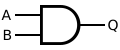
AND Gate:

AND ANSI Labelled
  A | B | A AND B
  ---------------
  0 | 0 |    0
  0 | 1 |    0
  1 | 0 |    0
  1 | 1 |    1

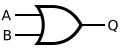
Or Gate:

OR ANSI Labelled
  A | B | A OR B
  ---------------
  0 | 0 |    0
  0 | 1 |    1
  1 | 0 |    1
  1 | 1 |    1

Not Gate:

NOT ANSI Labelled
  A | NOT A
  ---------
  0 |   1
  1 |   0

See this note1

Part b)

Suggested response:

XOR truth table:

ABA XOR B
000
011
101
110

Output is 1 in XOR for (NOT A AND B) OR (A AND NOT B)

Circuit:

XOR implemented with NOT gates (Inverters) and AND gates (Sum of products form)

Explanation


Assume we want to use an AND gate as a building block for our resulting circuit. Wherever we have an output of 1  it means that the inputs to that and gate should also be 1 .

If we imagine an AND gate being the last gate before the output, wherever there is a 1 we need to understand that the inputs to that gate would have to be 1.

ABA XOR B
000
011
101
110


-For each output that produces a 1, we modify the variable input to match  the modded input listed in the specific row of the table:

Row numberABA XOR BDesired output using AND Gate
i000 
ii011NOT A AND B
iii101A AND NOT B
iv110 

We see that either row ii) OR row iii)  produces a 1, i.e

(NOT A AND B) OR (A AND NOT B)

From this expression, we draw the circuit as shown in the suggested response above.

Part c)

4-to-1 multiplexer

Data Lines (Input) are denoted as x1…x4, select line are denoted as s1 and s2, Output is denoted as f

Alternative Diagram in ASCII :

        _______________________
       |        4-to-1         |
D0 ----|      Multiplexer      |
       |                       |
D1 ----|                       |---> Output
       |                       |
D2 ----|                       |
       |                       |
D3 ----|_______________________|
              |         |
              |         |
              |         |
              |         |
              S1        S0
Data Lines (Input) are denoted as D0...D3, select line are denoted as S0 and S1.

See Note2

Part d) i)

16+8+0+2+1 =27

Explanation/Working:

(0×27)+(0×26)+(0×25)+(1×24)+(1×23)+(0×22)+(1×21)+(1×20)

0+0+0+16+8+0+2+1=27

Part d) ii)


  0111 +
  1110
———-
10101 this result cannot be stored in 4 bits.

Part d) iii)


Largest number = 0111 =7 (Show conversion)
Smallest number= 1111= -ve 7 (Show conversion)

Part d) iv)

Suggestion solution 1:


Algorithm, copy all numbers from LSB to MSB up to and including the first 1, then flip remaining bits in that order, i.e
5= 0101

Applying algorithm : 1011

Suggestion solution 2:

+5= 0101
Ones = 0101+1 = 1010
Twos = 1010+1 = 1011

Attributions to media used in this post

Inductiveload, Public domain, via Wikimedia Commons


Footnotes

  1. https://islandclass.org/2021/10/20/logic-gates-formal-introduction/ ↩︎
  2. https://islandclass.org/2021/10/21/multiplexers/ ↩︎

© 2023  Vedesh Kungebeharry. All rights reserved. 

2013 U1 Q1

  1. Part a) i)
  2. Part a) ii)
  3. Part a) iii)
  4. Part b) i)
  5. Part b) ii)
  6. Part b) iii)
  7. Part c)
  8. Part d) i)
  9. Part d) ii)
  10. Part d) iii)

Part a) i)

        _______________________
       |        4-to-1         |
D0 ----|      Multiplexer      |
       |                       |
D1 ----|                       |---> Output
       |                       |
D2 ----|                       |
       |                       |
D3 ----|_______________________|
              |         |
              |         |
              |         |
              |         |
              S1        S0


Part a) ii)

Set the select inputlines to 01 to select the 2nd line, and when input from the 4th line is needed after 1 second (i.e i3), set the select input lines to 11

Part a) iii)

– It always exists in 1 of 2 stable states.
-It can retain its state to achieve storage (in the case the set goes from 1 to 0)

Can be used in RAM Arrays (to implement 1 bit storage) or to Implement a Ripple Counter

Part b) i)


1101

(First bit is 1 for to represent a negative value,

working for 510 to binary :

       2 | 

       2 |2  remainder 1

       2 |1  remainder 0 

            0  remainder 1

i.e 510  = 1012

combining the result we get 11012

)

Part b) ii)


1010 (flipped bits of 0101)

Part b) iii)

1010 +1 = 1011

Part c)

(Show binary-decimal conversions)

For an unbiased exponent and unnormalized mantissa:

sign is -ve, Exponent = 2, Mantissa= 0101

i.e -0.0101 x 2­2 = -1.01

-1.012   =  (-1 x 20)+ (0 x 2-1)+ (1 x 2-2)

          = -1 + 0+ ¼

          = -1.25

Part d) i)


Not (Unary operator)

xNot X
01
10

Part d) ii)

AND

xYX AND Y
000
010
100
111

Part d) iii)

OR

xyX OR Y
000
011
101
111

© 2023  Vedesh Kungebeharry. All rights reserved. 

2022 U2 Q1

Part a)

The main difference between a stack and a queue is how data is inserted and removed from each of them. In a stack, the last element inserted is the first to be removed as compared to a queue where the first element inserted is the first to be removed.

Part b) i)

The enqueue(element) adds an element to the end of  the list of elements which represent the queue. If the list of elements is empty, it adds it at the first location or head of the queue.

Part b) ii)

The dequeue(element) removes an element to the front of  the list of elements which represent the queue. If the list of elements is empty, no element is removed.

Part c)

//Assumptions: The following state is used
#define MAX_SIZE 100
int stack[MAX_SIZE];
int top = -1;

void push(int *stack, int value) {
    if (top >= MAX_SIZE - 1) {
        // Stack is full
        printf("Stack is full, element was not added!\n");
        return;
    }
    top++;
    stack[top] = value;
}

© 2023  Vedesh Kungebeharry. All rights reserved. 

2017 U2 Q5

Part a)

Client server

Part b)

  1. The user clicks on a link to a webpage from a previous webpage.
  2. The browser resolves the ip address from the server name and sets up a tcp connection to the server (usually on port 80 or 8080)
  3. The browser sends a http request to the server containing the requested resource and information about itself, e.g browser type, supported language etc
  4. The server generates a response which contains header information as well as HTML code for the browser to render.
  5. The browser interprets the code and displays the page to the user.

Part c)

The url https://www.buythings.com  would be preferred since this http protocol includes SSL (Secure sockets layer) or TLS (Transport layer security) which encrypts all HTTP information such that only the sender and the receiver can decipher the information. This is more secure, especially in the case where the http information can be intercepted by malicious entities on the network, they won’t be able to read the sensitive payment information that can be used defraud the online shopper.

Part d)

A process is a running program.

The PCB stores metadata necessary for  managing the process, e.g. process id, process state, memory allocation addresses, scheduling info (priority, time slice), pointers to it’s resources (files, other processes).

Part e)

  1. New
  2. Running
  3. Ready
  4. Waiting
  • Terminated

Part f)

Paging is were each process in an OS is allocated memory in units called pages for easier coordination and management by the operating system. The pages can be stored physically in memory , or stored on the hard disk (in the case that the process is not running at that time). If a process is stored on the disk and needs to be run, a page fault is generated so that the process is swapped back into the physical memory for processing.

Part g)

Thrashing occurs when memory resources become limited by the amount of running processes. The need for physical memory can be exceeded, thus multiple processes that are in waiting state are stored as pages on disk. For continued running of the system, processes are constantly swapped in and out of physical memory, an execution which spends a lot of time on the cpu when compared to running the processes themselves.

Part h)

  1. Because of the frequent process swapping by page faults, the system becomes inefficient and can run slowly.  (The solution is to inefficiency increase the size of physical memory by upgrading the ram size, or configure/manage the system to run less processes.)

  2. The system can become overwhelmed to the point of “crashing”, i.e stop working or responding altogether.

Part i)

Too little physical memory is available for a system that needs to run a lot of processes.


© 2023  Vedesh Kungebeharry. All rights reserved.