Integrated Software

Integrated software was a term that was born out of the evolution software developed in specialized industries.

It was possible to have one application existing for years alongside new applications that were acquired or created to meet the needs of new user tasks.  It is a quite common occurrence that data produced in one application is required to be used in another new application. For example, data produced by a payroll application would be needed in another accounting application.

Traditionally this data conversion was sometimes done my employees of the organization, but this process was prone to human error. It is a better practice to create new applications that can work with data and information produced by older applications. In this way human error is eliminated and the applications can share data with each other. (Note that old applications can sometimes be upgraded to produce data for new applications)

When the data is standardized in this way , we say the applications are Integrated, hence the term Integrated software.

Definition: Integrated Software refers to 2 or more applications that can share data with each other.

Two Examples include the following suites: Microsoft office (Word ,excel etc) , Adobe Creative Cloud  (Illustrator, Photoshop etc)

See Also :

https://www.techopedia.com/definition/7748/integrated-software

Enterprise Resource Planning (Shelly, Vermaat; Discovering computers 2011  )

Copyright  © Vedesh Kungebeharry. All Rights Reserved.

Computer Suitability by Specification

When purchasing a computer , we must consider the purpose of it’s main use.

Some main purposes include:

  • Web Browsing
  • Office document preparation
  • Graphics editing and Magazine publication (online and offline)
  • Desktop  Publication
  • Video Production
  • Gaming for entertainment and development

Based on the purpose of it’s main use we can consider some minimum recommendations for hardware specifications based on  the following criteria:

  • Processor speed in Gigahertz
  • RAM capacity  (including type and speed)
  • Hard Drive Capacity , type and number of hard disk drives
  • Graphics acceleration
  • Port Interfaces

Below is a Table showing the minimum recommendations for various applications:

Computer Purpose Hardware specification
CPU RAM HARD DRIVE Graphics Types of software Additional Peripherals
Web Browsing,


1 GHZ 1-2 GB A few gigabytes of free space Web Browser (Edge, Internet Explore, Chrome, Safari, Opera, Firefox)
Office document preparation


1-2 GHZ 4 GB 100-200 GB Word-processing

Spreadsheet (Microsoft Office)


Accounting  (Peachtree accounting)

N/A
Desktop Publishing 2 GHZ 4GB 100-200 GB On Board graphics Publishing software (Microsoft Publisher) Stylus, Touch Screen
Graphics editing and Magazine publication (online and offline) 2- 3 GHZ,


Dual ,Quad Core


Examples: Intel i5, i7

4 – 8 GB 500 – 1000 GB Mechanical HDD  On Board  graphics E.G Photoshop


Microsoft Publisher

Graphics pad
Video Production


2- 4 GHZ,


Dual ,Quad Core, up to 12 cores


Examples: Intel i5, i7 ,i9

8-32 GB SSD or SSHD for OS and program files (256 GB )


Mechanical Hard Drive for additional Storage 1-2 TB

Dedicated hardware acceleration with 2 GB VRAM E.g Adobe Premiere Pro


Adobe After Effects


Maya

Trackball,

Digital video converters

Gaming for entertainment and development 3- 4 GHZ,


Dual ,Quad Core, up to 12 cores


Examples: Intel i5, i7 ,i9

8-32 GB SSD or SSHD for OS and program files (256 GB )


Mechanical Hard Drive for additional Storage 1-2 TB

Dedicated hardware acceleration with 4 GB VRAM

© 2018 Vedesh Kungebeharry. All rights reserved

Local Storage and Cloud Storage

Local Storage

Local Storage is secondary storage that is physically connected to a device; e.g. a Pc’s internal hard drive , a phone’s internal memory.

The connection is provided internally within the system unit. Note that external backing storage devices , although portable, are local storage devices by virtue of the fact that they are connected internally via ports or interfaces.

Cloud Storage

Cloud storage is provided over a computer network by a cloud service provider

The cloud service provider makes the storage available via an app or web interface (web application) via a web browser.

Examples include Google drive , Dropbox, onedrive etc.


© 2018 Vedesh Kungebeharry. All rights reserved

Email Introduction

EMAIL

Definition: Telecommunication means communication at a distance (tele means “at a distance”). Modern telecommunication is usually timely and employs electronic devices.

Definition: E-mail (electronic mail) is the exchange of computer-stored messages by telecommunication[1]. It can be thought of as the electronic version of traditional mail.

In Class Demonstration:  Setting up an Email account with google

Teacher demonstrates the sending of email:

  1. From person to person (including reply)
  2. From person to people (including reply)
  3. Including an attachment. (reply class discussion)

Email Attachments

An email attachment is a digital file that is added to an email message for delivery to the recipient.e.g. a picture, audio file , program file etc

Email address format

Each user has a unique email address specified by their username at the mail server in the following format:

username@server.topLevelDomain

e.g. JimBob@yahoo.com

Parts of an E-mail

Internet email messages consist of two major sections:

  • the message header. The header is structured into fields such as From, To, CC, Subject, Date, and other information about the email.
  • message body, collectively known as content.

The message header must include at least the following fields:

From:

The email address of the originator of the message. This field is sometimes formatted to include a first name and last name, or  other alternative formats

Date:

The geographical local time and date when the message was sent.  This field is almost exclusively generated by the email service provider (e.g Gmail, Hotmail etc)

To:

The email address(es) OF the messages’ main recipient(s).

Cc:

Carbon Copy.  Recipients in this field receive a copy of the email between the sender in From: and the main recipients in To:.  The recipients can see all recipients in the  and To: and Cc: fields.

This term originated from the use of traditional carbon paper to produce copies of hand written pages.

Bcc:

Short for Blind Carbon Copy. Recipients in this field receive a copy of the email between the sender in From: and the main recipients in To:  as well as Cc:.   The main difference here is that recipients in the To: and Cc: fields WILL NOT see any recipients specified in Bcc:

Subject:

A brief summary of the topic of the message. Certain abbreviations are commonly used in the subject, including “RE:”  (concerning) and “FW:” (forwarded message).

A forwarded message is a copy of an email sent to a recipient at a later time than the original email.

Updates:

2023 Jan 7th

-Added section for email address format.

[1] https://whatis.techtarget.com/definition/e-mail-electronic-mail-or-email

© 2018 Vedesh Kungebeharry. All rights reserved

The Functions of the Main Components of a Computer System

The  hardware components include the keyboard , monitor , cpu (processor) an the hard drive. In this lesson, we wish to observe the main functions for each component category.

The Logical Steps For Data Processing

Data processing has a logical organization divided into 4 main steps functions.

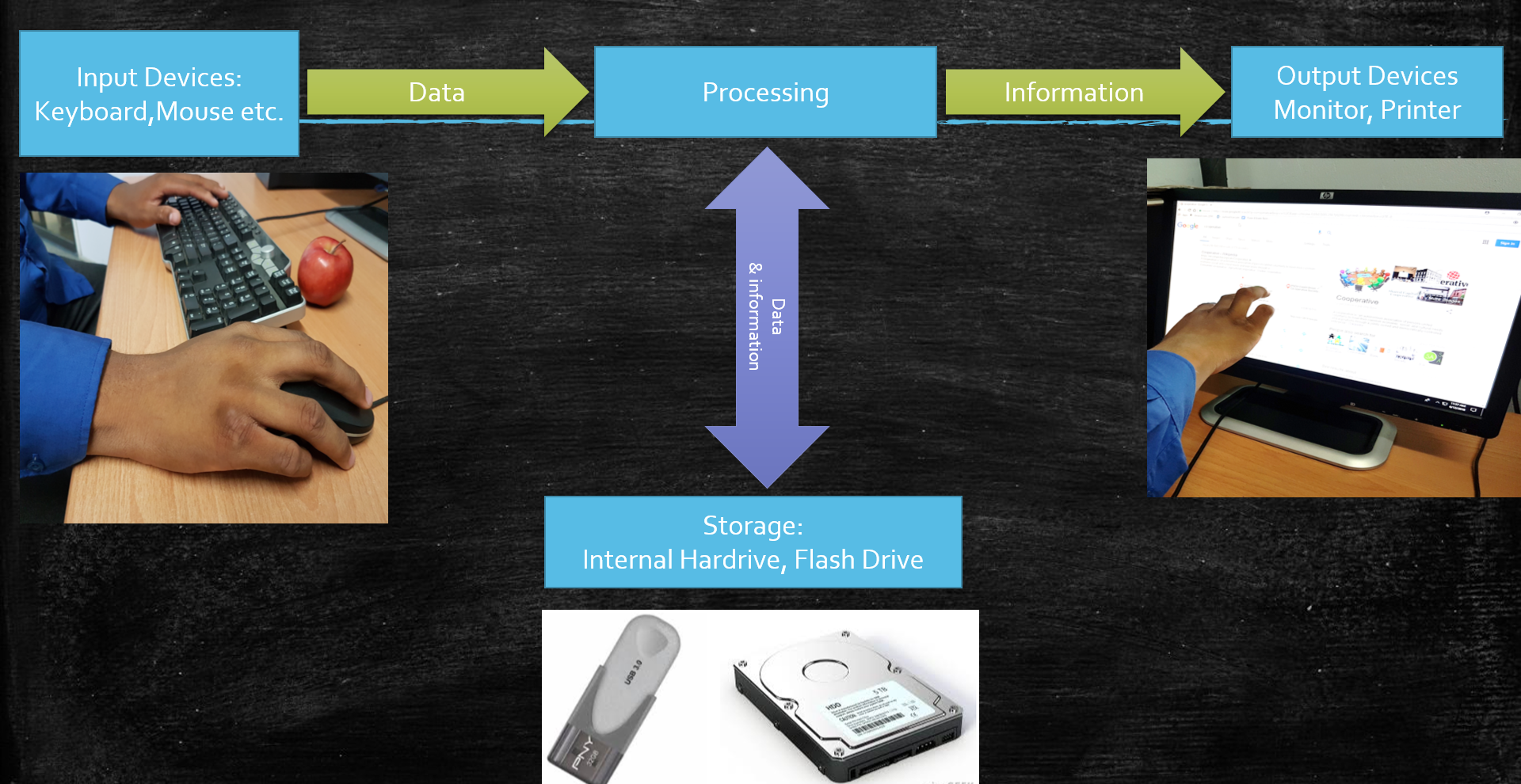
Computers input  data via input devices, processes the data to produce information which is in turn output to the user via output devices.   The results of processing or even the captured data can be stored on storage devices.

IPO

Input : to get data into the computer system

Processing: perform some operation on data as directed by software instructions.

Output: to make the results of processing (information) available to the computer user.

Storage:  to store data and information for future use.

IPO-in-context

© 2018 Vedesh Kungebeharry. All rights reserved