Ways of representing algorithms

There are several ways in which algorithms can be represented:

  1. Narrative form : An algorithm can also be represented using narrative form, such as English or another human language. This representation is often used to describe algorithms in a way that is easy for humans to understand, but it can be difficult to translate into a programming language.

  2. Pseudocode: Pseudocode is a way of representing an algorithm using a combination of natural language and programming language constructs. It is often used to represent algorithms in a way that is easy for humans to understand, but that can also be easily translated into a programming language.
  3. Flowcharts: A flowchart is a graphical representation of an algorithm that uses symbols to represent different parts of the algorithm, such as input, output, decision-making, and loops. Flowcharts are often used to represent algorithms in a way that is easy for humans to understand and visualize.

Narrative form

Narrative form is a way of representing an algorithm using a story or a sequence of events. This representation is often used to describe algorithms in a way that is easy for humans to understand, but it can be difficult to translate into a programming language.

For example, an algorithm for sorting a list of numbers could be represented in narrative form as follows:

  1. Start with an unsorted list of numbers.
  2. Compare the first two numbers in the list. If the first number is larger than the second number, swap their positions.
  3. Compare the second and third numbers in the list. If the second number is larger than the third number, swap their positions.
  4. Continue comparing and swapping pairs of numbers until the end of the list is reached.
  5. Repeat the process until the list is sorted in ascending order.

Here is an example of an algorithm in narrative form that explains the steps for using a menu system to withdraw money from an ATM:

  1. Start at the main menu of the ATM.
  2. Choose the “Withdraw” option from the menu.
  3. Enter the amount of money you want to withdraw.
  4. Confirm the amount of money you want to withdraw.
  5. If the ATM has enough money to dispense the requested amount, it will dispense the cash and return to the main menu. If the ATM does not have enough money, it will display an error message and return to the main menu.
  6. If you want to make another transaction, return to the main menu and choose a different option. If you are finished, choose the “Exit” option from the menu to end the transaction and return to the main menu.

Narrative form is often used to describe algorithms in a way that is easy for humans to understand, but it is not as precise as other forms of representation, such as pseudocode or programming language.

Pseudocode

Pseudocode is a way of representing an algorithm using a combination of natural language and programming language constructs. It is often used to represent algorithms in a way that is easy for humans to understand, but that can also be easily translated into a programming language.

Here is an example of pseudocode for calculating the simple interest on a loan:

START CalculateSimpleInterest(principal, rate, time)

    INPUT: float principal, float rate, float time

    OUTPUT: float interest

    interest <- principal * rate * time

    RETURN interest

END

This pseudocode represents an algorithm that calculates the simple interest on a loan given the principal amount, interest rate, and time period. It starts by calculating the interest as the product of the principal, rate, and time. It then returns the value of interest as the output of the algorithm.

In this pseudocode, principal, rate, and time are the input variables, and interest is the output variable. The keyword START indicates the start of the algorithm, and the keyword END indicates the end of the algorithm. The keyword INPUT specifies the input variables, and the keyword OUTPUT specifies the output variable. The keyword RETURN is used to return the output of the algorithm.

Flowchart

Flowchart symbols are graphical symbols used to represent different parts of an by showing the flow from one step to another. Here are some common flowchart symbols and their meanings:

  1. Oval or Circle: The oval or circle symbol represents the start or end of an algorithm.
  2. Rectangle: The rectangle symbol represents a process step or action.
  3. Diamond: The diamond symbol represents a decision point or branching point in the algorithm. It is used to represent a decision that must be made, with different branches leading to different outcomes based on the decision.
  4. Arrow: The arrow symbol represents the flow of the algorithm and is used to connect different symbols in the flowchart.
  5. Parallelogram: The parallelogram symbol represents input or output in the algorithm.
  6. Terminal: The terminal symbol represents the start or end of a subprocess within the main algorithm.
  7. Process: The process symbol represents a process step that involves some kind of manipulation or calculation.
  8. Predefined Process: The predefined process symbol represents a process step that involves using a predefined function or procedure.
  9. Off-page Connector: The off-page connector symbol represents a connection to a separate page or subprocess within the main algorithm.

Flowchart symbols are used to represent the different steps and decisions in an algorithm in a way that is easy for humans to understand and visualize. They are an important tool for representing algorithms and are widely used in a variety of fields.

Algorithms compared

Here is a table showing the advantages and disadvantages of algorithms represented in different forms:

FormAdvantagesDisadvantages
Narrative– Easy for humans to understand– Not precise
– Can be used to describe complex algorithms in an intuitive way– Difficult to translate into a programming language
– Can be used to communicate algorithms to people who are not familiar with programming languages
Pseudocode– Easy for humans to understand– Still, it is not  a real programming language, so it may require some translation to be implemented in a computer program
– Can be easily translated into a programming language
– Allows for a high level of precision and detail
Flowchart– Easy for humans to understand and visualize– May require more time and effort to create than pseudocode or narrative forms
– Can be used to communicate algorithms to people who are not familiar with programming languages– May not be as precise as pseudocode
– Can be helpful for understanding and debugging algorithms

As you can see, each form of representation has its own advantages and disadvantages. The form that is most suitable for a given situation will depend on the needs and goals of the person representing the algorithm.


[1] TA-Note
Tutorial: Storing and loading data in a plain textfile.

A program which contains an array of prime numbers requires functions to facilitate the persistence of data using functions to save an load data.

In this tutorial, we have some functions which can be used to achieve this.

The goal of this tutorial is to understand how we can achieve this by performing the actions in the inline comments of the main() function.

Run the code below, and perform the tasks whilst keeping track of your answers in your notebook:

#include <stdio.h>
#include <stdlib.h>
void setupDummyData();
void saveToFile();
void readFile();
void printPrimesToScreen();


int primes[100];
int result[100];
int count = 0;

int main()
{


   //When answering tutorial questions, be as precise and descriptive as possible

   //TUTORIAL BLOCK 1:
   //a. What does the code accomplish if the following multiline comment is removed?

  /* printPrimesToScreen();
   setupDummyData();
   printPrimesToScreen();*/


   //TUTORIAL BLOCK 2:
   //a. Redo the multiline comment above.
   //b. What does the code accomplish if the following multiline comment is removed?
   /*
   printPrimesToScreen();
   setupDummyData();
   saveToFile();
   printPrimesToScreen();   */


   //TUTORIAL BLOCK 3:
   //a. Redo the multiline comment above.
   //b. What does the code accomplish if the following multiline comment is removed?
   //c. Where did the data in the array come from on the second printPrimesToScreen()?
   /*
   printPrimesToScreen();
   readFile();
   printPrimesToScreen();//2nd printPrimesToScreen()
   */

   //TUTORIAL BLOCK 4:
   //a. Redo the multiline comment above.
   //b. DELETE the file "primes.txt"
   //c. What does the code accomplish if the following multiline comment is removed?
   //d. What data exists in the file "primes.txt"
   /*
   printPrimesToScreen();
   readFile();
   saveToFile();
   readFile();
   printPrimesToScreen();
   */

   //DELETE primes.txt if you need to retry this tutorial.

   printf("Program quitting...\n");
   return 0;
}

//HARDCODE Data into array
void setupDummyData()
{
   count = 8;
    primes[0]= 2;
    primes[1]= 3;
    primes[2]= 5;
    primes[3]= 7;
    primes[4]= 11;
    primes[5]= 13;
    primes[6]= 17;
    primes[7]= 19;
    primes[8]= 23;
    primes[9]= 29;
}

//empty all contents into a file in overwritemode
void saveToFile()
{
   FILE* filePtr = fopen("primes.txt","w");
   if (filePtr==NULL)
      printf("Error creating savefile.....Check that file is not in use\n\n");
   else
   {
      //write the number of records in the array on the first line
      fprintf(filePtr, "%d\n",count);
      //write each prime number on a separate line in the file
      for (int i = 0 ; i<count;i++)
         fprintf(filePtr, "%d\n",primes[i]);
   }
   fclose(filePtr);//close file for use by other processes
   printf("Datafile Saved!\n\n");
}


//read all data into array
void readFile()
{
   FILE* filePtr = fopen("primes.txt","r");
   if (filePtr==NULL)
      printf("Error reading file, does it exist?\n\n");
   else
   {
      //read the number of records in the file from the first line
      fscanf(filePtr, "%d",&count);
      //write each prime number on a separate line in the file
      for (int i = 0 ; i<count;i++)
         fscanf(filePtr, "%d",&primes[i]);
   }
   fclose(filePtr);//close file for use by other processes
}


void printPrimesToScreen()
{
   printf("\n\n****Now Displaying all Primes in the array\n");
   if (count==0)
         printf("\nPrime Array Is empty...\n\n");
   else
   {
      for (int i = 0 ; i<count;i++)
         printf("index: %d , prime: %d \n",i,primes[i]);
      printf("\n");

   }

}


© 2022  Vedesh Kungebeharry. All rights reserved. 

Python Example: Indefinite prompting to determine the corresponding grade for a given mark

Task

Create a program that would repeatedly prompt the user for a mark and outputs the corresponding grade.

Solution using discrete selection statements

confirm= input ("\nWould you like to enter a grade? \n Y for Yes, any other key for no\n")
while (confirm.lower() =="y" ):
    #processdata here
    grade = float(input("please enter a mark\n\n"))
    if (grade<50):
        print("fail")
    elif (grade<65):
        print("D")
    elif (grade<75):
        print("C")
    elif (grade<85):
        print("B")
    else:
        print ("A")
    
    #end dataprocessing
    confirm= input ("\nWould you like to enter a grade? \n Y for Yes, any other key for no\n")
print("end")

Solution using cascading/nested selection statements

confirm= input ("\nWould you like to enter a grade? \n Y for Yes, any other key for no\n")
while (confirm.lower() =="y" ):
    #processdata here
    grade = float(input("please enter a mark\n\n"))
    if (0<=grade and grade<50):
        print("fail")
    if (50<=grade and grade<65):
        print("D")
    if (65<=grade and grade<75):
        print("C")
    if (75<=grade and grade<85):
        print("B")
    if (85<=grade and
        ygrade<=100):
        print ("A")
    
    #end dataprocessing
    confirm= input ("\nWould you like to enter a grade? \n Y for Yes, any other key for no\n")
print("end")

© 2022  Vedesh Kungebeharry. All rights reserved. 

Stack Implemented by a Linked List

Assume that there exists an implementation for a linked list which contains the following state:

first // a reference to the first node in the list

and behavior:

addFirst(element data)

addLast(element data)

element removeFirst()

element removeLast()

boolean isEmpty()

Write algorithms which use the only the above linked list functions to implement a stack,

i.e write algorithms which use to above state and behavior to implement:

  1. push(element data)
  2. pop()
  3. peek()

(Ensure that you include appropriate return types where necessary)

Updates to this post:

2022 Sept 30 – removed data as a parameter to removeFirst and removeLast()

2023 Sept 28 – reworded the task from: “Write algorithms for functions to this linked list such that a stack can be implemented,” to “Write algorithms which use the only the above linked list functions to implement a stack,”

© 2022  Vedesh Kungebeharry. All rights reserved. 

Computational Thinking  – A simple task! (Optional Class Activity)

In class Exercise

Students are arranged into groups of two.

Student 1 – writes instructions for student 2 to perform a simple task. Student 2 is not allowed to see the instructions as they are written.

Student 2 – Performs the task according to the given instructions.

Tasks include

Drawing

  • Draw a triangle
  • Draw a square

Dancing

Do the floss[1]

Discussion

Were the instructions precise?

Written Instruction In book

Instruction: Students are instructed to rewrite the instructions in a concise and precise manner with the expectation that the recipient of the instruction is motivated to achieve the goals of the instruction; i.e. the recipient understands the intent of the instructions and is not subject trivial misinterpretation which can lead to faults.

Moving From documenting an activity to solving problems

When solving a problem the following the steps to be followed:

  1. Information gathering;
  2. Brainstorming;
  3. Identification of resources;
  4. Evaluation of pros and cons of multiple solutions;
  5. Determining most feasible solution.

See the plan for next class discussion here: https://islandclass.org/2021/05/19/problem-solving-discussion/

Homework

Visit scratch.mit.edu and create an account for class next week.


[1] https://metro.co.uk/2018/04/18/floss-dance-created-everyone-7476359/

© 2022  Vedesh Kungebeharry. All rights reserved. 

Hardware Specifications – Computer Ports

NB - not all ports are mentioned in this post e.g ps2, serial, parallel ports etc.  This content focuses on the requirements of our NCSE ICT syllabus.

Computer Ports

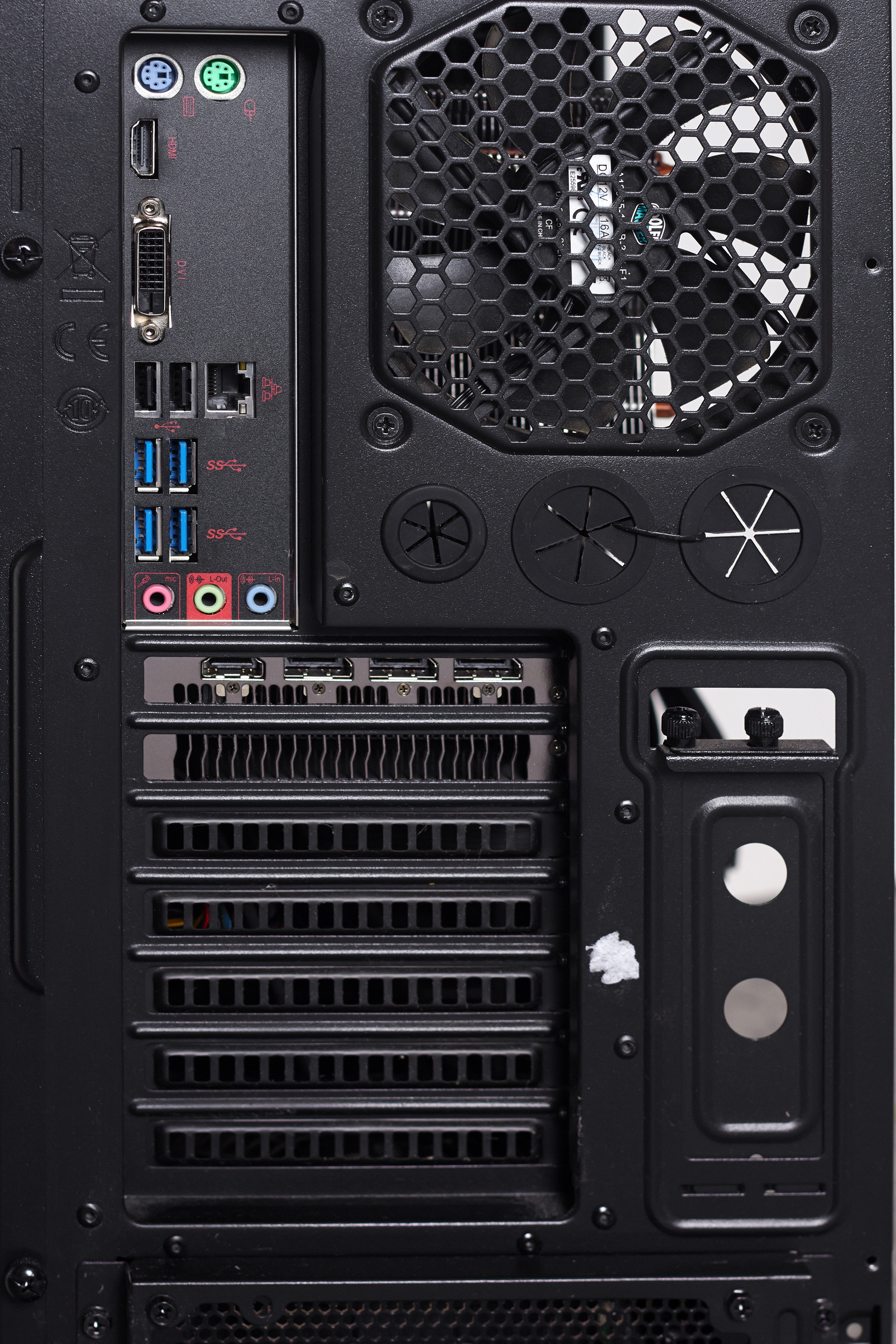
Computer ports can be found on the system unit and serves as points of connection to various peripheral devices via wired cabled or wireless transmission media.

A view of a system unit’s ports is shown below:

Output Devices And Ports

Video output to a computer monitor (or any other visual display unit [VDU]) can be achieved by sending signals from the system unit’s graphics circuits via specific display port over a cable and to the monitor/screen.

Two types of video ports are VGA and HDMI

VGA – Video Graphics Array

This technology has been around since 1978 , and is essentially a chipset for graphical display. A VGA cable connects one end to the system unit’s VGA port and the other to a VGA port on the VDU (Projector, computer monitor, Smart TV, etc)

The system unit’s VGA port is shown below:

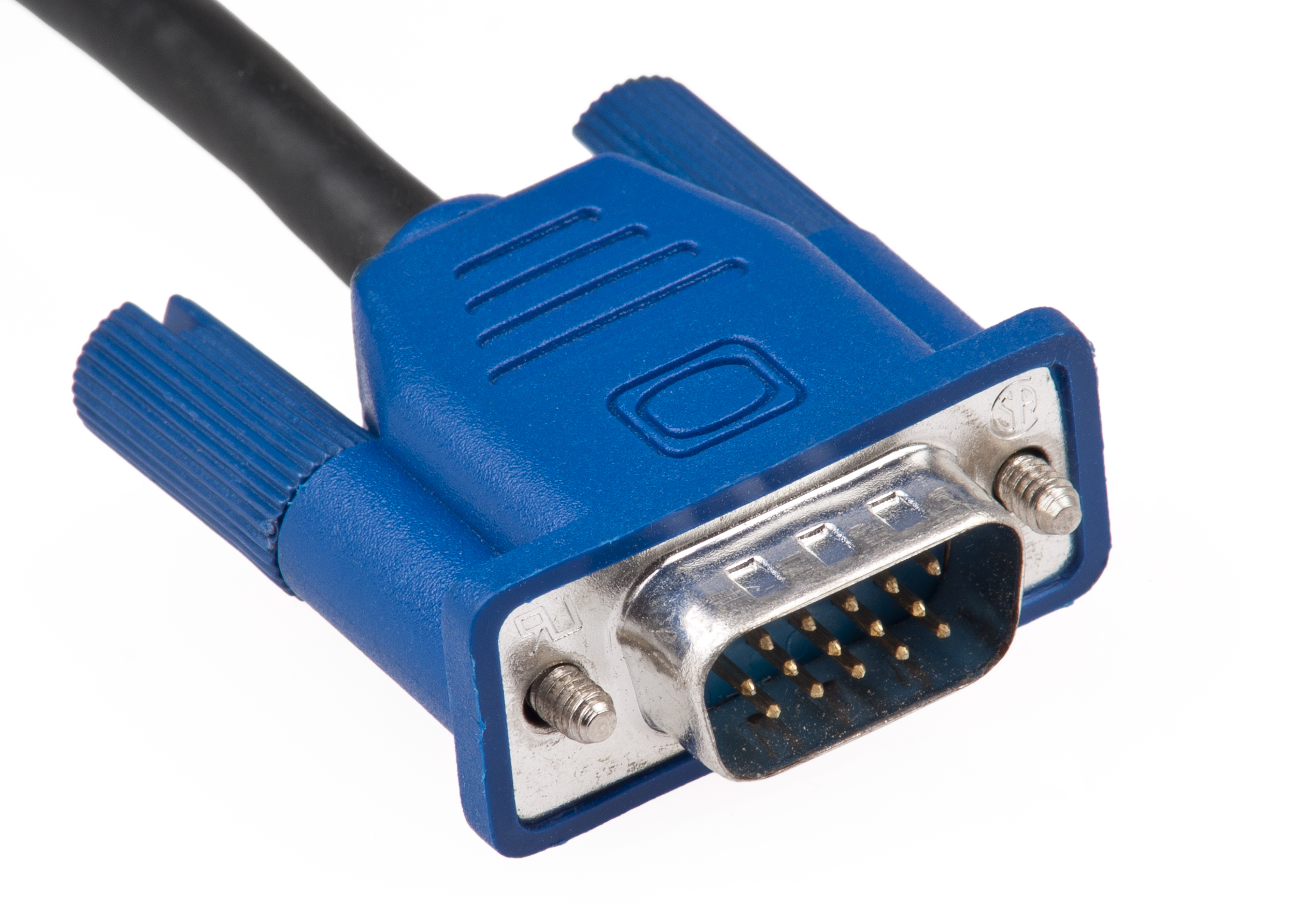
Below is an image showing the end of the cable VGA Cable which connects the VGA Port:

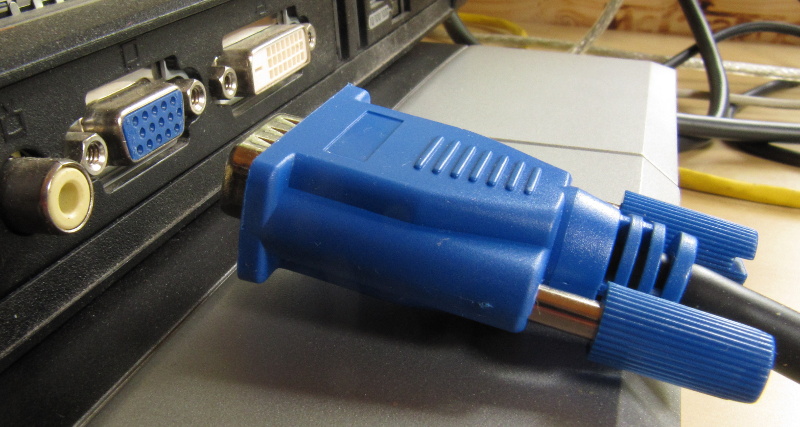
Below is an image shown how the cable is intended to be connected via the port for our VGA technology:

Characteristics of VGA Technology

VGA technology,

  • is affordable and the cheapest option. VGA only Devices are very cheap, as opposed to other devices that include HDMI etc.
  • is widespread, popular and can be easily found world wide
  • can display up to 256 colors
  • Displays a reliable resolution for most applications, however other technologies can display sharper and clearer images at high resolution.

HDMI – High Definition Multimedia Interface

This is an another output technology which outputs high quality , high resolution video and sound via HDMI ports and cables. One cable’s end connects to the System unit’s hdmi port and the other to a VDU which can also output sound.

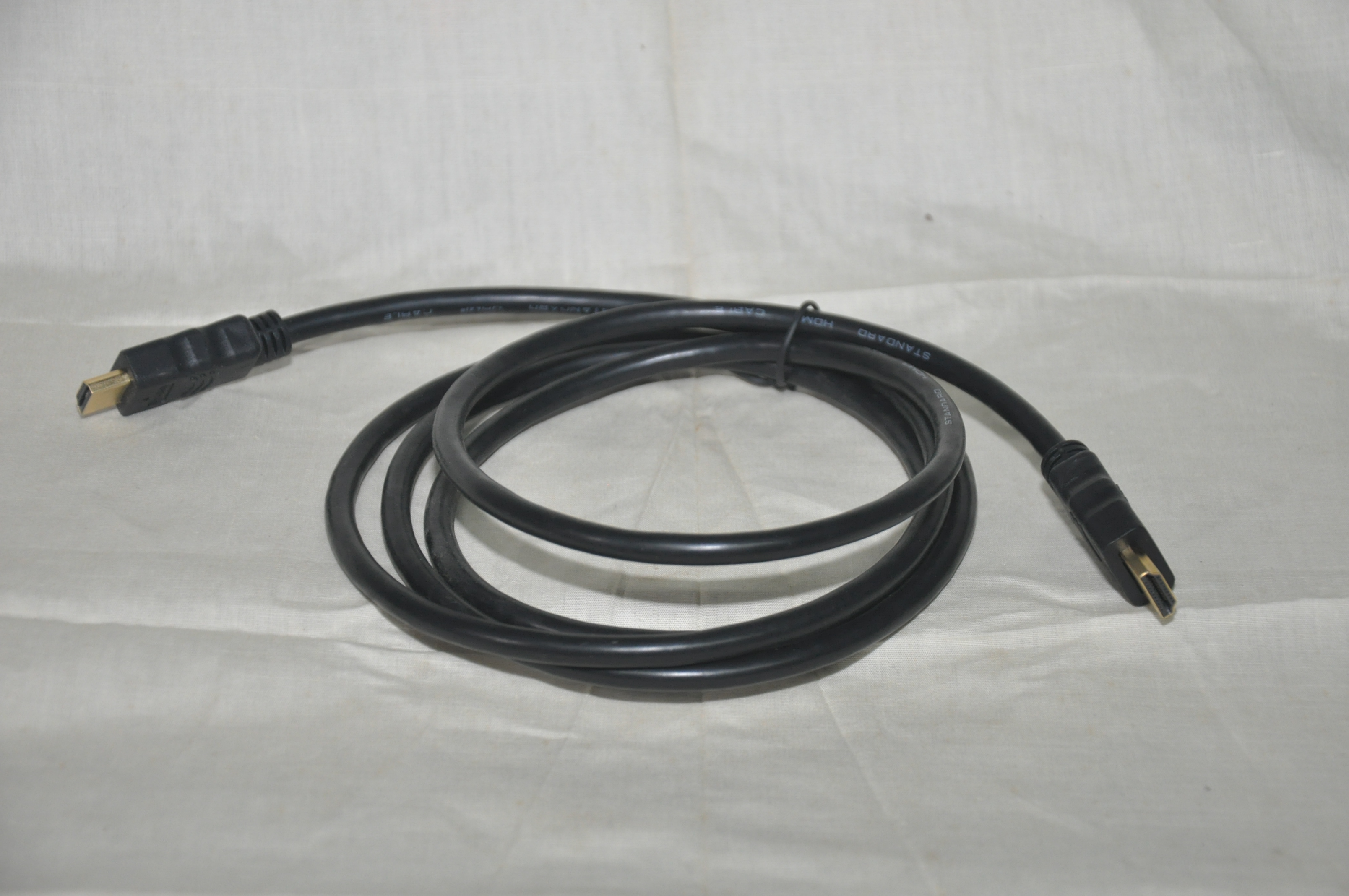
An image is shown below of an HDMI Cable:

An image is shown below of an HDMI Cable port on a VDU:


Communication Ports

Communication Ports allow for computer networking.

Ethernet port (RJ45)

This is a very common standard of networking which uses a wired cable connected via and ethernet port. The ethernet cable can be used to connect 2 PCs, or a pc to network hardware, or even one network to the next.

An image of an ethernet cable with a RJ45 connector end is shown next to a laptop’s RJ45 connector(Right). (The port on the left on the laptop is a RJ11 Connector used for land line phone connection):


A special type of port , USB – Universal Serial Bus

USB technology was developed with the intention to connect many device types to the computer system and/or each other via USB Ports and Cables. E.g networking 2 computer systems, connecting to game consoles to each other for playing videogames etc.

Devices include input , output , external storage devices, communications devices and specialized devices.

Input devices

Keyboard, Mouse, Graphics tablets

Output

Printers,VDUs, Audio

External storage devices

Flash Drives, External Hard Drives

Communications devices

Wireless Networking, Wireless Modems

Specialized devices

Security dongles, Video Cameras, Audio equipment, Midi Keyboards and Controllers.


Fire wire

Firewire is a standard similar to USB that was developed to connect multiple device types to the computer system.

Below is an image of a firewire port:

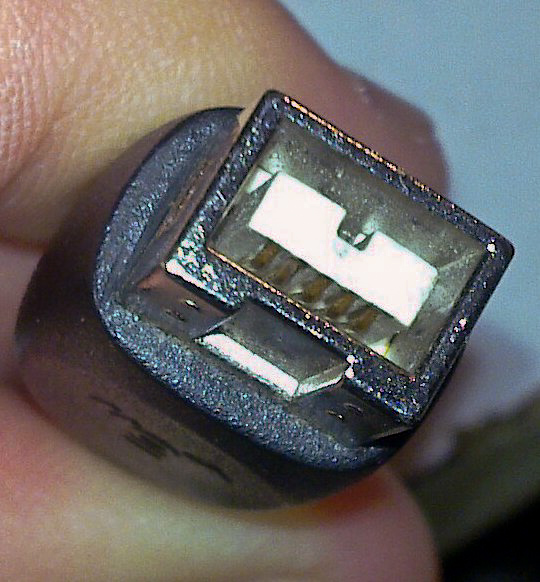
A firewire cable end:


Internal Ports – SATA and IDE

Within the computer’s system unit various ports, connectors and cables are used to connect devices internally so that they can be manipulated by the computer system

Mass storage devices, such as optical disk drives and hard drives, are connected to the system using two types of technologies:

  • IDE – Integrated Drive Electronics
  • SATA – Serial Advanced Technology Attachment

IDE – Integrated Drive Electronics

This was an earlier technology which was created for mass storage via the device and a multi wired cable in the form of a ribbon. This method of data transfer uses “parallel communication”. (At this level we will not delve into what parallel communication is, more so that we note that it is a defining characteristic of the technology.)

An IDE Hard drive is shown below with a space of connection to the ribbon cable on the bottom left:

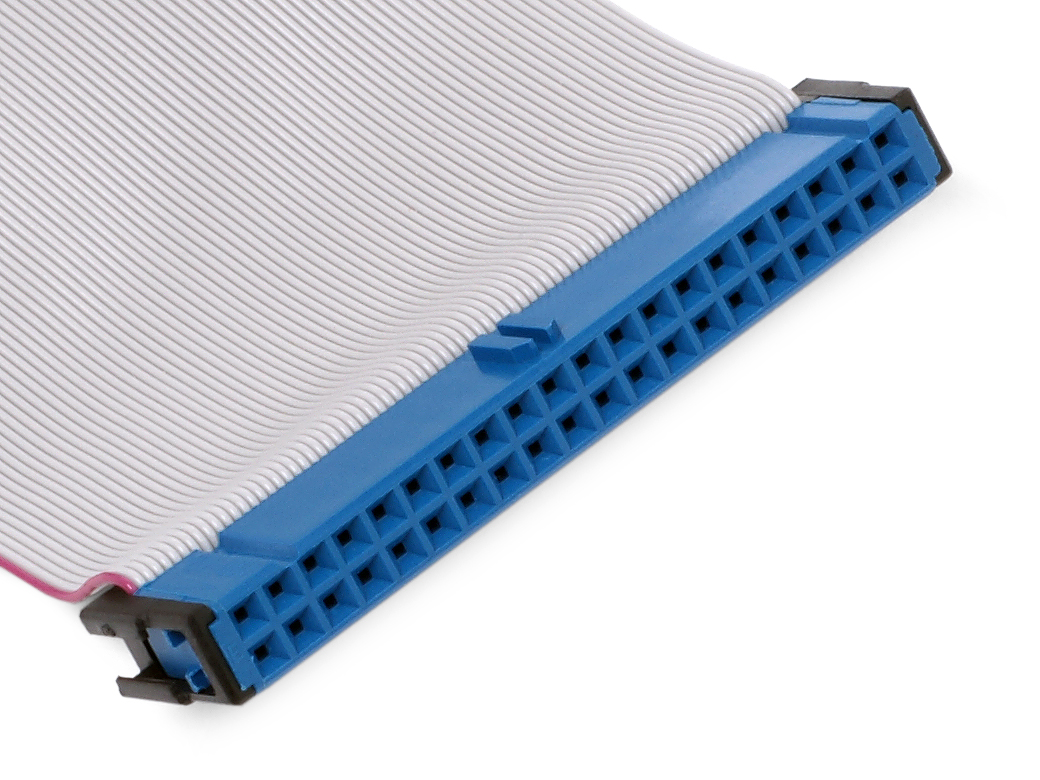
An IDE ribbon cable is shown below for connection to either the storage device or the computer system’s circuitry (motherboard):

An IDE Connector on the computer system’s circuitry (motherboard)

SATA – Serial Advanced Technology Attachment

SATA was meant to be a an improvement over IDE Technology. SATA connects mass storage device via SATA Ports and Cabling. This method of data transfer uses “parallel communication”. By the nature of SATA Technology’s design it’s cabling is less bulky than IDE and less expensive making it more popular. Data transfer is much faster as compared to IDE with SATA transferring approximately 45 times faster than IDE Technology.

Below is a picture of a SATA hard drive:

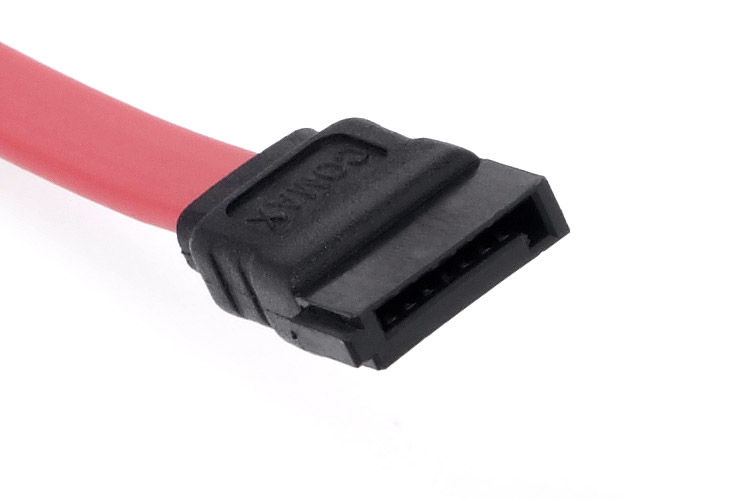
A SATA Data Cable

Below is an image of SATA Cables connected to the computer system’s circuitry (Motherboard)

UPDATES TO THIS POST

28th Sept 2022 – Added “Smart TV with a HDMI port” as an example for a VDU.


Attributions to media used in this post

© 2022  Vedesh Kungebeharry. All rights reserved. 

What do these scratch programs draw? – Solutions

Draw the shapes from the following snippets of scratch code:

Exercise 1

pen down
repeat 4
    move 100 steps
    turn right 90 degrees
end repeat    

Solution: https://scratch.mit.edu/projects/700717121

https://upload.wikimedia.org/wikipedia/commons/3/3e/Drawing_Exercise_1.png

Exercise 2

pen down
repeat 3
    move 100 steps
    turn right 120 degrees
end repeat

Solution: https://scratch.mit.edu/projects/700720654

https://upload.wikimedia.org/wikipedia/commons/c/c6/Drawing_Exercise_2.png

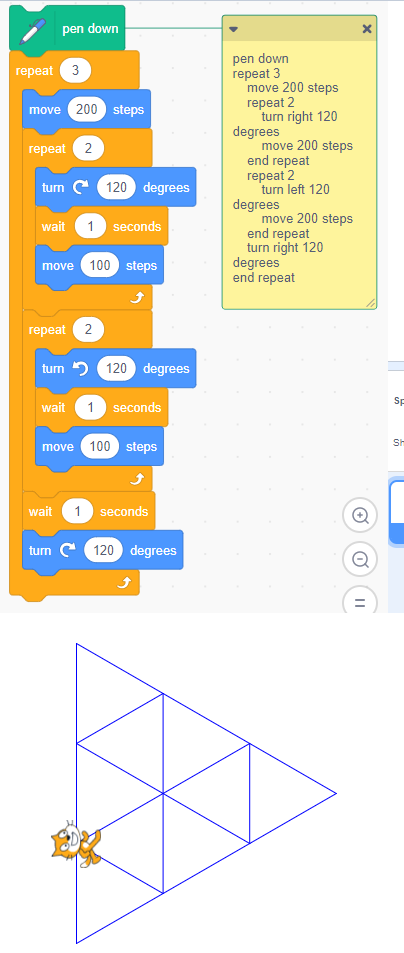
Exercise 3

pen down
repeat 3
    move 200 steps
    repeat 2 
        turn right 120 degrees
        move 200 steps
    end repeat
    repeat 2 
        turn left 120 degrees
        move 200 steps
    end repeat
    turn right 120 degrees
end repeat

Solution: https://scratch.mit.edu/projects/700721746

https://upload.wikimedia.org/wikipedia/commons/1/1f/Drawing_Exercise_3.png

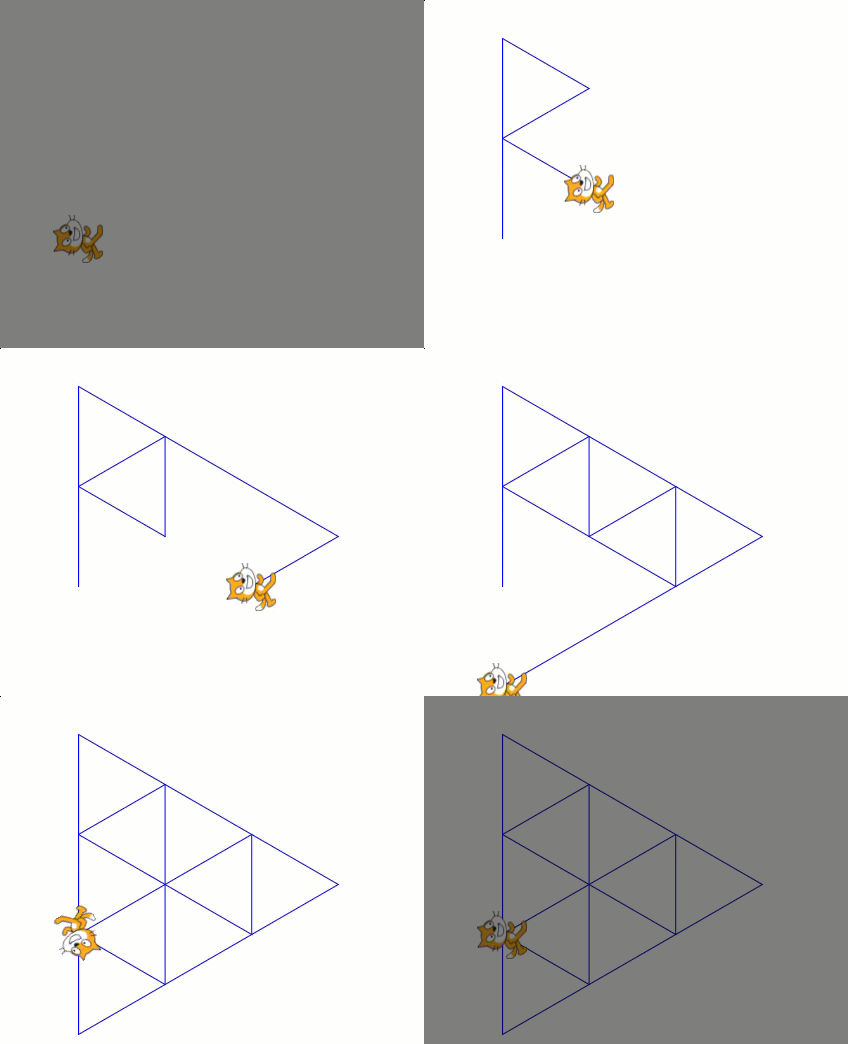
Animated solution:

https://upload.wikimedia.org/wikipedia/commons/a/a1/Drawing_Exercise_3_-_Animation.gif

Solution with more pauses: https://scratch.mit.edu/projects/638143905

© 2022  Vedesh Kungebeharry. All rights reserved. 

What do these scratch programs draw?

Draw the shapes from the following snippets of scratch code:

Exercise 1

pen down
repeat 4
    move 100 steps
    turn right 90 degrees
end repeat    

Exercise 2

pen down
repeat 3
    move 100 steps
    turn right 120 degrees
end repeat

Exercise 3

pen down
repeat 3
    move 200 steps
    repeat 2 
        turn right 120 degrees
        move 200 steps
    end repeat
    repeat 2 
        turn left 120 degrees
        move 200 steps
    end repeat
    turn right 120 degrees
end repeat

© 2022  Vedesh Kungebeharry. All rights reserved. 

Scratch – Selection, Sensing, Repetition, Outputting Results.

Task 1

Create a solution in scratch which accepts a mark from the user and outputs whether or not the mark is a pass or a fail. Assume the pass mark is 50.

Solution: https://scratch.mit.edu/projects/699663431

Task 2

Modify your solution above to keep on prompting the user indefinitely and keep track of the number of marks entered.

In the above scenario, we add:

  • a forever block to achieve indefinite/infinite repetition
  • a variable to keep track of the number of marks, numMarks
  • the join operator to output results

© 2022  Vedesh Kungebeharry. All rights reserved.