Queues

Having studied the principle of a stack, we will list the principle of operation for a queue:

A queue models a real-life queue, for example, a queue (line) of people in a cafeteria waiting to order and pay for food.

The queue (line) of people can be thought of as a list with a :

Head or Front– the first person in the line, and the first to be served.

Tail  or End – the last person in the line and the last to be served.

Every time an lunch order is processed, the head of the queue leaves the line, the entire line moves up , and the next person becomes the new head.

The queue ADT consists of a list of items and at least 3 reference variables which keep track of the location of the head, tail and the size of the queue. Operations on the queue are shown below:

OperationExplanationExample
Add(..) or Enqueue(..)Adds/Enqueues an item to the end of the queue and updates the tail to point to the newly added item.   if the queue is full, the item is not added and an error message displayed.   If the queue is empty, add the new item at the head. In this case the head and tail point to the newly added item.  A person joins the end of the line at the cafeteria.   If the line is full, the person cannot enter the line.   If the line is empty, the person goes straight to the head, i.e the cash register.  
Remove(..) or Dequeue(..)Removes/Dequeues and returns the item at the head of the queue.   If the que is empty, the remove operation fails , an error message is displayed. An appropriate dummy/null value is returned.Accept payment from the person at the cash register and send them on their way.   If there are more people in the line, the line moves up and the person at the front of the line is at the cash register.  
Peek(..)returns the item at the head of the queue.   If the que is empty, the peek operation fails , an error message is displayed. An appropriate dummy/null value is returned. 
Size(…)Returns the size of the queue 
   
IsEmpty()Returns true if the queue is empty, i.e, size==0 

Characteristics of a Queue

In creating a coded implementation of a queue using an array, we observe the following characteristics:

State:

VariableDescriptionValue at initialization
sizeInteger to keep track of the size f the queue.0
headInteger to keep track of the front of the queue. This value stores the array index of the head/front0
tailInteger to keep track of the  tail/end of the queue. This value stores the array index of the tail/end-1
MAX_SIZEThis stores he maximum size of the array; the array lengthSufficiently large, chosen by the programmer.

Behavior:

Items are added/enqueued using the tail index, items are removed/dequeued using the head index.

During the enqueue operation

If the queue is full

            Cannot add, display error message

Else

            Increment tail index

            Place new data at tail index

            Increment size

During the dequeue Operation

If the queue is empty

            Display error message, return dummy value e.g -999

Else

            Store the data that was at the head in a new variable, X

            Increment the head index

            Decrement size

            Return X

During the Peek Operation

If the queue is empty

            Display error message, return dummy value e.g -999

Else

            Return the data stored at head index

( updated – 14th October 2020)

© 2020 Vedesh Kungebeharry. All rights reserved

Checking for Integers (in C code)

When processing text data , either from a text file or input entered via the keyboard, we sometimes need to check the data to see if it’s an integer first, then use it for processing.

Note: All code in this example can be downloaded here

Logical error…

In this example, we ask our user to enter a valid integer and we output the square of the integer:

/*
we ask our user to enter a valid integer
and we output the square of the integer
*/
#include <stdio.h>
#include <stdlib.h>

int main()
{
    int inputInteger; //string used to store user input
    int  inputSquared;// used to store the square of a valid integer.

    printf("Enter an Integer value....\n");
    scanf("\n%d",&inputInteger);//get input from user

    printf("You entered : %d\n", inputInteger);

    inputSquared = inputInteger*inputInteger;//find square
    printf("\n%d squared is %d\n",inputInteger, inputSquared);
    printf("\nSuccess!  Exiting program\n");

    return 0;
}

This code works when we enter valid input , in this case the user enters 12:

However, if the user enters alpha text data, we get strange results:

A simple fix…

To fix this issue we adhere to 2 rules:

  1. Read all text data as character strings, and then
  2. use the atoi(…) function to convert the string to a valid integer

The previous example can be fixed by using the rules above applied to the current situation:

  1. Read all text data as character strings, and then
  2. use the atoi(…) function to TRY to convert the string to a valid integer
  3. If the user had entered alpha text data, generate an error message, prompt the user to re-enter the data, and go to step 1, otherwise :
  4. Calculate the valid output.

Below is the code…

/*
this programs shows how to validate user input as integers.
if the user enters a valid integer, we output the square of the integer,
otherwise we output an error message and prompt the user to re enter  a valid integer
*/
#include <stdio.h>
#include <stdlib.h>
#include <stdbool.h> //in order touse true and false

int main()
{
    char input[50]; //string used to store user input
    int  inputAsAnInteger;//used store the converted input  as an integer
    int  inputSquared;// used to store the square of a valid integer.

    while(true)//loop 'infinitely'
    {
        printf("Enter an Integer value....\n");
        scanf("%s",&input);//get input from user

        printf("You entered : %s\n", input);

        inputAsAnInteger=atoi(input);//convert input to integer

        if (inputAsAnInteger==0)//if the input is not a number......
        {
            printf("Invalid input entered\n\n");
        }
        else//input is a number
        {

            inputSquared = inputAsAnInteger*inputAsAnInteger;//find square
            printf("\n%d squared is %d\n",inputAsAnInteger, inputSquared);
            printf("\nSuccess!  Exiting program\n");
            break;//exit 'infinite' loop.
        }
    }
    return 0;
}


And a sample run shown below with invalid input and valid input:

However, note that atoi(…) returns 0 when 0 is entered or invalid input entered, an edge case which produces erroneous results:

Fixing the fix…

This problem can be solved by checking every digit in the input string to see if they are all digits, before converting to string. In this way, we cater for a correct result if the text data “0” is entered.

Our rules to fix the problem now becomes:

  1. Read all text data as character strings, and then
  2. Check eack character of the string to ensure they’re all digits, then
  3. use the atoi(…) function to convert the string to a valid integer

This code uses a function which performs that check:

/*
this programs shows how to validate user input as integers.
if the user enters a valid integer, we output the square of the integer,
otherwise we output an error message and prompt the user to re enter  a valid integer
*/
#include <stdio.h>
#include <stdlib.h>
#include <stdbool.h> //in order to use true and false
#include <ctype.h>   // in order to use the isdigit function.

bool isNumber(char* stringArray);

int main()
{
    char input[50]; //string used to store user input
    int  inputAsAnInteger;//used store the converted input  as an integer
    int  inputSquared;// used to store the square of a valid integer.

    while(true)//loop 'infinitely'
    {
        printf("Enter an Integer value....\n");
        scanf("%s",&input);//get input from user

        printf("You entered : %s\n", input);


        if (!isNumber(input))//if the input is not a number......
        {
            printf("Invalid input entered\n\n");
        }
        else//input is a number
        {
            inputAsAnInteger=atoi(input);//convert input to integer
            inputSquared = inputAsAnInteger*inputAsAnInteger;//find square
            printf("\n%d squared is %d\n",inputAsAnInteger, inputSquared);
            printf("\nSuccess!  Exiting program\n");
            break;//exit 'infinite' loop.
        }
    }
    return 0;
}

bool isNumber(char* stringArray)
{

    //go through each character
    //location in the array until
    //we reach the null character (end of input)
    for (int i = 0; stringArray[i]!='\000'; i++)
    {
        if(isdigit(stringArray[i])==0)//if the current character is not a digit....
            return false; //return false and end function here

    }

    return true;//return true since the entire array contained numeric characters
}

Now, we get correct results in all cases:

Conclusion And Thoughts

The basic strategy for checking for integer input, is to read all input as text and use the atoi(…) function to try converting the input whilst performing error checking.

To best understand the coded examples, I insist that you use the data in the sample runs to :

  1. perform a dry run as well as
  2. step through each line of code by running the code in debug mode .

The examples above contain minimal explanation, is intended pre-class preparation and presentation in our classroom where we can have a broader discussion and I can answer any questions that you may have.

© 2020 Vedesh Kungebeharry. All rights reserved.

Stacks

A stack consists of a collection of items which analogous to  a real world stack of items stored on a desktop.

Discussion: Scenario of a traditional Inbox pile where new items are placed on the top of the stack. (Simalarity to: a/an

 Instagram feed

Cargo entering a ships container palate by palate, filled to capacity which must be processed by customs at the destination port.

Washing dishes collected after dinner.

)

  1. Characteristics of a Stack
  2. Coded example
    1. Stack.h
    2. Stack.c
    3. Main.c
  3. Updates to this post

Characteristics of a Stack

Form our discussion. We see that in a real life stack, the most recent item to enter the stack is the first to be processed and leave the stack.

We say that the Last item In is the First item Out (LIFO)

The stack ADT consists of a collection of items and an integer which keeps track of the size of the stack. 

The stack  supports the following operations:

OperationExplanation
Push(…)Adds an item to the top of the stack and returns the size of the stack. If an error occurs, return a negative number
Peek()Return the data at the top of the stack
Pop(…)Removes and Returns the item at the top of the stack, keeping track of the size.
IsEmpty()Returns true if the stack is empty, i.e, size==0

NB, When using a stack, the programmer only has access to the item stored at the top/head of the stack at any given point in time. The programmer is unable to access any other data that is stored under the top.

The top of the stack is also referred to as the head of the stack.

Coded example

Stack.h

#include <stdbool.h>
#ifndef STACK_H_INCLUDED
#define STACK_H_INCLUDED

//push data if the stack is not full
bool push(int newData);

//returns the +ve integer at the 
//top of the stack or -1 if the stack is empty
int peek();

//Removes and returns the +ve integer at the 
//top of the stack or -1 if the stack is empty
int pop();

//returns the current size of the stack
int size();

//returns true if the stack is empty
bool isEmpty();


#endif // STACK_H_INCLUDED

Stack.c

#include <stdbool.h>
#include <stdio.h>
#define MAX_SIZE 10
#include "Stack.h"

int stackData[MAX_SIZE];
int sizeOfStack = 0;

bool push(int newData)
{

    if(sizeOfStack==MAX_SIZE)
    {
        puts("ERROR: Tried to push to a full stack. Operation failed\n");
        return false;
    }
    else
    {
        stackData[sizeOfStack]=newData;//add data to the next available location
        sizeOfStack++;//increment size
        return true;
    }


}

int peek()
{
    if(isEmpty())
    {
        puts("ERROR: Tried to peek at an empty stack. -999999 returned as result\n");
        return-999999;
    }

    else
        return stackData[sizeOfStack-1];//return item at the top of the stack
}

int pop()
{
    if(isEmpty())
    {
        puts("ERROR: Tried to pop an empty stack. -999999 returned as result\n");
        return -999999;
    }
    else
    {
        int result = stackData[sizeOfStack-1];//return item at the top of the stack
        sizeOfStack--;//reduce size
        return result;
    }

}

int size()
{
    return sizeOfStack;
}

bool isEmpty()
{
    return sizeOfStack==0;
}


Main.c

#include <stdio.h>
#include <stdlib.h>
#include "Stack.h"
int main()
{
    //stack demo
    //try peeing at empty stack
    printf("%d\n",peek());

    //push 100,200,...,1000,1100 (push 11 numbers, 10 should be pushed, 1100 will not be pushed
    push(100);
    printf("%d\n",peek());
    push(200);
    printf("%d\n",peek());
    push(300);
    printf("%d\n",peek());
    push(400);
    printf("%d\n",peek());
    push(500);
    printf("%d\n",peek());
    push(600);
    printf("%d\n",peek());
    push(700);
    printf("%d\n",peek());
    push(800);
    printf("%d\n",peek());
    push(900);
    printf("%d\n",peek());
    push(1000);
    printf("%d\n",peek());
    push(1100);
    printf("%d\n",peek());

    //try displaying the size and popping 11 times.
    //failure expected on the 11th time.
    printf("Size, Pop\n");
    printf("%d\n",size());
    printf("%d\n",pop());
    printf("\n\n");
    printf("Size, Pop\n");
    printf("%d\n",size());
    printf("%d\n",pop());
    printf("\n\n");
    printf("Size, Pop\n");
    printf("%d\n",size());
    printf("%d\n",pop());
    printf("\n\n");
    printf("Size, Pop\n");
    printf("%d\n",size());
    printf("%d\n",pop());
    printf("\n\n");
    printf("Size, Pop\n");
    printf("%d\n",size());
    printf("%d\n",pop());
    printf("\n\n");
    printf("Size, Pop\n");
    printf("%d\n",size());
    printf("%d\n",pop());
    printf("\n\n");
    printf("Size, Pop\n");
    printf("%d\n",size());
    printf("%d\n",pop());
    printf("\n\n");
    printf("Size, Pop\n");
    printf("%d\n",size());
    printf("%d\n",pop());
    printf("\n\n");
    printf("Size, Pop\n");
    printf("%d\n",size());
    printf("%d\n",pop());
    printf("\n\n");
    printf("Size, Pop\n");
    printf("%d\n",size());
    printf("%d\n",pop());
    printf("\n\n");
    printf("Size, Pop\n");
    printf("%d\n",size());
    printf("%d\n",pop());
    printf("\n\n");


    return 0;
}

Updates to this post

11th June 2024 –

1. Added Table of Contents

    2. changed :

    The stack ADT consists of a collection of items and an integer which keeps track of the size of the stack. 

    to:

    STATE
    The stack ADT consists of a collection of items and two integers,
    top – used to keep track of the top of stack, and
    size which keeps track of the size of the stack.

    BEHAVIOUR
    The stack supports the following operations:.....

    © 2020 Vedesh Kungebeharry. All rights reserved

    Abstract Data Types

    Previously we’ve dealt with primitive datatypes  in C. 

    Examples of some primitive data types are shown below:

    Data TypeExample
    integer int a=5;
    Floating point numbersfloat a=5.1;
    Characterchar input =’q’;

    In this case we see that only one item of data is stored per variable declared.

    Abstract Data Types  (ADTs)  store collections of data  and are accompanied by functions which perform operations on the data.

    They are created for use by programmers who in turn manipulate the data collection by use of the provided functions. The programmer using the ADT is never expected to directly manipulate the collection of data.

    ADTs are used to model collections of data in real world scenarios.

    An ADT consists of  :

    State- The container of items itself, information about the container of items e.g the size, a reference to the first item in the  list etc

    Behaviour – The operations that can be performed on the collection of data. Usually adding and/or, updating, and/or removing items.

    The array is the considered to be a basic abstract data type that was formalized to use indexing during the development of high level languages. supporting programs were built to allow for the creation and management of data access to arrays.

    If you’ve previously created c structures and managed their use through functions then you’ve created a specialized ADT. For example, our book catalog is an ADT.

    A seemingly unlikely ADT example: The array

    Even though assignment and retrieval of data in array seems trivial and is supported by basic syntax as with other primitive data types; this was not the case during the early development of programming languages.

    High level programming languages were modified so that arrays could use the basic syntax of variable declaration, initialization, assignment and access because of their expected widespread use.

    Updates to this post

    • 4th June 2024 –
      -Added “Updates to this post” as a section
    • Updated on 17/9/2020.

    © 2018Vedesh Kungebeharry. All rights reserved.

    Stages in problem solving

    Problem Definition

    This is a precise and concise definition of a problem stating what needs to happen to transform from the current state of things to the desired future state. The problem definition should address the inputs to the problem and the desired outcome.

    Problem Analysis

    We determine:

    Input

    • what data needs to be recorded/managed by our solution;

    Processing

    • What events need to occur during the use of the solution,
    • the rules for manipulating/processing the data in our solution;

    Output

    • and what data and files our solution needs to deliver to the end user and save for future use.

    Identify and evaluate possible solutions

    Multiple approaches may be used to solve the problem, thus many solutions may be generated.

    Identify and evaluate possible solutions

    Multiple approaches may be used to solve the problem, thus many solutions may be generated. Each solution’s comparative strength and weakness is documented at this point.

    Select and justify the optimal solutions;

    Of all solutions generated, we select the one which is most optimal and best suited to solve the problem.

    The optimal solution is chosen based on criteria which point to the most efficient solution based on speed, storage capacity and generally how good the solution is suited against the problem statement/definition.

    A detailed algorithm of the best solution is the output of the process.

    Implementation and review

    Implementation: The algorithm is implemented in code and placed in the environment of its intended and made accessible to users.

    Review : To determine any unforeseen issues:

    • The implementation is observed in its environment. 
    • Feedback is elicited from users.

    After the initial review phase, any major issues are fixed. 

    We compare our solution back to our original problem statement to verify the problem has indeed been solved.
    Implementation Review then continues in the form of maintenance  where additional feedback is gathered to improve the solution which is implemented at a reasonable future date.

    Summary

    Problem definition – A concise definition of the problem is made which decribes what the future solution should do

    problem analysis – determine all details that are needed to solve the problem, e.g processes, procedures, data etc.

    Identify and evaluate possible solutions – generate many solutions and learn each solutions strength and weaknesses compared to each other.

    Select and justify the optimal solutions – choose the optimal solution based on criteria which point to the most efficient solution based on speed and storage capacity.

    Implementation and review – the solution is created and reviewed to determine any issues that prevents it from solving the problem. The issues, if any are fixed so that the problem is now completely solved.

    © 2020 Vedesh Kungebeharry.  All rights reserved.

    CAPE 2012 U1 Q3 Solution

    2012 U1 Q3

    Part A

    Algorithms are used to solve computational problems and are a technique for precisely documenting the solution.

    Part B


    i) Bounded, since the number of iterations are constant every time the algorithm is applied. In this case, the loop is executed 16 times.

    ii) Unbounded, since the number of iterations is not set and is dependent on the value of a sentinel variable, in this case X     

    Part C) 

    START
    rcount, bcount,gcount,ncount <--0
    for i<-- 1 to 150 do
    	input vote
    	if (vote = "red") then
    		rcount++
    	else if (vote = "green") then
    		gcount++
    	else if (vote = "blue") then
    		bcount++
    	else
    		ncount++
    	endif
    endfor
    
    output "total votes for color  = " + rcount+gcount+bcount
    output rcount " voted for red"
    output bcount " voted for blue"
    output gcount " voted for green"
    END


    Part d

    (Flowgorithm file here: https://drive.google.com/drive/folders/1pazPgOeE2OA75OPIpUScROX302NyBhrX?usp=drive_link)

    Alternatively, in Pseudocode:

    © 2020  Vedesh Kungebeharry. All rights reserved.

    Mini IA Example – A library catalog

    In this post, we build on the menu system shown here:Mini Internal Assessment Example

    Download the code here.

    Screen Shots

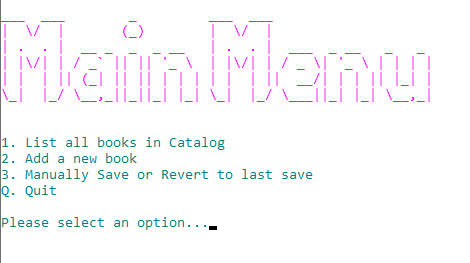
    The main Menu
    Listing All books
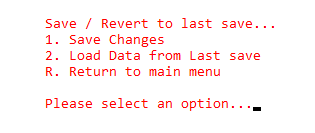
    Save Data sub menu

    Project organization

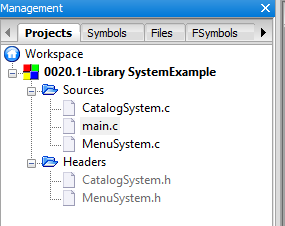
    Code is split into various C and Header files as shown in the screen capture below:

    LibrarySystemExample-Files
    LibrarySystemExample-Files

    See the Contents of the code files below:

    main.c

    /*
    This program demonstrates how a menu driven
    system can be used to trigger functions used
    to maintain a simple library catalog.
    
    Data is loaded to and from a binary file.
    
    Date    :   16th November 2019
    Author  :   Vedesh Kungebeharry
    */
    
    #include "MenuSystem.h"
    #include "CatalogSystem.h"


    //function declarations
    void initialization();
    void exitProgram();
    
    
    int main()
    {
    
        initialization();
        runMainMenu();
        exitProgram();
    
    
        return 0;
    }
    
    
    void initialization()
    {
        menuInitialization();
        loadCatalogFromFile();
    }
    
    void exitProgram()
    {
        saveCatalogToFile();
        exitProgramMenu();
    }


    CatalogSystem.h

    #include <stdbool.h>
    #ifndef CATALOGSYSTEM_H_INCLUDED
    #define CATALOGSYSTEM_H_INCLUDED
    //#include "CatalogSystem.c"
    
    //structures
    typedef struct BookStructure
    {
    
        char    Title [50];
        char    Author [50];
        int     Year;
        bool    isOnLoan;
        bool    hasData;
    } Book;
    
    
    //function declarations
    void printBookByLocation(int location);
    void printBook(Book b);
    int  findBook(char searchQuery[]);
    void printAllBooks();
    int  addBook(Book newBook);
    
    //file function declaration
    void saveCatalogToFile();
    bool loadCatalogFromFile();
    
    //functions for testing
    void setupDummyData();
    
    #endif // CATALOGSYSTEM_H_INCLUDED


    CatalogSystem.c

    #include <stdio.h>
    #include <stdlib.h>
    #include <stdbool.h>
    #include <string.h>
    #include "CatalogSystem.h"
    
    #define maxSize 1000
    
    //constants
    const char catalogFilename[50] = "catalog.bin";
    
    //global variables
    Book catalog[maxSize];
    int count = 0;
    FILE *datafilePtr;
    
    //prints a book stored at a given index in the catalog array
    void printBookByLocation(int location)
    {
        printBook(catalog[location]);
    }
    
    void printBook(Book b)
    {
        if (b.hasData)
        {
            printf("Title:\t%s\n",b.Title);
            printf("Author:\t%s\n",b.Author);
            printf("Year:\t%d\n",b.Year);
            printf("Loaned? : \t%s\n\n",b.isOnLoan?"Yes":"No");
            //printf("hasData: \t%s\n\n", b.hasData?"Yes":"No");
    
    
        }
        else
        {
    
            printf("\nNo book found at current index location...\n");
        }
    
    }
    
    int addBook(Book newBook)
    {
        newBook.hasData=true;
        catalog[count]=newBook;//place book in next
                              //empty location in the array
        count++;//increment count to point to the
                //next empty location.
    
        return count-1;
    }
    
    void printAllBooks()
    {
        if(count==0)
        {
            printf("\nNo books in catalog\n");
        }
        else
        {
            for (int i = 0; i<count;i++)
            printBook(catalog[i]);
    
        }
    
    }
    
    //finds a book by searching for titles that contain a substring of the query.
    //this function finds the first positive result only
    int findBook(char searchQuery[])
    {
        for( int i = 0; i<count; i++)
        {
            char currentBookTitle[50];
            char lowercaseSearchQuery[50];
            strcpy(currentBookTitle,catalog[i].Title);
            strcpy(lowercaseSearchQuery,searchQuery);
    
            strlwr(currentBookTitle);
            strlwr(lowercaseSearchQuery);
    
            if(strstr(currentBookTitle, lowercaseSearchQuery))
                return i;
    
        }
    
        return -1;
    }
    
    void saveCatalogToFile()
    {
        datafilePtr = fopen(catalogFilename,"wb");
        if (datafilePtr == NULL)
        {
            //unable to create file
            printf("Error creating file to save data\n");
            exit(1);
        }
        else
        {
            fwrite(&count,sizeof(int),1,datafilePtr) ;
            for(int i = 0; i<count; i++)
            {
               fwrite(&catalog[i],sizeof(Book),1,datafilePtr) ;
            }
        }
        fclose(datafilePtr);
    
    }
    
    bool loadCatalogFromFile()
    {
        datafilePtr = fopen(catalogFilename,"rb");
        if (datafilePtr == NULL)
        {
            //unable to create file
            printf("Datafile not found...Catalog empty\n");
            printf("A new save file will be created during exit or manual save....\n");
            return false;
        }
        else
        {
            fread(&count,sizeof(int),1,datafilePtr);
            for(int i = 0; i<count; i++)
            {
               fread(&catalog[i],sizeof(Book),1,datafilePtr) ;
            }
        }
        fclose(datafilePtr);
        return true;
    
    }
    
    
    void setupDummyData()
    {
        Book a=
                {
                    .Title = "ATitle",
                    .Author = "AAuthor",
                    .Year = 2006 ,
                    .isOnLoan=false
                };
        Book b=
                {
                    .Title = "BTitle",
                    .Author = "BAuthor",
                    .Year = 2006 ,
                    .isOnLoan=false
                };
        Book c=
                {
                    .Title = "CTitle",
                    .Author = "CAuthor",
                    .Year = 2006 ,
                    .isOnLoan=false
                };
    
    
        addBook(a);
        addBook(b);
        addBook(c);
    
        saveCatalogToFile();
    
    
    }


    MenuSystem.h

    #ifndef MENUSYSTEM_H_INCLUDED
    #define MENUSYSTEM_H_INCLUDED
    
    //function declarations
    void    menuInitialization();
    void    showMainMenu();
    void    showSaveLoadMenu();
    void    runMainMenu();
    void    runSaveLoadMenu();
    void    pause();
    void    printAllBooksUserInteraction();
    void    AddNewBookUserInteraction();
    void    exitProgramMenu();
    void    SaveLoadUserInteraction();
    void    ClearConsoleToColors(int ForgC, int BackC);
    void    SetColor(int ForgC);
    
    
    #endif // MENUSYSTEM_H_INCLUDED


    MenuSystem.c

    #include <time.h> // for pause()
    #include <stdio.h>
    #include <stdlib.h>
    #include <conio.h>   //for getch()
    #include <string.h>
    #include <windows.h> //for SetColor()
    #include "MenuSystem.h"
    #include "CatalogSystem.h"
    
    /*See: https://stackoverflow.com/questions/29574849/how-to-change-text-color-and-console-color-in-codeblocks
    
    system("Color F0");
    Letter Represents Background Color while the number represents the text color.
    
    0 = Black
    
    1 = Blue
    
    2 = Green
    
    3 = Aqua
    
    4 = Red
    
    5 = Purple
    
    6 = Yellow
    
    7 = White
    
    8 = Gray
    
    9 = Light Blue
    
    A = Light Green
    
    B = Light Aqua
    
    C = Light Red
    
    D = Light Purple
    
    E = Light Yellow
    
    F = Bright White
    
    
    */
    
    //global static  variables
    char choice;
    
    
    /*
    *initialize all instance variables and arrays here
    *
    */
    void menuInitialization()
    {
        choice = '_';
    }
    
    //displays the main menu and accepts input
    void runMainMenu()
    {
        int pauseDuration = 2000;
        int sentinel=0;//used to break  out of our menu loop
        while (sentinel>=0)//loop menu here
        {
            showMainMenu();//display menu text
    
            choice = getch();//get a character from the input buffer
    
            system("@cls");// clear screen after getting input
    
            switch (choice)//based on the choice take the desired action
            {
                case '1':   printf("\nList all books\n");
                            printAllBooksUserInteraction();
                            break;
    
                case '2':   printf("\nAdd a new book...\n");
                            AddNewBookUserInteraction();
                            break;
    
                case '3':   SaveLoadUserInteraction();
                            break;
    
                case 'q':   printf("\nYou chose to quit\n");
                            sentinel=-1;//update the sentinel so that looping will cease
                            break;
    
                case 'Q':   printf("\nYou chose to quit\n");//cease if upper case
                            sentinel=-1;
                            break;
                default:
                            printf("\nYou have entered an option that is not in the menu\n");
                            pause(pauseDuration);
                            break;
    
            }
            if(sentinel>=0)//if we have continued regular execution , continue looping
            {
                system("@cls");//clear last screen
            }
    
        }


    }
    
    //shows and accepts input for the math sub menu
    void runSaveLoadMenu()
    {
        int pauseDuration = 2000;
        int sentinel=0;
    
        while (sentinel>=0)
        {
    
            showSaveLoadMenu();//show options
    
            choice = getch();//get a character from the input buffer
    
            system("@cls");//clear screen
    
            switch (choice)
            {
                case '1':   printf("\n\tSaving All Changes...\n");
                            saveCatalogToFile();
                            printf("\n\tSaving Complete...\n");
                            system("pause");
                            break;
                case '2':   printf("\n\tLoading last save...\n");
                            if(loadCatalogFromFile())//if a catalog datafile exists....
                                printf("\n\tLoading Complete...\n");
                            system("pause");
                            break;
                case 'r':   //printf("\n\tYou chose to quit\n");
                            sentinel=-1;
                            break;
                case 'R':   //printf("\n\tYou chose to quit\n");
                            sentinel=-1;
                            break;
                default:
                        printf("\n\tYou have entered an option that is not in the menu\n");
                        printf("\n\tReturning to the save menu in %.2lf seconds\n",pauseDuration/1000.00);
                        pause(pauseDuration);
                        break;
    
    
            }
    
            system("@cls");
        }
    
    }
    
    void showMainMenu()
    {
        int animationDelayMS=50;
        system("color F1");//set background color to bright white
        SetColor(13);//change foreground color of text
        //Ascii art generated at:http://patorjk.com/software/taag/#p=display&h=1&v=1&f=Doom&t=Main%20Menu%20
        pause(animationDelayMS);printf("___  ___        _         ___  ___                     \n");
        pause(animationDelayMS);printf("|  \\/  |       (_)        |  \\/  |                     \n");
        pause(animationDelayMS);printf("| .  . |  __ _  _  _ __   | .  . |  ___  _ __   _   _  \n");
        pause(animationDelayMS);printf("| |\\/| | / _` || || '_ \\  | |\\/| | / _ \\| '_ \\ | | | | \n");
        pause(animationDelayMS);printf("| |  | || (_| || || | | | | |  | ||  __/| | | || |_| | \n");
        pause(animationDelayMS);printf("\\_|  |_/ \\__,_||_||_| |_| \\_|  |_/ \\___||_| |_| \\__,_| \n");
        SetColor(3);;//change foreground color of text
        pause(animationDelayMS);printf("\n\n1. List all books in Catalog\n");
        pause(animationDelayMS);printf("2. Add a new book\n");
        pause(animationDelayMS);printf("3. Manually Save or Revert to last save\n");
        pause(animationDelayMS);printf("Q. Quit    \n");
        pause(animationDelayMS);printf("\nPlease select an option...");
    }
    
    void showSaveLoadMenu()
    {
        int animationDelayMS=100;
        SetColor(12);
        pause(animationDelayMS);printf("\n\tSave / Revert to last save...\n");
        pause(animationDelayMS);printf("\t1. Save Changes\n");
        pause(animationDelayMS);printf("\t2. Load Data from Last save\n");
        pause(animationDelayMS);printf("\tR. Return to main menu    \n");
        pause(animationDelayMS);printf("\n\tPlease select an option...");
    }
    
    //pauses execution
    void pause(int milliseconds)
    {
        clock_t now = clock();
        while(clock()< now+milliseconds);
    
    }
    
    void exitProgramMenu()
    {
        printf("\nExiting program in 2 seconds...\n");
        pause(2000);
    
    }
    
    void printAllBooksUserInteraction()
    {
        printf("\nPrinting all books\n");
        printAllBooks();
        system("Pause");
    
    }
    
    void SaveLoadUserInteraction()
    {
     runSaveLoadMenu();
    }
    
    void AddNewBookUserInteraction()
    {
        char    theTitle[50];
        char    theAuthor[50];
        int     theYear;
    
        Book newBook;
    
        printf("\nEnter the Book's Title...\n");
        fflush(stdin);
        gets(theTitle);
    
        printf("\nEnter the Author's Name...\n");
        gets(theAuthor);
    
        printf("\nEnter Year\n");
        scanf(" %d",&theYear);
    
        strcpy(newBook.Title,theTitle);
        strcpy(newBook.Author,theAuthor);
        newBook.Year=theYear;
        newBook.isOnLoan=false;
    
        int catalogLocation = addBook(newBook);
        SetColor(0);
        printf("\nNew Book Created:\n");
        printBookByLocation(catalogLocation);
        system("pause");
    
    }
    //See:https://stackoverflow.com/questions/29574849/how-to-change-text-color-and-console-color-in-codeblocks
    void ClearConsoleToColors(int ForgC, int BackC)
    {
        WORD wColor = ((BackC & 0x0F) << 4) + (ForgC & 0x0F);
                   //Get the handle to the current output buffer...
        HANDLE hStdOut = GetStdHandle(STD_OUTPUT_HANDLE);
                         //This is used to reset the carat/cursor to the top left.
        COORD coord = {0, 0};
                      //A return value... indicating how many chars were written
                        //   not used but we need to capture this since it will be
                          //   written anyway (passing NULL causes an access violation).
        DWORD count;
    
                                   //This is a structure containing all of the console info
                          // it is used here to find the size of the console.
        CONSOLE_SCREEN_BUFFER_INFO csbi;
                     //Here we will set the current color
        SetConsoleTextAttribute(hStdOut, wColor);
        if(GetConsoleScreenBufferInfo(hStdOut, &csbi))
        {
                              //This fills the buffer with a given character (in this case 32=space).
          FillConsoleOutputCharacter(hStdOut, (TCHAR) 32, csbi.dwSize.X * csbi.dwSize.Y, coord, &count);
    
          FillConsoleOutputAttribute(hStdOut, csbi.wAttributes, csbi.dwSize.X * csbi.dwSize.Y, coord, &count );
                              //This will set our cursor position for the next print statement.
          SetConsoleCursorPosition(hStdOut, coord);
        }
     return;
    }
    
    //See:https://stackoverflow.com/questions/29574849/how-to-change-text-color-and-console-color-in-codeblocks
    void SetColor(int ForgC)
    {
         WORD wColor;
         //This handle is needed to get the current background attribute
    
         HANDLE hStdOut = GetStdHandle(STD_OUTPUT_HANDLE);
         CONSOLE_SCREEN_BUFFER_INFO csbi;
         //csbi is used for wAttributes word
    
         if(GetConsoleScreenBufferInfo(hStdOut, &csbi))
         {
              //To mask out all but the background attribute, and to add the color
              wColor = (csbi.wAttributes & 0xF0) + (ForgC & 0x0F);
              SetConsoleTextAttribute(hStdOut, wColor);
         }
         return;
    }


    © 2020  Vedesh Kungebeharry. All rights reserved.