Your First Program Using Codeblocks IDE

0001 Your first program

*Using Codeblocks 17.12

1. Create a new Project

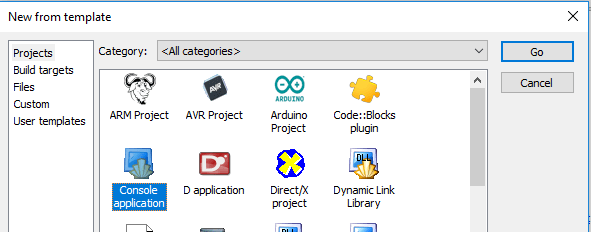
2.Select “Console Application” and click on go.
3.Select “C” and click next.

4. Give your project a title and optionally select a folder where you want the project to be created. In this case we use “Upper camel case”` : “0001-MyFirstProgram”

5.Leave all settings as default and choose finish:

6. Open main.c from the tree on the left. [1] Expand sources, [2]then double click on “main.c”.

7. Click on Build, and choose build and run.

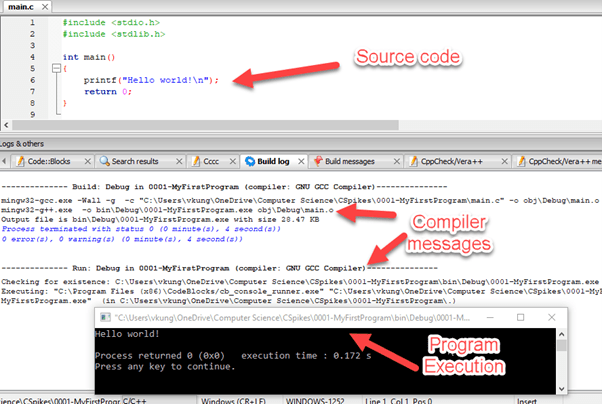
8. Your code is now built to an executable file, and the program is executed in the console window:
Exercises

  1. What happens when “Hello world!\n” is changed to “Hello world!” and the program is run?
  2. Modify the printed message to say “Goodbye”.

You can download the project here:

https://drive.google.com/drive/folders/1-oDom6OVimkNZeBACsJs9FZ0byhsNXHv?usp=sharing

The code is shown below:

#include <stdio.h>
#include <stdlib.h>

int main()
{
    printf("Goodbye world!");
    return 0;
}

© 2021  Vedesh Kungebeharry. All rights reserved. 

Iteration – While Loop (Live Class)

This content was recorded and posted on Monday 8th November 2021.

See the video and files below:

Files used in Demonstration: https://drive.google.com/drive/folders/1HqohDwVDXH7KHh0XUmyOvVj814SiKp31?usp=sharing

Notes to students:

1.See the attached video from class for revision if needed.
2.The demonstration files that were created are also attached to this post. (It’s posted individually as “Demo01.Fprg” and “Demo02-Looping (While Loop).fprg“.  Both of these files are packaged together in the zip, “Class Demonstration Files Package.zip

Homework

Follow the example that was demonstrated in class today to :
1. Draw a flowchart which will output the cubes of the first 100 numbers
2. Write the pseudocode for the flowchart above.
3. Required reading for next class:  https://islandclass.org/2020/08/21/repetition-iteration-constructs/

© 2021  Vedesh Kungebeharry. All rights reserved. 

Retrospective – The video production pipeline.

Steps In Professional Video creation

The following stages are iterative and the project might move back and forth between the stages, however, best practices keeps the back and forth constructive to a  minimum.

  • Planning
    • Video Brief and Rationale
    • Narration Script
    • Storyboard

  • Pre-Production
    • Audio Narration
    • Initial Video Draft
    • Final Video Draft

  • Production
    • Final Video is produced for distribution

Note that steps 1-3 are considered the blueprint – no part of the video has been produced as yet.

© 2021  Vedesh Kungebeharry. All rights reserved. 

Project – Create a Video Using a Storyboard.

Task

You are required to produce a storyboard and a video in 4 events/panels which describes the main goal of sport/game/videogame.

An example storyboard is shown here:

VisualNarration/Text
Title screen with catchy music is shown 2-5 secondsFootball in Two Sentences
Display video of a football with some sort of slow moving graphics.Football is a team sport played by two opposing teams.
Show a live , exciting video of a goal being sored and the jubilation felt from scoring the goal. (The screams of the crowd should be audible over background music) 
Show a timelapse (sped up video) of a field  with players playing the sort from a distance.The object of the game is to get the football into the other team’s goal without using your hands.
Similar title screen graphic as used in intro.Thanks for watching!

An example video is shown here @ https://www.youtube.com/watch?v=zklE6oIsZk8

You are required to :

  • produce and submit the storyboard with 4 events/panels
  • use at least 2 distinct source files that you have created or downloaded from a stock website (e.g https://pixabay.com)
  • use 1 title card for the start of the video, and 1 title card for the end of the video
  • Produce and submit a finished video that is no longer that 60 seconds.

Note for this assignment :

  • You are not limited to 2 sentences.
  • You must have text /narration on at least 1 source file

Marks will be awarded for:

Storyboard

Narration/text consistent to visual – 4 marks

Visual descriptions are sufficient to convey the idea for each panel – 4 marks

Video

Video follows sequencing of events/panels – 1 mark

Evidence that the video matches the narration/text of each panel – 4 marks

2 Distinct source video files used – 2 marks

Total : 15 marks.

© 2021  Vedesh Kungebeharry. All rights reserved.