Compilers are tools used to produce executable code from source code.
Compilers process code through many stages, but it can be thought of as 3 main steps:
Step
Description
Preprocessing
Combining all the source code from multiple files into 1 source code file
Translation
Checking the source code (produced from the preprocessing stage) for errors. If errors are found, the entire compilation process is halted and error messages generated, otherwise the source code is translated into object code.
Linking
Combining the generated object file to other dependencies to form a stand alone executable. (e.g for a “hello world” c program at the console, the main object code of a would be combined with object code for output to the console to produce a single executable file.)
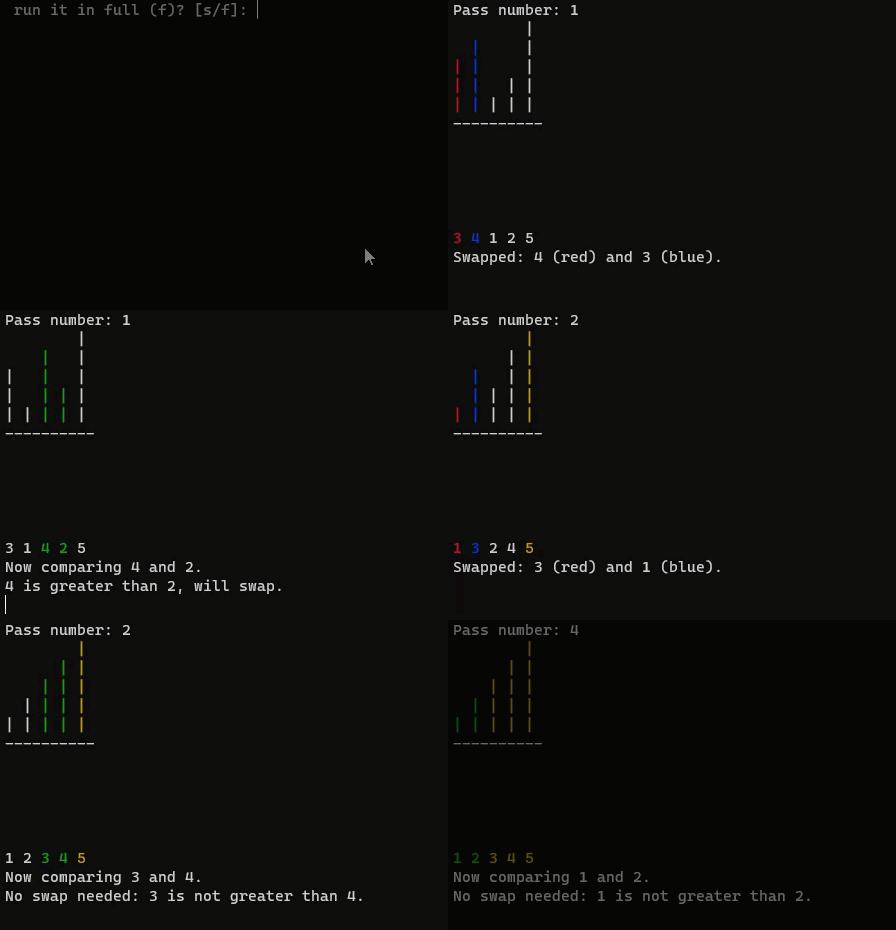
not that in this code, the array values are different and contain negative numbers
#include <stdio.h>
#include <stdlib.h>
#ifdef _WIN32
#include <windows.h> // For Windows API functions
#else
#include <unistd.h> // For usleep
#endif
// ANSI escape codes for colors
#define RESET_COLOR "\x1b[0m"
#define RED "\x1b[31m"
#define GREEN "\x1b[32m"
#define BLUE "\x1b[34m"
#define YELLOW "\x1b[33m"
// Global sleep time definitions (in milliseconds)
#define SLEEP_TIME_MS 1000
int findMaxAbsValue(int a[], int numItems) {
int maxAbsValue = abs(a[0]);
for (int i = 1; i < numItems; i++) {
if (abs(a[i]) > maxAbsValue) {
maxAbsValue = abs(a[i]);
}
}
return maxAbsValue;
}
void printArrayAsColumns(int a[], int numItems, int maxAbsValue, int compareIndex, int swapped, int pass, int sortedIndex) {
printf("Pass number: %d\n", pass); // Print the pass number at the top
for (int level = maxAbsValue; level > 0; level--) {
for (int i = 0; i < numItems; i++) {
if (i >= sortedIndex) {
printf(YELLOW);
} else if (i == compareIndex || i == compareIndex + 1) {
printf(swapped ? (i == compareIndex ? RED : BLUE) : GREEN);
}
if (a[i] >= level) {
printf("| ");
} else {
printf(" ");
}
printf(RESET_COLOR);
}
printf("\n");
}
for (int i = 0; i < numItems; i++) {
printf("--");
}
printf("\n");
for (int level = 1; level <= maxAbsValue; level++) {
for (int i = 0; i < numItems; i++) {
if (i >= sortedIndex) {
printf(YELLOW);
} else if (i == compareIndex || i == compareIndex + 1) {
printf(swapped ? (i == compareIndex ? RED : BLUE) : GREEN);
}
if (a[i] <= -level) {
printf("| ");
} else {
printf(" ");
}
printf(RESET_COLOR);
}
printf("\n");
}
for (int i = 0; i < numItems; i++) {
if (i >= sortedIndex) {
printf(YELLOW);
} else if (i == compareIndex || i == compareIndex + 1) {
printf(swapped ? (i == compareIndex ? RED : BLUE) : GREEN);
}
printf("%d ", a[i]);
printf(RESET_COLOR);
}
printf("\n");
}
void animateBubbleSort(int a[], int numItems, int stepThrough) {
int maxAbsValue = findMaxAbsValue(a, numItems);
int i, j, temp, pass = 0;
for (i = 0; i < numItems - 1; i++) {
pass++;
for (j = 0; j < numItems - i - 1; j++) {
int swapped = 0;
// Clear the screen
#ifdef _WIN32
system("cls");
#else
system("clear");
#endif
printArrayAsColumns(a, numItems, maxAbsValue, j, swapped, pass, numItems - i);
// Print the initial comparison statement
printf("Now comparing %d and %d.\n", a[j], a[j + 1]);
if (a[j] > a[j + 1]) {
printf("%d is greater than %d, will swap.\n", a[j], a[j + 1]);
swapped = 1;
if (stepThrough) {
printf("Press enter to continue to the next step...\n");
while (getchar() != '\n'); // Wait for user to press enter
} else {
#ifdef _WIN32
Sleep(SLEEP_TIME_MS); // Sleep for Windows
#else
usleep(SLEEP_TIME_MS * 1000); // Sleep for Unix, converting milliseconds to microseconds
#endif
}
// Perform the swap
temp = a[j];
a[j] = a[j + 1];
a[j + 1] = temp;
// Clear the screen for swap update
#ifdef _WIN32
system("cls");
#else
system("clear");
#endif
printArrayAsColumns(a, numItems, maxAbsValue, j, swapped, pass, numItems - i);
// Print the swap confirmation
printf("Swapped: %d (red) and %d (blue).\n", a[j + 1], a[j]);
} else {
// Print the no swap statement
printf("No swap needed: %d is not greater than %d.\n", a[j], a[j + 1]);
}
if (stepThrough) {
printf("Press enter to continue to the next step...\n");
while (getchar() != '\n'); // Wait for user to press enter
} else {
#ifdef _WIN32
Sleep(SLEEP_TIME_MS); // Sleep for Windows
#else
usleep(SLEEP_TIME_MS * 1000); // Sleep for Unix, converting milliseconds to microseconds
#endif
}
}
}
}
int main() {
int myArray[] = {4, -3, 1, -2, 5};
int numItems = sizeof(myArray) / sizeof(myArray[0]);
char userChoice;
printf("Do you want to step through the animation (s) or run it in full (f)? [s/f]: ");
scanf(" %c", &userChoice); // Note the space before %c to consume any whitespace characters
// Consume the newline character left in the input buffer by scanf
while (getchar() != '\n');
// Call the animateBubbleSort function
if (userChoice == 's' || userChoice == 'S') {
animateBubbleSort(myArray, numItems, 1); // Step through
} else {
animateBubbleSort(myArray, numItems, 0); // Run in full
}
return 0;
}
#include <stdio.h>
#include <stdlib.h>
#ifdef _WIN32
#include <windows.h> // For Windows API functions
#else
#include <unistd.h> // For usleep on Unix
#endif
// ANSI escape codes for colors
#define RESET_COLOR "\x1b[0m"
#define HIGHLIGHT "\x1b[44m" // Blue background
#define GREY "\x1b[90m" // Grey text
// Global sleep time definition (in milliseconds)
#define SLEEP_TIME_MS 2000
void clearScreen() {
#ifdef _WIN32
system("cls");
#else
system("clear");
#endif
}
void sleepMs(int milliseconds) {
#ifdef _WIN32
Sleep(milliseconds);
#else
usleep(milliseconds * 1000); // convert to microseconds
#endif
}
void printAnnotation(int position, const char* annotation, int listSize) {
for (int i = 0; i < position * 4 + 11; i++) { // Adjust position for correct alignment
printf(" ");
}
printf("%s\n", annotation); // Print the annotation (Fir, Mid, Las)
}
void printAnnotations(int listSize, int first, int last, int middle) {
if (first >= 0) printAnnotation(first, "Fir", listSize);
if (middle >= 0) printAnnotation(middle, "Mid", listSize);
if (last >= 0) printAnnotation(last, "Las", listSize);
}
void printArray(int list[], int listSize, int first, int last, int middle, int initialDisplay) {
printf("+");
for (int i = 0; i < listSize * 4 + 9; i++) { // Adjust border size based on array size
printf("-");
}
printf("+\n");
printf("|Elements |");
for (int i = 0; i < listSize; i++) {
if (!initialDisplay && (i < first || i > last)) {
printf(GREY); // Grey out discarded elements during search
} else if (i == first || i == last || i == middle) {
printf(HIGHLIGHT); // Highlight the first, last, and middle elements during search
}
printf(" %2d" RESET_COLOR "|", list[i]);
}
printf("\n");
printf("+");
for (int i = 0; i < listSize * 4 + 9; i++) { // Adjust border size based on array size
printf("-");
}
printf("+\n");
printf("|Index |");
for (int i = 0; i < listSize; i++) {
if (!initialDisplay && (i < first || i > last)) {
printf(GREY); // Grey out discarded indexes during search
} else if (i == first || i == last || i == middle) {
printf(HIGHLIGHT); // Highlight the first, last, and middle indexes during search
}
printf(" %2d" RESET_COLOR "|", i);
}
printf("\n");
printf("+");
for (int i = 0; i < listSize * 4 + 9; i++) { // Adjust border size based on array size
printf("-");
}
printf("+\n");
}
void displayInitialArray(int list[], int listSize) {
printf("\nInitial array:\n");
printArray(list, listSize, -1, -1, -1, 1); // Display all elements normally
printf("\nPress Enter to start the search...");
getchar(); // Wait for user to press enter to continue
}
int binarySearch(int key, int list[], int listSize, int stepThrough, int *comparisonCount) {
int first = 0;
int last = listSize - 1;
int middle = first + (last - first) / 2;
while (first <= last) {
(*comparisonCount)++; // Increment the comparison count
clearScreen();
printArray(list, listSize, first, last, middle, 0);
printAnnotations(listSize, first, last, middle); // Print the annotations
if (key == list[middle]) {
printf("\nKey %d found at index %d.\n", key, middle);
return middle;
} else if (key < list[middle]) {
printf("\nKey %d is less than %d, searching lower half.\n", key, list[middle]);
last = middle - 1;
} else {
printf("\nKey %d is greater than %d, searching upper half.\n", key, list[middle]);
first = middle + 1;
}
middle = first + (last - first) / 2;
if (stepThrough) {
printf("Press Enter to continue...");
getchar(); // Wait for user to press enter to continue to the next step
} else {
sleepMs(SLEEP_TIME_MS);
}
}
printf("\nKey %d not found.\n", key);
return -1;
}
int main() {
// Modify the array here for different demonstrations
//int list[10] = {5, 10, 15, 20, 25, 30, 35, 40, 45, 50};
int list[] = {3, 6, 8, 12, 15, 18, 21, 24, 27, 30, 33, 36, 39, 42, 45, 48, 51};
int listSize = sizeof(list) / sizeof(list[0]); // Calculate the size of the array
int key, stepThrough, comparisonCount;
printf("Enter 1 for step through, 0 for full animation: ");
scanf("%d", &stepThrough);
getchar(); // Consume the newline character left in the input buffer by scanf
displayInitialArray(list, listSize); // Display the array before starting the search
printf("\nEnter a search key (-1 to exit): ");
scanf("%d", &key);
while (key != -1) {
getchar(); // Consume the newline character left in the input buffer by scanf
comparisonCount = 0; // Reset comparison count for each search
binarySearch(key, list, listSize, stepThrough, &comparisonCount);
printf("Number of comparisons made: %d\n", comparisonCount);
printf("\nEnter a search key (-1 to exit): ");
scanf("%d", &key);
}
return 0;
}
The main differences between a compiler and interpreter
Execution
Compilers produce complete file of executable code for execution at a later time, whereas an interpreter translates source code one line or block of code at a time and executes it during the program’s run.
Error detection
Compilers detect all errors (syntax and semantic) before the final executable can be produced, a programmer must fix all errors before the final executable is produced. The most common error that is produced during execution are runtime errors.
Interpreters detect errors as they arise during execution one line or block of code at a time, the most common errors are datatype errors.
Note that both compilers and interpreters are susceptible to syntax and runtime errors.
A client server network has one or more computer nodes providing all the services needed by all other client computers. E.g web server, ftp server etc.
Hardware and resources are easily configured.
Servers can be administered to allow connection only to authorized computers on the network thus benefit from better security.
The sever can easily undergo regular backups easily since all data is centralized.
For P2P each computer on the network can act as a server for all others on the network.
Each node on the P2P is not guaranteed to be powerful, and mostly have the average power as clients.
This configuration is difficult to keep secure, additional third party software is usually required to implement security.
P2P networks add strain on the network as more peers are added to the network since sometimes one node would be responsible for routing a lot of traffic to all others. It is impractical to attempt backup on this network configuration.
A firewall is a hardware and/or software security measure which protects against external network threats in the form of unauthorized connections or attacks. It also filters connections within the network to prevent malicious activity.
Fddi uses fibre optic cables , and transfers data using token ring topology, and can be much faster over long distances (200 Km). The ring technology includes additional rings in the event that one ring fails, another exists to carry on data communication.
Ethernet mainly uses copper wires, and transfers data using packet switching (Star Topology), over shorter distances (100 m) and is slower than FDDI. Ethernet does not typically have backup lines to help prevent network failure.
The Transport layer is responsible for segmenting packets and reliable communications across the transport layer by implementing end to end communication with error checking and data flow control (speed changes between networks)
The network layer is responsible for efficiently routing data from network to network by choosing the best paths using IP protocol which gives each node on the network a unique IP address.
It is designed to provide wireless network connectivity over a cellular network so that traditional network tasks, e.g. connecting to the internet, can be facilitated. It was developed for wireless POS systems, MMS, tracking and navigation , wireless electricity meters , etc.
Differentiation between a program (a set of instructions on storage) and a process (an executing program with allocated resources in the CPU and memory).
Process States and Transitions
Understanding the various states a process can be in (running, ready, waiting, finished) and the reasons for transitions between these states.
Deadlock
Comprehension of the condition where two or more processes are waiting indefinitely for each other to release resources.
Multitasking vs. Multiprocessing
Distinction between multitasking (managing multiple tasks by time-sharing a single CPU) and multiprocessing (managing tasks across multiple CPUs for parallel execution).
Virtual Memory
Discussion on why modern computers use virtual memory, how it works through paging and swapping, and the disadvantages of excessive reliance on virtual memory, such as thrashing.
A program is a set of computer instructions that is stored on secondary storage, and a process is a program that is currently being executed on the cpu, it’s instructions and data are stored in main memory – RAM and registers in the CPU.
Eventually p1 needs d2 also, it is put into a waiting state.
P2 needs d1, but d1 is in use by p1 and p1 is waiting on p2 to release d2.
P2 will be put into a waiting state
Both process are waiting on each other and will not release the DVD resources that they are allocated, thus neither process can complete and thus we say they are deadlocked.
Windows 10, is a multitasking operating system, tasks share time on the CPU.
Linux is a multiprocessing operating system allowing for the running of separate tasks on separate CPUs, thus achieving higher performance.
Further explanation
All present-day operating systems support multitasking and multiprocessing, there are cases where multiprocessing may not be used, e.g where an embedded system is designed for specific task that doesn’t require much processing power.
Multiple page frames are created for each process. Ideally, the currently running’s process’s frames are stored in physical ram, and all other ready or waiting processes are stored in ram. As more processes are run which exceed the physical ram capacity, the page frames for the ready and waiting processes are swapped out of physical ram onto the page file on the hard disk to accommodate running processes. When a running process is put into waiting/ready state, it may be put on the virtual page file, and the next process to be run can be put from the virtual page file back into the physical ram to be run.
The system can operate inefficiently since a lot of swapping may occur, and this is dependent on the much slower hard disk memory access for each swap. This condition is know as thrashing.
int binarySearch(int key, int list[], int low, int high) {
int result = -1;
int keyFound = 0; //sentinel to end loop on a successful search
while (low <= high && !keyFound) {
int middle = (high-low) / 2 + low;//determine middle of the range
if (key == list[middle])
{
result = middle;
keyFound=1; // Key found, exit loop
}
else if (key < list[middle])
{
high = middle - 1; // Narrow the search to the lower half
}
else
low = middle + 1; // Narrow the search to the upper half
}
}
return result; //Returns -1 if not found,
//otherwise, the index of the key
}
int binarySearch(int key, int list[], int low, int high) {
int result = -1; //result is -1 if not found
int keyFound = 0; //sentinel to end loop on a successful search
while (low <= high && !keyFound) //while there is more locations
//to search and the key has not
//been found
{
int middle = (high-low) / 2 + low;//determine middle of the range
if (key == list[middle]) //if the key is found..
{
result = middle;
keyFound=1; // Key found, exit loop
}
else if (key < list[middle]) //if key may be in the lower half...
{
high = middle - 1; // Narrow the search to the lower half
}
else //else the key may be in the upper half
{
low = middle + 1; // Narrow the search to the upper half
}
}
return result; // Returns -1 if not found, otherwise the key
Response using recursion
int binarySearch(int key, int list[], int low, int high)
{
int result=-1;
int middle = (high-low)/2+low;
if (low<=high)//if low and high have not crossed...
{
if(key==list[middle])//if the key is found....
{
result=middle;
return result
}
else//the key was not found
{
if(key<list[middle])
{
result= binarySearch(key,list,low,middle-1);
return result;
}
else
{
result= binarySearch(key,list,middle+1,high);
return result;
}
}
}
return result;
Further Explanation
int binarySearch(int key, int list[], int low, int high)
{
/*we use low and high to represent a
portion of the array. Initially, low and high
points to the start of the array and the end of
the array respectively. Middle indexes the location
to the middle of the array.
*/
int result=-1;//-1 represents a failed search
int middle = (high-low)/2+low;
if (low<=high)//if low and high have not crossed...
{
if(key==list[middle])//if the key is found....
{
result=middle;
return result;//return the current index and exit function
}
else//the key was not found
{
if(key<list[middle])//if the key would be found
{ //from low to middle
//we now search the lower half
result= binarySearch(key,list,low,middle-1);
return result;
}
else //key would be found from middle to high
{
result= binarySearch(key,list,middle+1,high);//we now search the upper half
return result;
}
}
}
return result;
Part b i)
//assume integer array
void swap(int array[], int a, int b) {
int temp = array[a];
array[a] = array[b];
array[b] = temp;
}
Part b ii)
The array is traversed from index 0 to n and the location of the smallest element is determined.
The smallest element is swapped with the first element that was traversed.
This is repeated on the unsorted portion of the array by incrementing the starting element that is traversed to 1 to n, then 2 to n, 3 to n, … until n-1 to n.
Part b iii)
void selectionSort (int arr[], int low, int high)
{
for (int i = low; i<high; i++)
{
int smallest = getSmallest(arr,i,high);
swap(arr,i,smallest);
}
}
Further explanation
The following complete program in C tests that the selection sort is working.
#include <stdio.h>
//function declarations
void selectionSort(int arr[], int low, int high);
void swap(int array[], int a, int b);
int getSmallest(int arr[], int low, int high);
int main()
{
int array[] = {64, 25, 12, 22, 11};
int size = sizeof(array) / sizeof(array[0]);
printf("Original array: ");
for (int i = 0; i < size; i++)
printf("%d ", array[i]);
printf("\n");
//sort the array
selectionSort(array, 0, size-1);
printf("Sorted array: ");
for (int i = 0; i < size; i++)
printf("%d ", array[i]);
printf("\n");
printf("\nEnding program...");
return 0;
}
void selectionSort(int arr[], int low, int high) {
// Traverse up to the
// second-to-last element
for (int i = low; i < high; i++)
{
/*find the index of the smallest
element in the range
*/
int smallest = getSmallest(arr, i, high);
/*if the smallest element
should be put in the first
position that was
traversed ...
*/
if(arr[smallest]<arr[i])
swap(arr, i, smallest);//swap elements
}
}
void swap(int array[], int a, int b) {
int temp = array[a];
array[a] = array[b];
array[b] = temp;
}
int getSmallest(int arr[], int low, int high) {
int smallestIndex = low;
// Include the high in the search
for (int i = low + 1; i <= high; i++)
{
if (arr[i] < arr[smallestIndex]) {
smallestIndex = i;
}
}
return smallestIndex;
}
In a linear search, each element of the array is traversed by using iteration. Each element in the traversal is compared against a search key. If the key is found, the location of the array index is returned. If the entire array is traversed without finding the key, dummy value is returned (e.g. -1)
In a binary search, an ordered list is searched for a key starting with the item at the middle of the list. If the item is not found at the location , a determination is made on which half of the list may contain the key, either the upper or lower half. This method is applied to search the midpoint of the half of the list which may contain the key. This repeats until the key is found, or until the search space is reduced to a single location and the list can no longer be divided into halves. If the key is found, the location of the element is returned, otherwise a dummy value is returned (e.g -1)
//Code to store values in array
int arr[] = {3,12,9,10,5,4};
int arrayLength = sizeof(arr)/sizeof(int);
//selection sort
for ( int i = 0; i<arrayLength; ++i)
{
int smallest = i;
for (int k = i ; k<arrayLength; ++k)
{
if (arr[k]<arr[smallest])
smallest=k;
}
//if the first element was not the smallest,
//swap the first item with the smallest
if (smallest!=i)
{
int temp = arr[i];
arr[i] = arr[smallest];
arr[smallest]=temp;
}
}
First, the algorithm calculates the midpoint of the entire array’s index range. The array has 10 elements, indexed from 0 to 9. The midpoint is calculated as (low + high) / 2. Initially, low is 0 and high is 9, so the midpoint is (0 + 9) / 2 which equals 4.5. Since we are working with integer indices, we take the floor of this value to choose the lower index, resulting in 4. The value at index 4 is 27, which is greater than 16.
Because 16 is less than 27, the algorithm ignores the right half of the array and recalculates the midpoint for the left subarray spanning from index 0 to 3. Now, low is 0 and high is 3, so the new midpoint is (0 + 3) / 2 which equals 1.5. Taking the floor of this value, we again choose the lower index, which is 1. The value at index 1 is 9, which is less than 16.
The algorithm then focuses on the right subarray of the previous range, which is from index 2 to 3. The midpoint here is (2 + 3) / 2 which equals 2.5. After taking the floor, the midpoint is index 2. The value at index 2 is 16, which matches the key we are searching for.
The search concludes with the algorithm returning index 2 as the position where the key 16 is located in the array.
Non Pre-emptive scheduling runs processes on a first come first serve basis, pre-emptive scheduling determines the length of time the processes will take to be executed , and then executes the shortest process first, followed by the next shortest and so on. Pre-emptive scheduling can also be accomplished by other algorithms , e.g round robin.
The process scheduler prepares to move the process of the CPU. The process’ updated program counter and state information is saved to its process control block, the process is now in the “ready” queue.
The process is interrupted by an I/O or event interrupt. The process’ updated program counter and state information is saved to its process control block, it is placed in the “waiting” queue to wait for an I/0 or event completion.
The process is moved to the ready queue from the waiting queue. If the process was waiting on an I/O operation, it’s PCB and local memory would be updated before it was moved to the ready queue.
The interrupt is a scheduling one, P5’s program counter and other information is saved to its PCB. P5 is put into a “ready” state since it was not blocked by IO or another event.
P2’s instruction from its Program counter is put on the cpu for execution, P2’s PCB is updated to “running” . P2 will run to completion assuming no error interrupts are generated. When P2 is complete, it’s state is set to terminated. Assuming that there are no other high priority tasks to be run than P5, P5 will be go from ready to running, and it’s instructions are executed from it’s program counter until it terminates and enters a terminated state.
Employ the use of access permissions to the sender and receiver only to be able to access the file.
Send over a reliable medium which can verify and ensure that the file was sent I.e the use of an application layer protocol running over a connection oriented protocol, e.g using an email client which implements SMTP which in turn uses the IP TCP.