Inserting rows and Columns, Formatting Cells and Formula Revision

Instructions

Practise the skills shown in the video above using this tutorial file : tutorial03

If you don’t have the file you can simply copy and paste the table below into excel and follow along:

Student NameMathEnglishScienceArtTotal MarksAveragePass?RankGradeComment
Bob Williams14889965      
Robin Hood22224085      
Kern Williams76977776      
David Ken14501265      
Len Brooke65177744      
Ava Thor76655588      
Maximum       
Minimum Value      
Summary
Pass Mark50
No. Students 
No. Passed 
Grades
Grade RangeGradeComment
0FMust work harder
50CKeep Trying
60BGood
80AExcellent

© 2021  Vedesh Kungebeharry. All rights reserved. 
Creating and managing Passwords online.

For all of your online accounts,

  • Use Strong Passwords. a strong password is long and difficult to guess
    • Use long passwords , at least 8 characters long
    • Use a combination of capital and common letters
    • Use numbers
    • Use special characters.
    • E.g “P@ssw0rD”

  • Change your passwords frequently
    • Change your password at least once per year
    • Change your password if you suspect that someone has accessed your online account.
    • Change your password if someone’s behavior appears that they intend to access your online account.

  • Do not use the same password for any two online accounts.

    Choose complex but memorable passwords. Although your passwords can be complex, ensure that the password is memorable to you. e.g ” F@c3b00k_Tr!p_T0_Th3_M00n “. This password example can be thought of as “Facebook trip to the moon” but you replaced

    letter a with @,
    letter o with 0 (zero) ,
    letter i with !
    letter e with 3
    spaces with _ (underscore) and
    the first letter of each word is capitalized, all others were either lower case or symbols.


Once you choose a memorable phrase and you settle on your symbol replacements, you’ll be good to go with creating a strong and manageable passwords!

© 2021  Vedesh Kungebeharry. All rights reserved. 

Catch by Coordinate – Scratch Game Assignment

The following task was discussed in class today:

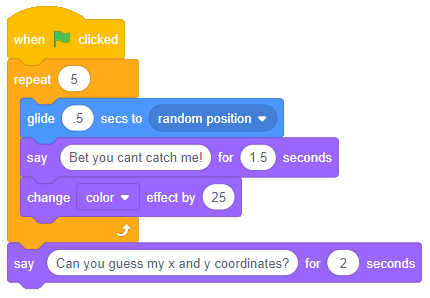
Task : Create a game where a sprite moves around a few times to a random position and asks the player (user) to guess his x and y coordinates. If both the x and y coordinates entered by the player are within 10 units of the sprites location, say a message which indicates success, otherwise, say that the player missed and tell the player to try again.

A sample of blocks below shows how to move the sprite around:

Hint

A previously recorded class shows how guessing can be improved to include a range.

https://islandclass.org/2026/05/08/how-to-tolerate-a-guess-withing-a-certain-range-using-the-abs-function-3n-2026-05-08_10-03-41/

Updates to this post

2026-05-08: Added hint section

© 2021  Vedesh Kungebeharry. All rights reserved. 

Selection Statements: Practise Exercise(s)

For these flowchart solutions, you may opt to:

  1. Draw the solution in your notebook OR
  2. Draw the solution in a word processing document OR
  3. Draw the solution in an online tool OR
  4. Create a solution using flowgorithm.

Exercise 1

Create a flowchart solution which prompts the user to enter a student’s math mark and outputs “You have passed” if the mark is 50 and/or greater or “You have failed” if the mark is less than 50.

Exercise 2

Create a flowchart solution which prompts the user to enter two numbers, A and B, and outputs the larger number.


© 2020  Vedesh Kungebeharry. All rights reserved. 

Hyperlinks

Definition: A hyperlink is actionable text or an object found in a hyper text document which navigates the user to the start of another hypertext document or a specific location within a hypertext document. An action could be from a gui : a click or a tap; or using the keyboard to press the “enter key” on a selected link.

Examples:

This is a hyperlink to wikipedia.org

This is a hyperlink to wikipedia.org opened in a new tab or browser.

This is a link to ……..

.

.

.

.

.

.

.

.

.

.

.

.

.

.

.

.

.

.

.

.

.

.

.

.

.

.

.

.

.

.

.

.

.

.

.

.

.

.

.

.

The Bottom Of The Page

This is a link to the top of the page

That is all!

© 2020  Vedesh Kungebeharry. All rights reserved. 

Flowchart Practise – Finding the average of 3 numbers.

Task

Create a flowchart algorithm which prompts the user to enter 3 numbers and outputs the average of the numbers.

Guided Solution

First, let us use an IPO Table:

InputProcessing Output
Three Numbers num1, num2, num3average=(num1+num2+num3)/3average

After considering what needs to be done, we see that we need 4 variables

Solution in flowgorithm:

Download the solution here

© 2020  Vedesh Kungebeharry. All rights reserved. 

Video Creation using Source files – Tutorial

Today, we’re going to create the following video from some source files:

Download the following files to practice the skills :

https://drive.google.com/drive/folders/1f3m2gXDaPThljZ_fmc6OGMYzwpanht2Y

(the videos are free to use and were downloaded from https://pixabay.com/images/search/soccer/ )

Follow along with the tutorial video below to create a video from the source files above:

Tutorial Video: Video Creation with Video Editor in Windows 10

Remember to pause the video when needed during the creation of the video from the source files.

Updated:

5th October 2021 – Enhanced formatting

© 2020  Vedesh Kungebeharry. All rights reserved.