Creating and managing Passwords online.

For all of your online accounts,

  • Use Strong Passwords. a strong password is long and difficult to guess
    • Use long passwords , at least 8 characters long
    • Use a combination of capital and common letters
    • Use numbers
    • Use special characters.
    • E.g “P@ssw0rD”

  • Change your passwords frequently
    • Change your password at least once per year
    • Change your password if you suspect that someone has accessed your online account.
    • Change your password if someone’s behavior appears that they intend to access your online account.

  • Do not use the same password for any two online accounts.

    Choose complex but memorable passwords. Although your passwords can be complex, ensure that the password is memorable to you. e.g ” F@c3b00k_Tr!p_T0_Th3_M00n “. This password example can be thought of as “Facebook trip to the moon” but you replaced

    letter a with @,
    letter o with 0 (zero) ,
    letter i with !
    letter e with 3
    spaces with _ (underscore) and
    the first letter of each word is capitalized, all others were either lower case or symbols.


Once you choose a memorable phrase and you settle on your symbol replacements, you’ll be good to go with creating a strong and manageable passwords!

© 2021  Vedesh Kungebeharry. All rights reserved. 
Catch by Coordinate – Scratch Game Assignment

The following task was discussed in class today:

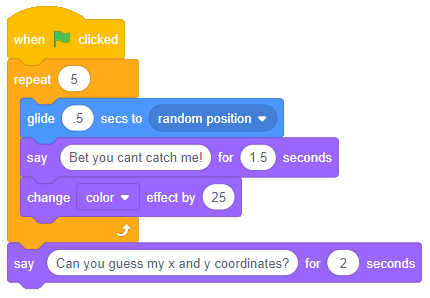
Task : Create a game where a sprite moves around a few times to a random position and asks the player (user) to guess his x and y coordinates. If both the x and y coordinates entered by the player are within 10 units of the sprites location, say a message which indicates success, otherwise, say that the player missed and tell the player to try again.

A sample of blocks below shows how to move the sprite around:

© 2021  Vedesh Kungebeharry. All rights reserved. 

Selection Statements: Practise Exercise(s)

For these flowchart solutions, you may opt to:

  1. Draw the solution in your notebook OR
  2. Draw the solution in a word processing document OR
  3. Draw the solution in an online tool OR
  4. Create a solution using flowgorithm.

Exercise 1

Create a flowchart solution which prompts the user to enter a student’s math mark and outputs “You have passed” if the mark is 50 and/or greater or “You have failed” if the mark is less than 50.

Exercise 2

Create a flowchart solution which prompts the user to enter two numbers, A and B, and outputs the larger number.


© 2020  Vedesh Kungebeharry. All rights reserved. 

Hyperlinks

Definition: A hyperlink is actionable text or an object found in a hyper text document which navigates the user to the start of another hypertext document or a specific location within a hypertext document. An action could be from a gui : a click or a tap; or using the keyboard to press the “enter key” on a selected link.

Examples:

This is a hyperlink to wikipedia.org

This is a hyperlink to wikipedia.org opened in a new tab or browser.

This is a link to ……..

.

.

.

.

.

.

.

.

.

.

.

.

.

.

.

.

.

.

.

.

.

.

.

.

.

.

.

.

.

.

.

.

.

.

.

.

.

.

.

.

The Bottom Of The Page

This is a link to the top of the page

That is all!

© 2020  Vedesh Kungebeharry. All rights reserved. 

Flowchart Practise – Finding the average of 3 numbers.

Task

Create a flowchart algorithm which prompts the user to enter 3 numbers and outputs the average of the numbers.

Guided Solution

First, let us use an IPO Table:

InputProcessing Output
Three Numbers num1, num2, num3average=(num1+num2+num3)/3average

After considering what needs to be done, we see that we need 4 variables

Solution in flowgorithm:

Download the solution here

© 2020  Vedesh Kungebeharry. All rights reserved. 

Video Creation using Source files – Tutorial

Today, we’re going to create the following video from some source files:

Download the following files to practice the skills :

https://drive.google.com/drive/folders/1f3m2gXDaPThljZ_fmc6OGMYzwpanht2Y

(the videos are free to use and were downloaded from https://pixabay.com/images/search/soccer/ )

Follow along with the tutorial video below to create a video from the source files above:

Tutorial Video: Video Creation with Video Editor in Windows 10

Remember to pause the video when needed during the creation of the video from the source files.

Updated:

5th October 2021 – Enhanced formatting

© 2020  Vedesh Kungebeharry. All rights reserved. 

Flowcharts – Sequence

Sequential instructions refer to groups of instructions which follow a strict order.  We can observe this by example:

Task: Create a program which prompts the user to enter two numbers.  The program must out put the  sum of the two numbers.

Solution in narrative form:

Prompt the user to enter the first number and accept the data.  Prompt the user to enter a second number and accept the data.  Calculate the sum. Output the sum to the user

Solution in Flowchart:

Notes/observations

  • Notice that to accomplish this task all steps are followed in sequence.
  • Variables are used as containers to store data input from the user and to store the results of processing for output. E.g num1, num2 for input storage, and result for storage and output.
  • the box which contains result <–num1+num2 can be interpreted as “adding the contents of num1 to num2 and then storing the value that was produced by processing in result
  • the line result <–num1+num2 can also be written as result = num1+num2

See the solution in flowgorithm below:

You can download the flowgorithm solution here:

https://drive.google.com/file/d/1s_QRRC-kx6Q-8NA3C__42xCn_-CpumA2/view?usp=sharing

Homework: Draw a flowcharts which accomplish the following tasks

1. Prompt the user to enter 3 numbers and output the sum

2. Prompt the user the enter 2 numbers and output the product

3 Prompt the user to enter 2 numbers and outputs the quotient (first number divided by the second number.) . What happens if the user enters the first number as 5 and the second number as 0 ?

Update

Updated on 18/11/2021 to include section “Notes observations” and 3 additional observations other than the first listed item.

© 2020  Vedesh Kungebeharry. All rights reserved.