Semantic analysis

Semantic analysis checks that the code makes programmatic sense by making sure that variables , constructs, and expression are used in a correct way according with the programming language’s rules.

This is accomplished by using  the parse tree ( generated from syntax analysis)  and a  symbol  table  to perform semantic checks.

Symbol Tables

A symbol (identifier) table is generated during semantic analysis which stores the attributes of each identifier including:

  • name,
    • datatype ,
    • Scope: where in the source code it was declared (Global or within functions)

For example, for the line of code below,

            x = 150;

the following table entry may be generated:

IdentifierTypeValueMemory LocationScope
xint1500x1001Global

Note that  in practice, symbol tables may store more metadata – we have simplified the concept for easy understanding.

Symbol Table Example With A Full Program

Code
#include <stdio.h>

float PI = 3.14159265359;  // Define PI as a variable
//function declaration was omitted for simplicity.
float calculateArea(float radius) {
    return PI * radius * radius;
}

int main() {
    float radius;

    printf("Enter the radius of the circle: ");
    scanf("%f", &radius);

    float area = calculateArea(radius);
    
    printf("The area of the circle with radius %.2f is %.2f\n", radius, area);

    return 0;
}

Symbol Table

The following simplified symbol table is generated:

IdentifierTypeValueMemory LocationScope
PIfloat3.141592653590x1001Global
calculateAreafloat()Global
mainint()Global
radiusfloat0x1002main
areafloat0x1003main

Taking an overview in order to perform these checks, we observer some facts of compiler design:

  • All parse trees and symbol tables are checked to see if they obey the rules of the language.
  • There are rules for the structure of the parse tree;
  • There are rules for the symbol table.
  • Together, these rules enforce the semantic rules of the language.

In this set of examples , we consider a hypothetical compiler of our own design.

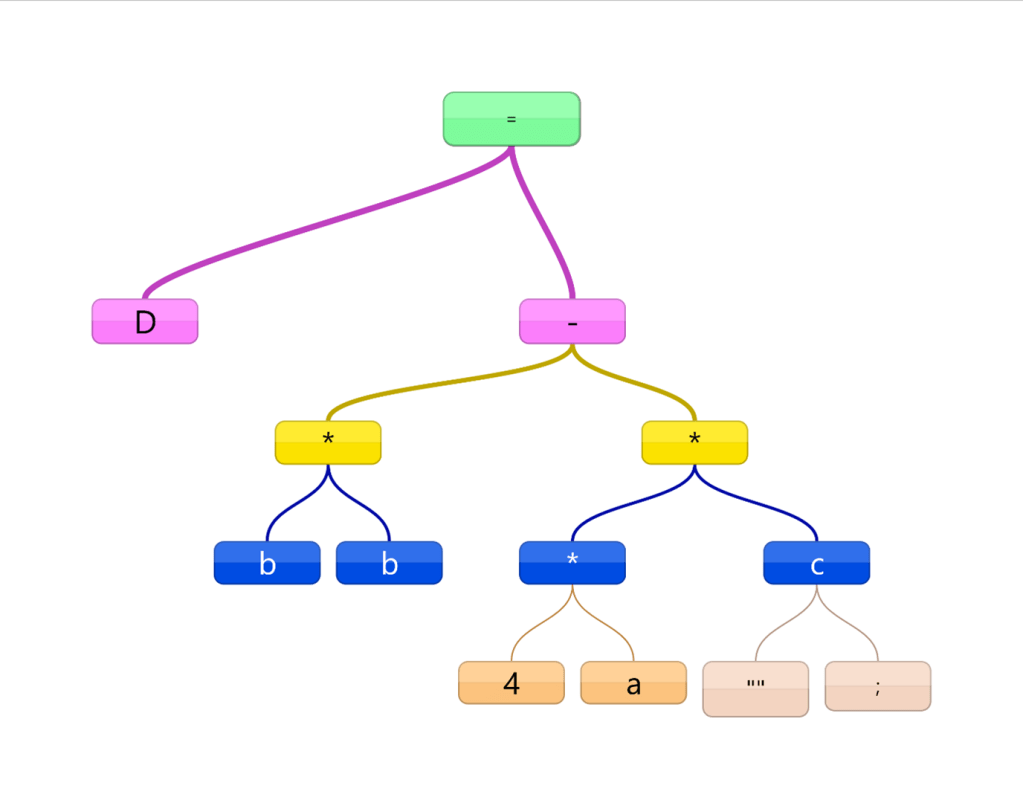
Recall the parse tree generated from example 1:

Line 1: Real D,b,a,c;

Line 2: D= b*b – 4*a*c;  

The tokens making up the line 2 (shown below)….

D=b*b4*a*c;


…will generate the following tree:

Example 2 – Check Symbol Tables for consistency

It is worth noting that another possible semantic check would be to see if all token identifiers have been declared. In our case for example 1:

Line 1: Real D,b,a,c;

Line 2: D= bb – 4*a*c;  

we see that our typo could have seen our tokens read as 

D=bb4*a*c;

At this stage, we should be able to check that each token was declared.  In this case , when we check our symbol table and see that it was not declared.  The compiler can now record an error for this line stating that bb was not declared.
 

Example 3 – Check Parse tree for invalid operands (Type Mismatch)

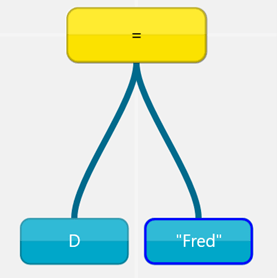
Consider the following code:

Line 1: Real D,b,a,c

Line 2: D= “Fred”

 Line 2 produces tokens:

D=“Fred”

Which produces the tree :

Note that D is of type real.  We could implement a new rule for our compiler:

All child nodes on the same level must have the same data type found in the symbol table.

Thus after checking our tree , we can record a type mismatch error for our current line.

Symbol Table and Parse Tree Analysis Summary

  1. All symbol tables and trees are checked for rules which identify violation of rules in our source language.
  2. Every time an error is found, its line location is recorded with an appropriate message.
  3. After all symbols and trees are checked, generate a list of errors and stop compilation.
  4. If no errors were recorded, move on to the next step: Intermediate code generation

© 2024  Vedesh Kungebeharry. All rights reserved. 
Syntax analysis (parsing)

Parse trees are generated for each expression.

e.g  for the  code

Line 1: Real D,b,a,c;

Line 2: D= b*b – 4*a*c;  

The tokens making up the line 2 (shown below)….

D=b*b4*a*c;


…will generate the following tree:

(Note that “” is a null left child of C)

This tree can now be checked for structural errors related to the grammatical rules of the language.

This tree is stored for use in generating the intermediate code and for error checking in semantic parsing.

Demonstration: Teacher uses an inorder traversal to regenerate the original code statement from the tree.

Examples of Syntax errors in C

ExampleDescription/Explanation
int a = 5Missing semicolon at the end of the statement.
if (a < 5) { int b = 0;Missing closing brace } for the if statement block.
for (int i = 0 i < 10; i++)Missing semicolon in the for loop declaration.
printf("%d", a, b);Mismatch in the number of arguments in printf.
int array[5 = {1, 2, 3, 4, 5};Syntax error in array initialization (should be array[5] = {1, 2, 3, 4, 5};).
while(a < 5)Missing opening or closing braces for the while loop body.
int x = (2, 3);Incorrect use of the comma operator in assignment.

© 2024  Vedesh Kungebeharry. All rights reserved. 
Lexical Analysis

  • This converts the source code into tokens. The individual characters of the source file must be grouped into tokens.

    e.g. x = 150;  will be broken into  4 tokens:
x=150;

Note that tokens are not just the characters that make up the line, but the parts that make up the entire line.  In the above example , 150 is recognized as a single token and not 3 tokens of 1, 5 and 0.

  • Next, a symbol (identifier) table is generated which stores the attributes of each identifier including:
    • name,
    • datatype ,
    • Scope: where in the source code it was declared (Globa , within functions)

For our line of code above, the following table entry may be generated:

IdentifierTypeValueMemory LocationScope
xint1500x1001Global

Note that  in practice, symbol tables may store more metadata – we have simplified the concept for easy understanding.

Symbol Table Example With A Full Program

Code

#include <stdio.h>   float PI = 3.14159265359;  // Define PI as a variable   float calculateArea(float radius) {     return PI * radius * radius; }   int main() {     float radius;       printf(“Enter the radius of the circle: “);     scanf(“%f”, &radius);       float area = calculateArea(radius);         printf(“The area of the circle with radius %.2f is %.2f\n”, radius, area);       return 0; }  

Symbol Table

The following simplified symbol table is generated:

IdentifierTypeValueMemory LocationScope
PIfloat3.141592653590x1001Global
calculateAreafloat()Global
mainint()Global
radiusfloat0x1002main
areafloat0x1003main

Error Detection (Lexical Error Handling)

Errors in the tokens are detected.

 Common errors include detecting :

  • invalid characters  not specified in the language , e.g

    int café = 42; // The ‘é’ character is not valid in C.


  • invalid identifier declaration, e.g,
    int $var = 10;  // Invalid character ‘$’

  • The misspelling of keywords eg
    innt x; //should be int:

Examples of lexical Errors In C

ExampleDescription/Explanation
int n%mber = 5;Illegal character % in identifier.
floar x = 5.0;Misspelling of keyword float as floar.
int 1stNumber = 1;Identifiers cannot start with a digit.
#incldue <stdio.h>Misspelling of directive #include.
double price = 45.6L;Incorrect use of float literal suffix (L is for long int).
char* str = ‘Hello’;Single quotes used instead of double quotes for string literal.

© 2024  Vedesh Kungebeharry. All rights reserved. 

Translation (Program Translation During the Compilation process)

This note continues from: Compilers

After the preprocessing produces a single source file in high level language , Translation of this source code can now occur.

Translation is the process of converting the High Level Language’s source code to object code.

It involves:

Analysis stageDescription
Lexical analysisBreaking the source code correctly into tokens
Syntax AnalysisEnsuring that the grammatical rules of the language are obeyed
Semantic analysisEnsuring that the program statements make logical sense by adhering to the rules of the language.  

After the steps above are completed, we are left with some output:  data structures and used in analysing the source code for errors, and if no errors were found, intermediate object code.

OutputSub Stage
A symbol tableLexical analysis
A parse treeSyntax Analysis
An annotated abstract treeSemantic analysis
Unoptimized Object CodeIntermediate code generation
Optimized Object codeCode Optimization

© 2024  Vedesh Kungebeharry. All rights reserved. 

Compilers

Compilers are tools used to produce executable code from source code.

Compilers process code through many stages, but it can be thought of as 3 main steps:

StepDescription
PreprocessingCombining all the source code from multiple files into 1 source code file
TranslationChecking the source code (produced from the preprocessing stage) for errors. If errors are found, the entire compilation process is halted and error messages generated, otherwise the source code is translated into object code.
LinkingCombining the generated object file to other dependencies to form a stand alone executable.    (e.g for a “hello world” c program at the console, the main object code of a would be combined with object code for output to the console to produce a single executable file.)

© 2024  Vedesh Kungebeharry. All rights reserved. 

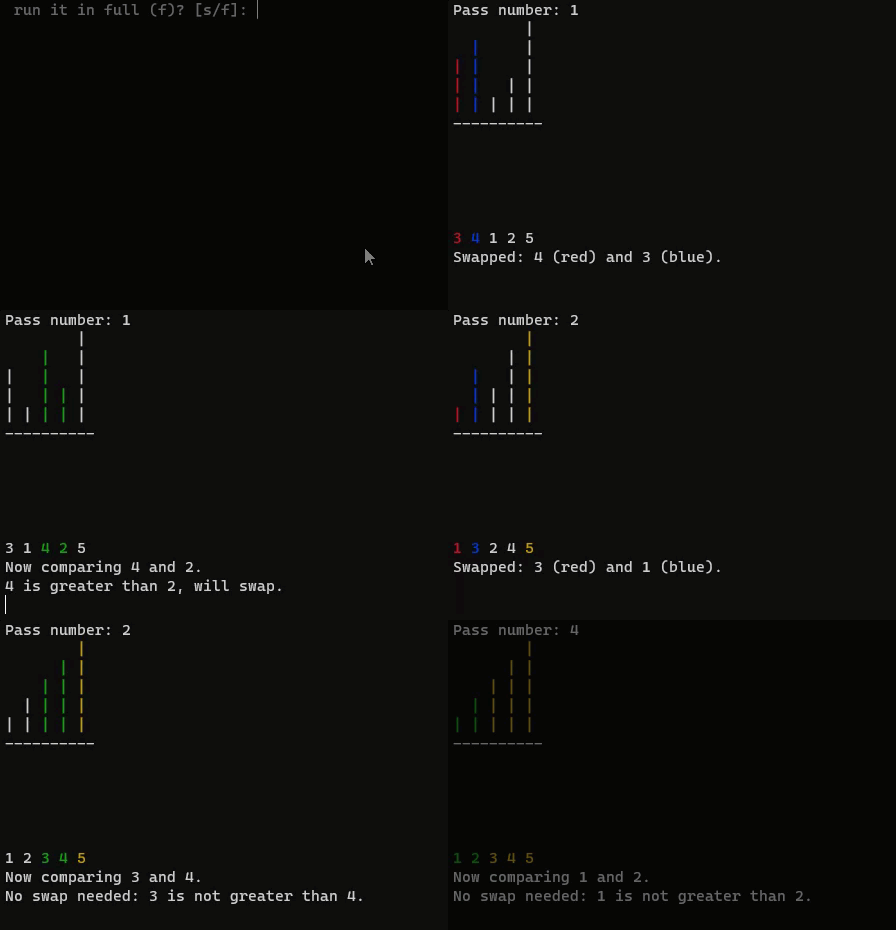
Bubble Sort Animation and Test Code

Here’s a coded demonstration which animates a bubble sort

Here’s a link which contains the executable files and code in c for download:

https://drive.google.com/drive/folders/1Uc8Hbr1tgQlf6XjMbn2h2MaIL9c86iXE?usp=drive_link

Here’s a the coded example using bubble sort to manipulate an integer array in C.

This is what the animation was based upon:

#include <stdio.h>
#include <stdlib.h>
void bubbleSort (int a [ ], int numItems);
void bubbleSort2 (int a [ ], int numItems);
void print(int a[], int numItems);
int main()
{

   int myArray[] = {4, 3, 1, 2, -1};

    // Calculate the number of items in the array
    int numItems = sizeof(myArray) / sizeof(myArray[0]);

    // Display the array
    print(myArray, numItems);

    //bubbleSort the array
    bubbleSort2(myArray,numItems);

    //Display the array after sorting
    print(myArray, numItems);
    return 0;
}

//bubble sort
void bubbleSort (int a [ ], int numItems)
{
   int i, j, temp;
   for(i=0;i<numItems -1; i++)
   {
      for (j = 0; (j<numItems-i-1); j++)
		{
		  	if (a[j]>a[j+1])
			{
				temp =a[j] ;
				a[j]=a[j+1];
				a[j+1]=temp;
			}
		}
   }
}

//bubble sort for debugging and demonstration
void bubbleSort2 (int a [ ], int numItems)
{
   int i, j, temp;
   for(i=0;i<numItems -1; i++)
   {
      printf("i=%d\n",i);
      printf("\tInner loop , j values: ");
		for (j = 0; (j<numItems-i-1); j++)
		{
		   printf("%d",j);
			if (a[j]>a[j+1])
			{
				temp =a[j] ;
				a[j]=a[j+1];
				a[j+1]=temp;
			}
		}
		print(a,numItems);
		printf("\n");
	}
}

// Function to print an array of integers
void print(int a[], int numItems)
{
    printf("\nThe array:   ");
    for(int i = 0; i < numItems; i++) {
        printf("%d ", a[i]);
    }
    printf("\n\n");
}

Here’s the code for the animation

(downloadable here from the link above)

not that in this code, the array values are different and contain negative numbers

#include <stdio.h>
#include <stdlib.h>

#ifdef _WIN32
#include <windows.h> // For Windows API functions
#else
#include <unistd.h> // For usleep
#endif

// ANSI escape codes for colors
#define RESET_COLOR "\x1b[0m"
#define RED "\x1b[31m"
#define GREEN "\x1b[32m"
#define BLUE "\x1b[34m"
#define YELLOW "\x1b[33m"

// Global sleep time definitions (in milliseconds)
#define SLEEP_TIME_MS 1000

int findMaxAbsValue(int a[], int numItems) {
    int maxAbsValue = abs(a[0]);
    for (int i = 1; i < numItems; i++) {
        if (abs(a[i]) > maxAbsValue) {
            maxAbsValue = abs(a[i]);
        }
    }
    return maxAbsValue;
}

void printArrayAsColumns(int a[], int numItems, int maxAbsValue, int compareIndex, int swapped, int pass, int sortedIndex) {
    printf("Pass number: %d\n", pass);  // Print the pass number at the top

    for (int level = maxAbsValue; level > 0; level--) {
        for (int i = 0; i < numItems; i++) {
            if (i >= sortedIndex) {
                printf(YELLOW);
            } else if (i == compareIndex || i == compareIndex + 1) {
                printf(swapped ? (i == compareIndex ? RED : BLUE) : GREEN);
            }
            if (a[i] >= level) {
                printf("| ");
            } else {
                printf("  ");
            }
            printf(RESET_COLOR);
        }
        printf("\n");
    }

    for (int i = 0; i < numItems; i++) {
        printf("--");
    }
    printf("\n");

    for (int level = 1; level <= maxAbsValue; level++) {
        for (int i = 0; i < numItems; i++) {
            if (i >= sortedIndex) {
                printf(YELLOW);
            } else if (i == compareIndex || i == compareIndex + 1) {
                printf(swapped ? (i == compareIndex ? RED : BLUE) : GREEN);
            }
            if (a[i] <= -level) {
                printf("| ");
            } else {
                printf("  ");
            }
            printf(RESET_COLOR);
        }
        printf("\n");
    }

    for (int i = 0; i < numItems; i++) {
        if (i >= sortedIndex) {
            printf(YELLOW);
        } else if (i == compareIndex || i == compareIndex + 1) {
            printf(swapped ? (i == compareIndex ? RED : BLUE) : GREEN);
        }
        printf("%d ", a[i]);
        printf(RESET_COLOR);
    }
    printf("\n");
}

void animateBubbleSort(int a[], int numItems, int stepThrough) {
    int maxAbsValue = findMaxAbsValue(a, numItems);
    int i, j, temp, pass = 0;
    for (i = 0; i < numItems - 1; i++) {
        pass++;
        for (j = 0; j < numItems - i - 1; j++) {
            int swapped = 0;

            // Clear the screen
            #ifdef _WIN32
            system("cls");
            #else
            system("clear");
            #endif

            printArrayAsColumns(a, numItems, maxAbsValue, j, swapped, pass, numItems - i);

            // Print the initial comparison statement
            printf("Now comparing %d and %d.\n", a[j], a[j + 1]);

            if (a[j] > a[j + 1]) {
                printf("%d is greater than %d, will swap.\n", a[j], a[j + 1]);
                swapped = 1;

                if (stepThrough) {
                    printf("Press enter to continue to the next step...\n");
                    while (getchar() != '\n'); // Wait for user to press enter
                } else {
                    #ifdef _WIN32
                    Sleep(SLEEP_TIME_MS); // Sleep for Windows
                    #else
                    usleep(SLEEP_TIME_MS * 1000); // Sleep for Unix, converting milliseconds to microseconds
                    #endif
                }

                // Perform the swap
                temp = a[j];
                a[j] = a[j + 1];
                a[j + 1] = temp;

                // Clear the screen for swap update
                #ifdef _WIN32
                system("cls");
                #else
                system("clear");
                #endif

                printArrayAsColumns(a, numItems, maxAbsValue, j, swapped, pass, numItems - i);

                // Print the swap confirmation
                printf("Swapped: %d (red) and %d (blue).\n", a[j + 1], a[j]);
            } else {
                // Print the no swap statement
                printf("No swap needed: %d is not greater than %d.\n", a[j], a[j + 1]);
            }

            if (stepThrough) {
                printf("Press enter to continue to the next step...\n");
                while (getchar() != '\n'); // Wait for user to press enter
            } else {
                #ifdef _WIN32
                Sleep(SLEEP_TIME_MS); // Sleep for Windows
                #else
                usleep(SLEEP_TIME_MS * 1000); // Sleep for Unix, converting milliseconds to microseconds
                #endif
            }
        }
    }
}

int main() {
    int myArray[] = {4, -3, 1, -2, 5};
    int numItems = sizeof(myArray) / sizeof(myArray[0]);

    char userChoice;
    printf("Do you want to step through the animation (s) or run it in full (f)? [s/f]: ");
    scanf(" %c", &userChoice); // Note the space before %c to consume any whitespace characters

    // Consume the newline character left in the input buffer by scanf
    while (getchar() != '\n');

    // Call the animateBubbleSort function
    if (userChoice == 's' || userChoice == 'S') {
        animateBubbleSort(myArray, numItems, 1); // Step through
    } else {
        animateBubbleSort(myArray, numItems, 0); // Run in full
    }

    return 0;
}

© 2023  Vedesh Kungebeharry. All rights reserved. 

Binary Search Animation (Animated C code)

This shows  a binary search for 1 then 39 then 24.

This animation was based on the code/algorithm in this post: Binary Search Implementation

Download the code and executable file here: https://drive.google.com/drive/folders/1i0TilBMD4eECj6nkjHcP6HHvfEBalMEF?usp=sharing

C Code

#include <stdio.h>
#include <stdlib.h>

#ifdef _WIN32
#include <windows.h> // For Windows API functions
#else
#include <unistd.h> // For usleep on Unix
#endif

// ANSI escape codes for colors
#define RESET_COLOR "\x1b[0m"
#define HIGHLIGHT "\x1b[44m"  // Blue background
#define GREY "\x1b[90m"       // Grey text

// Global sleep time definition (in milliseconds)
#define SLEEP_TIME_MS 2000

void clearScreen() {
    #ifdef _WIN32
    system("cls");
    #else
    system("clear");
    #endif
}

void sleepMs(int milliseconds) {
    #ifdef _WIN32
    Sleep(milliseconds);
    #else
    usleep(milliseconds * 1000); // convert to microseconds
    #endif
}

void printAnnotation(int position, const char* annotation, int listSize) {
    for (int i = 0; i < position * 4 + 11; i++) { // Adjust position for correct alignment
        printf(" ");
    }
    printf("%s\n", annotation); // Print the annotation (Fir, Mid, Las)
}

void printAnnotations(int listSize, int first, int last, int middle) {
    if (first >= 0) printAnnotation(first, "Fir", listSize);
    if (middle >= 0) printAnnotation(middle, "Mid", listSize);
    if (last >= 0) printAnnotation(last, "Las", listSize);
}

void printArray(int list[], int listSize, int first, int last, int middle, int initialDisplay) {
    printf("+");
    for (int i = 0; i < listSize * 4 + 9; i++) { // Adjust border size based on array size
        printf("-");
    }
    printf("+\n");

    printf("|Elements |");
    for (int i = 0; i < listSize; i++) {
        if (!initialDisplay && (i < first || i > last)) {
            printf(GREY); // Grey out discarded elements during search
        } else if (i == first || i == last || i == middle) {
            printf(HIGHLIGHT); // Highlight the first, last, and middle elements during search
        }
        printf(" %2d" RESET_COLOR "|", list[i]);
    }
    printf("\n");

    printf("+");
    for (int i = 0; i < listSize * 4 + 9; i++) { // Adjust border size based on array size
        printf("-");
    }
    printf("+\n");

    printf("|Index    |");
    for (int i = 0; i < listSize; i++) {
        if (!initialDisplay && (i < first || i > last)) {
            printf(GREY); // Grey out discarded indexes during search
        } else if (i == first || i == last || i == middle) {
            printf(HIGHLIGHT); // Highlight the first, last, and middle indexes during search
        }
        printf(" %2d" RESET_COLOR "|", i);
    }
    printf("\n");

    printf("+");
    for (int i = 0; i < listSize * 4 + 9; i++) { // Adjust border size based on array size
        printf("-");
    }
    printf("+\n");
}

void displayInitialArray(int list[], int listSize) {
    printf("\nInitial array:\n");
    printArray(list, listSize, -1, -1, -1, 1); // Display all elements normally
    printf("\nPress Enter to start the search...");
    getchar(); // Wait for user to press enter to continue
}

int binarySearch(int key, int list[], int listSize, int stepThrough, int *comparisonCount) {
    int first = 0;
    int last = listSize - 1;
    int middle = first + (last - first) / 2;

    while (first <= last) {
        (*comparisonCount)++; // Increment the comparison count
        clearScreen();
        printArray(list, listSize, first, last, middle, 0);
        printAnnotations(listSize, first, last, middle); // Print the annotations

        if (key == list[middle]) {
            printf("\nKey %d found at index %d.\n", key, middle);
            return middle;
        } else if (key < list[middle]) {
            printf("\nKey %d is less than %d, searching lower half.\n", key, list[middle]);
            last = middle - 1;
        } else {
            printf("\nKey %d is greater than %d, searching upper half.\n", key, list[middle]);
            first = middle + 1;
        }
        middle = first + (last - first) / 2;

        if (stepThrough) {
            printf("Press Enter to continue...");
            getchar(); // Wait for user to press enter to continue to the next step
        } else {
            sleepMs(SLEEP_TIME_MS);
        }
    }

    printf("\nKey %d not found.\n", key);
    return -1;
}

int main() {
    // Modify the array here for different demonstrations
    //int list[10] = {5, 10, 15, 20, 25, 30, 35, 40, 45, 50};
    int list[] = {3, 6, 8, 12, 15, 18, 21, 24, 27, 30, 33, 36, 39, 42, 45, 48, 51};
    int listSize = sizeof(list) / sizeof(list[0]); // Calculate the size of the array
    int key, stepThrough, comparisonCount;

    printf("Enter 1 for step through, 0 for full animation: ");
    scanf("%d", &stepThrough);
    getchar(); // Consume the newline character left in the input buffer by scanf

    displayInitialArray(list, listSize); // Display the array before starting the search

    printf("\nEnter a search key (-1 to exit): ");
    scanf("%d", &key);
    while (key != -1) {
        getchar(); // Consume the newline character left in the input buffer by scanf
        comparisonCount = 0; // Reset comparison count for each search
        binarySearch(key, list, listSize, stepThrough, &comparisonCount);
        printf("Number of comparisons made: %d\n", comparisonCount);

        printf("\nEnter a search key (-1 to exit): ");
        scanf("%d", &key);
    }

    return 0;
}

© 2023  Vedesh Kungebeharry. All rights reserved. 

Compilers Vs Interpreters

The main differences between a compiler and interpreter

Execution

Compilers produce complete file of executable code for execution at a later time, whereas an interpreter translates source code one line or block of code at a time and executes it during the program’s run.

Error detection

Compilers detect all errors  (syntax and semantic) before the final executable can be produced, a programmer must fix all errors before the final executable is produced. The most common error that is  produced during execution are runtime errors.

Interpreters detect errors as they arise during  execution one line or block of code at a time, the most common errors are datatype errors.

Note that both compilers and interpreters are susceptible to syntax and runtime errors.

© 2023  Vedesh Kungebeharry. All rights reserved. 

Diagrams for a Multiplexer in PNG and ASCII Art

4-to-1 multiplexer

Data Lines (Input) are denoted as x1…x4, select line are denoted as s1 and s2, Output is denoted as f

Alternative Diagram in ASCII :

        _______________________
       |        4-to-1         |
D0 ----|      Multiplexer      |
       |                       |
D1 ----|                       |---> Output
       |                       |
D2 ----|                       |
       |                       |
D3 ----|_______________________|
              |         |
              |         |
              |         |
              |         |
              S1        S0
Data Lines (Input) are denoted as D0...D3, select line are denoted as S0 and S1.

© 2023  Vedesh Kungebeharry. All rights reserved.