FREE • BEGINNER-FRIENDLY • 50 LESSONS
Animation and Game Design – Free Lessons
Learn how cartoons and video games are made – from flip books and the 12 principles of animation to game genres, game theory, pitching and rapid prototyping – in short, plain-English lessons.
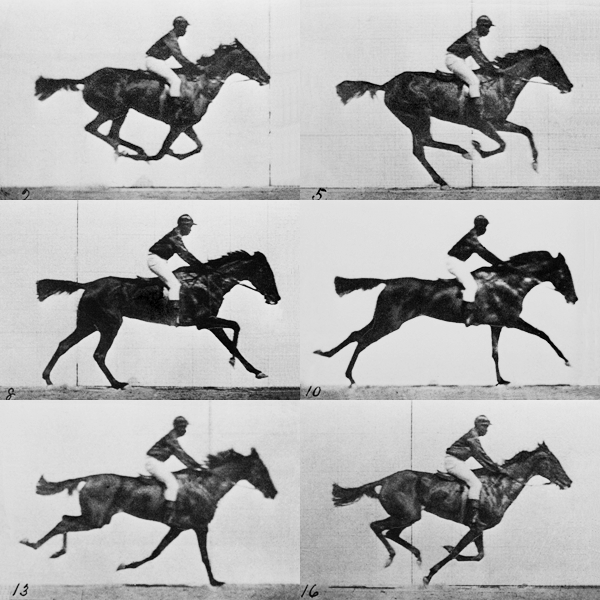
Animation is just pictures shown fast enough to fool the eye.
Who this is for
Anyone starting out in animation or game design: self-taught learners, hobbyists, teachers and students anywhere in the world. The lessons also cover every specific objective of CAPE® Animation and Game Design – Unit 1, Module 1: Understanding Animation and Game Design, Module 2: Drawing and Layout and Module 3: Story and Character Development, and of Unit 2, Module 1: Introduction to Interactive Design, Module 2: Game Design and Development and Module 3: Animation for Games.
How to use these notes
- Work through the lessons in order – each builds on the last.
- Try the exercise at the end of every lesson.
- Studying for CAPE? Use the syllabus map to tick off every objective.
Unit 1, Module 1: Understanding Animation and Game Design (9 lessons)
Pick any lesson to jump in. Each one takes about 5–10 minutes to read.
LESSON 01
What Is Animation? What Is Game Design?
Clear definitions of animation and game design, the main types of animation and a glossary of key terms like frame rate, keyframe, sprite and game engine.
Syllabus objectives: 1
LESSON 02
History of Animation and Video Games
From optical toys and early cartoons to Pong, mobile games, VR, AR and gesture-based gaming – plus where the industry is heading next.
Syllabus objectives: 2, 4
LESSON 03
Jobs in Animation and Game Design
Who makes animation and games, the skills employers want, virtual teams, outsourcing, entrepreneurship and the industry’s impact on the Caribbean.
Syllabus objectives: 3, 9, 10, 11
LESSON 04
Types of Video Games: Genres, Goals and Platforms
Educational vs entertainment goals, genres from arcade to RPG, strategy and simulator, and how games are deployed on each platform.
Syllabus objectives: 5, 6
LESSON 05
Elements of Gameplay and Game Theory
Rules, characters, environment, choice and player modes, plus an easy introduction to zero-sum, positive-sum and negative-sum games.
Syllabus objectives: 7, 8
LESSON 06
How to Pitch and Fund an Animation or Game Project
Build an e-portfolio, pitch your idea, write a project proposal and compare loans, grants, crowdfunding, angel investors and venture capital.
Syllabus objectives: 12, 13, 14, 15
LESSON 07
The 12 Principles of Animation, Tools and Sound Editing
The 12 principles of animation explained simply, beginner programming languages and game tools, open source vs proprietary software and basic sound editing.
Syllabus objectives: 16, 17
LESSON 08
Ethics, Copyright and Intellectual Property
Plagiarism, piracy and DRM, copyright and patents, Creative Commons, open source vs public domain – and practical ways to reduce the risks.
Syllabus objectives: 18, 19, 20
LESSON 09
The Game Design Process: RAD vs Waterfall
The main stages of game design – brainstorming, ideation, rapid prototyping, playtesting and revision – plus RAD vs the waterfall model.
Syllabus objectives: 21, 22
Syllabus map: Module 1 objectives 1–22
Every specific objective in CAPE® Animation and Game Design, Unit 1 – Fundamentals of Animation and Game Design, Module 1 – Understanding Animation and Game Design is covered once. Objectives marked * are flagged in the syllabus as particularly suitable for practical exercises.
| # | Specific objective (students should be able to…) | Lesson |
|---|---|---|
| 1 | define terms associated with animation and game design; | Lesson 01 – What Is Animation? What Is Game Design? |
| 2 | outline the history and present use of animation and game design; | Lesson 02 – History of Animation and Video Games |
| 3 | identify the roles and responsibilities of persons in the animation and game design industry; | Lesson 03 – Jobs in Animation and Game Design |
| 4 | discuss future trends in animation and game design; | Lesson 02 – History of Animation and Video Games |
| 5 | explain the different game goals and game genres; | Lesson 04 – Types of Video Games: Genres, Goals and Platforms |
| 6 | discuss the methods of deploying games on various game platforms; | Lesson 04 – Types of Video Games: Genres, Goals and Platforms |
| 7 | outline the elements of game play; | Lesson 05 – Elements of Gameplay and Game Theory |
| 8 | explain game theory in animation and game design; | Lesson 05 – Elements of Gameplay and Game Theory |
| 9 | outline the role and impact of the Animation and Gaming Industry on the Caribbean region; | Lesson 03 – Jobs in Animation and Game Design |
| 10 | discuss the skills that support employment and entrepreneurship in animation and game design; | Lesson 03 – Jobs in Animation and Game Design |
| 11 | explain the relevance of animation and game designs to entrepreneurship; | Lesson 03 – Jobs in Animation and Game Design |
| 12 | *demonstrate the use of e-portfolios and use of pitching; | Lesson 06 – How to Pitch and Fund an Animation or Game Project |
| 13 | identify project funding opportunities for animation and game design; | Lesson 06 – How to Pitch and Fund an Animation or Game Project |
| 14 | evaluate project funding opportunities available for animation and game design; | Lesson 06 – How to Pitch and Fund an Animation or Game Project |
| 15 | present project proposals; | Lesson 06 – How to Pitch and Fund an Animation or Game Project |
| 16 | identify concepts and skills required for animation and game design; | Lesson 07 – The 12 Principles of Animation, Tools and Sound Editing |
| 17 | *demonstrate basic sound editing techniques; | Lesson 07 – The 12 Principles of Animation, Tools and Sound Editing |
| 18 | outline ethical issues associated with animation and game design; | Lesson 08 – Ethics, Copyright and Intellectual Property |
| 19 | identify risks associated with animation and game design; | Lesson 08 – Ethics, Copyright and Intellectual Property |
| 20 | develop solutions to mitigate the risks associated with animation and game design; | Lesson 08 – Ethics, Copyright and Intellectual Property |
| 21 | identify the main stages of game design; and, | Lesson 09 – The Game Design Process: RAD vs Waterfall |
| 22 | explain the importance of RAD in game design. | Lesson 09 – The Game Design Process: RAD vs Waterfall |
Unit 1, Module 2: Drawing and Layout
Seven lessons on drawing characters and environments, perspective and colour, level design, folklore and culture, story and scripts, and creating digital artwork.
MODULE 2 • LESSON 01
Motion and Figure Drawing
Gesture, dynamic figure and figure-in-motion drawing, humanoid and non-humanoid characters, plus life drawing, skeleton, muscles and faces.
Syllabus objectives: 1, 2
MODULE 2 • LESSON 02
Environment Layers and Perspective
Foreground, midground and background layers, parallax scrolling, observational drawing and 1-, 2- and 3-point perspective.
Syllabus objectives: 3, 4
MODULE 2 • LESSON 03
Colour Theory, Texture and Composition
The colour wheel and colour harmonies, texture, composition, scene design and blocking for animation and game scenes.
Syllabus objectives: 2, 4
MODULE 2 • LESSON 04
Levels in Game Design
What a level is, how to structure gameplay, missions, quests, episodes, worlds and chapters – and how to outline your first three levels.
Syllabus objectives: 5, 6
MODULE 2 • LESSON 05
Folklore, Culture and Heritage
Using folklore, festivals, monuments, artefacts and architecture to create original characters and worlds, with Caribbean examples.
Syllabus objectives: 7
MODULE 2 • LESSON 06
Story Development and Scriptwriting
The steps of story development, basic storyboarding, the story arc, creative writing, character development and script formats.
Syllabus objectives: 8, 9
MODULE 2 • LESSON 07
Environment Design and Digital Artwork
Designing environments for different genres, then digitising drawings: scanning, clean-up, colour palettes and free tools like GIMP and Krita.
Syllabus objectives: 10, 11
Syllabus map: Module 2 objectives 1–11
Every specific objective in CAPE® Animation and Game Design, Unit 1 – Fundamentals of Animation and Game Design, Module 2 – Drawing and Layout is covered. Objectives marked * are flagged in the syllabus as particularly suitable for practical exercises.
| # | Specific objective (students should be able to…) | Lesson |
|---|---|---|
| 1 | list types of motion drawings; | Lesson 01 – Motion and Figure Drawing |
| 2 | *apply drawing and design principles for layout /environment and character development; | Lesson 01 – Motion and Figure Drawing Lesson 03 – Colour Theory, Texture and Composition |
| 3 | identify layers of an environment; | Lesson 02 – Environment Layers and Perspective |
| 4 | *apply knowledge of design principles for environmental design; | Lesson 02 – Environment Layers and Perspective Lesson 03 – Colour Theory, Texture and Composition |
| 5 | define the concept of a level in game design; | Lesson 04 – Levels in Game Design |
| 6 | outline the first three levels of a game; | Lesson 04 – Levels in Game Design |
| 7 | apply socio-cultural context to the development of local ideas and concepts; | Lesson 05 – Folklore, Culture and Heritage |
| 8 | identify the steps used for story development; | Lesson 06 – Story Development and Scriptwriting |
| 9 | *apply concepts to design a script for animation and game design; | Lesson 06 – Story Development and Scriptwriting |
| 10 | *construct environment for various genres; and, | Lesson 07 – Environment Design and Digital Artwork |
| 11 | *utilise digital image processing software to create digital artwork. | Lesson 07 – Environment Design and Digital Artwork |
Unit 1, Module 3: Story and Character Development
Eight lessons on synopses and pitches, story arcs, storyboards and camera angles, character design and turnarounds, environments, concept art and the production bible.
MODULE 3 • LESSON 01
Synopsis and Elevator Pitch
How to write a logline, a one-page synopsis and a 30–60 second elevator pitch for an animation or a game.
Syllabus objectives: 1
MODULE 3 • LESSON 02
Story Arcs: Five-Point, Eight-Point and Three-Act
Five-point, eight-point and three-act story arcs compared, then writing a narrative for an animation and for a game.
Syllabus objectives: 2
MODULE 3 • LESSON 03
Storyboarding with Camera Shots and Angles
Panel anatomy, shot sizes, camera angles and camera movement – plus a camera angle montage exercise.
Syllabus objectives: 3
MODULE 3 • LESSON 04
Character Design for Different Genres
Character theory: shape language, silhouette, colour, props and abilities for genre-appropriate characters.
Syllabus objectives: 4, 5
MODULE 3 • LESSON 05
Character Turnarounds and Model Sheets
Front, three-quarter, side and back views, guide lines and keeping proportions consistent on a model sheet.
Syllabus objectives: 6
MODULE 3 • LESSON 06
Conceptualising Environments
Foreground, midground and background layers, depth of field, atmospheric perspective and design theory for genres.
Syllabus objectives: 7, 8, 9
MODULE 3 • LESSON 07
What Is Concept Art?
What concept art is, who uses it, and a step-by-step process for creating concept art for your own project.
Syllabus objectives: 10, 11
MODULE 3 • LESSON 08
The Production Bible
What goes into a production bible for a game or animation, with a reusable template for your project or SBA.
Syllabus objectives: 12
Syllabus map: Module 3 objectives 1–12
Every specific objective in CAPE® Animation and Game Design, Unit 1 – Fundamentals of Animation and Game Design, Module 3 – Story and Character Development is covered. Objectives marked * are flagged in the syllabus as particularly suitable for practical exercises.
| # | Specific objective (students should be able to…) | Lesson |
|---|---|---|
| 1 | *create a synopsis for a game or animation; | Lesson 01 – Synopsis and Elevator Pitch |
| 2 | *write a narrative for a game and an animation based on story arcs and storytelling principles; | Lesson 02 – Story Arcs: Five-Point, Eight-Point and Three-Act |
| 3 | *create a storyboard for a game or animation; | Lesson 03 – Storyboarding with Camera Shots and Angles |
| 4 | explain character design as it relates to genre; | Lesson 04 – Character Design for Different Genres |
| 5 | *design genre-appropriate characters; | Lesson 04 – Character Design for Different Genres |
| 6 | *create character turnarounds; | Lesson 05 – Character Turnarounds and Model Sheets |
| 7 | conceptualise an environment; | Lesson 06 – Conceptualising Environments |
| 8 | *create environmental layers for backgrounds, midgrounds and foregrounds; | Lesson 06 – Conceptualising Environments |
| 9 | *apply design theory to create environments for particular genres; | Lesson 06 – Conceptualising Environments |
| 10 | explain concept art; | Lesson 07 – What Is Concept Art? |
| 11 | *create concept art for project; and, | Lesson 07 – What Is Concept Art? |
| 12 | *create a Production Bible for game design and animation. | Lesson 08 – The Production Bible |
Unit 2: Interactive Design and Game Development
Unit 2 moves from ideas to interactive products: designing interfaces and user experiences, building game mechanics and stories, and animating characters, props and scenes for games. It has 26 lessons in three modules.
Unit 2, Module 1: Introduction to Interactive Design
Nine lessons on the evolution of games and animation, interaction design and UX, wireframing, visual design, colour theory, story and storyboards, pitching and audiences, and culture, ratings and intellectual property.
UNIT 2 • MODULE 1 • LESSON 01
Evolution of Animation and Games + Genres
From Tennis for Two to VR: how animation and games evolved, where they are used today, and the main game genres.
Syllabus objectives: 1, 2
UNIT 2 • MODULE 1 • LESSON 02
What Is Interaction Design (IxD)?
Goal-driven design, interface as magic, usability, affordances and learnability – the ideas behind interaction design.
Syllabus objectives: 3, 4
UNIT 2 • MODULE 1 • LESSON 03
UX Factors and the 5 Principles of IxD
The UX honeycomb and the five key principles: consistent, perceivable, learnable, predictable and feedback.
Syllabus objectives: 5, 6
UNIT 2 • MODULE 1 • LESSON 04
Wireframing a Game UI
Questions and best practices for designing interactions, fidelity levels and a step-by-step HUD wireframe.
Syllabus objectives: 7, 8
UNIT 2 • MODULE 1 • LESSON 05
Elements and Principles of Visual Design
Line, shape, direction, size, texture, colour and value, plus unity, Gestalt, balance, hierarchy and contrast.
Syllabus objectives: 9, 10
UNIT 2 • MODULE 1 • LESSON 06
Colour Theory for Games and Animation
What colour theory is and why it matters: guiding the eye, mood, information, culture and colour-blind accessibility.
Syllabus objectives: 16, 17
UNIT 2 • MODULE 1 • LESSON 07
Story Arcs, Game Scripts and Storyboards
The steps of a story arc, branching game scripts with choices and barks, and storyboards for cut-scenes and gameplay.
Syllabus objectives: 11, 12, 13
UNIT 2 • MODULE 1 • LESSON 08
Pitching a Game and Target Audiences
Demographics, personas and critical thinking for design problems, plus an eight-point structure for pitching a game.
Syllabus objectives: 14, 15
UNIT 2 • MODULE 1 • LESSON 09
Culture, Ratings and Intellectual Property
Folklore characters, ESRB and PEGI ratings, intellectual property violations and the role of monitoring agencies.
Syllabus objectives: 18
Syllabus map: Unit 2, Module 1 objectives 1–18
Every specific objective in CAPE® Animation and Game Design, Unit 2 – Interactive Design and Game Development, Module 1 – Introduction to Interactive Design is covered. Objectives marked * are flagged in the syllabus as particularly suitable for practical exercises.
| # | Specific objective (students should be able to…) | Lesson |
|---|---|---|
| 1 | outline the history and present use of animation and game design and development; | Lesson 01 – Evolution of Animation and Games + Genres |
| 2 | identify the different genres of game design; | Lesson 01 – Evolution of Animation and Games + Genres |
| 3 | define Interactive Design; | Lesson 02 – What Is Interaction Design (IxD)? |
| 4 | discuss the concepts that drive Interactive Design; | Lesson 02 – What Is Interaction Design (IxD)? |
| 5 | outline the factors that influence user experience; | Lesson 03 – UX Factors and the 5 Principles of IxD |
| 6 | identify the five key/main principles of Interactive Design; | Lesson 03 – UX Factors and the 5 Principles of IxD |
| 7 | outline some prominent best practices for designing interactions; | Lesson 04 – Wireframing a Game UI |
| 8 | *employ design principles and best practices to create a wireframe of the user interface (UI) of a game; | Lesson 04 – Wireframing a Game UI |
| 9 | identify the basic elements of visual design; | Lesson 05 – Elements and Principles of Visual Design |
| 10 | outline the principles for creating a visual design; | Lesson 05 – Elements and Principles of Visual Design |
| 11 | identify the steps involved in creating a story arc; | Lesson 07 – Story Arcs, Game Scripts and Storyboards |
| 12 | *employ the knowledge of writing scripts for games; | Lesson 07 – Story Arcs, Game Scripts and Storyboards |
| 13 | *create a storyboard; | Lesson 07 – Story Arcs, Game Scripts and Storyboards |
| 14 | *present an idea for an interactive game; | Lesson 08 – Pitching a Game and Target Audiences |
| 15 | apply critical thinking to solve interactive design problems to meet customers’ needs; | Lesson 08 – Pitching a Game and Target Audiences |
| 16 | define Colour Theory; | Lesson 06 – Colour Theory for Games and Animation |
| 17 | outline the importance of Colour Theory in animation and game design; | Lesson 06 – Colour Theory for Games and Animation |
| 18 | outline the importance of culture in animation and game design. | Lesson 09 – Culture, Ratings and Intellectual Property |
Unit 2, Module 2: Game Design and Development
Nine lessons on game design terms and careers, core dynamics, iterative design, mechanics and goals, types of stories, characters and environments, game UI, camera views, and game design tools and constraints.
UNIT 2 • MODULE 2 • LESSON 01
Game Design Terms, Careers and Types of Design
Key terms such as alpha, beta, gold and mechanics, game careers, and world, system, content, writing, level and UI design.
Syllabus objectives: 1, 2, 3, 4
UNIT 2 • MODULE 2 • LESSON 02
The 10 Core Dynamics of Games
Territorial acquisition, prediction, spatial reasoning, survival, destruction, building, collection, chasing, trading and racing.
Syllabus objectives: 5
UNIT 2 • MODULE 2 • LESSON 03
Iterative Design: Prototype, Playtest, Revise
Rapid prototyping, playtesting, revision and repeating the loop – with tips for getting useful feedback.
Syllabus objectives: 6
UNIT 2 • MODULE 2 • LESSON 04
Game Mechanics, Game State and Goals
Setup, victory conditions, progression and player actions; rules, players, avatars, game state, views and goals.
Syllabus objectives: 7, 8, 9
UNIT 2 • MODULE 2 • LESSON 05
Types of Stories in Games
Linear, branching, open-ended, instanced, emergent, thematic and algorithmic stories – and when to use each.
Syllabus objectives: 10, 11
UNIT 2 • MODULE 2 • LESSON 06
Characters and Environments in Games
Character design for play, the seven archetypes, and environments described by scale, time of day and camera.
Syllabus objectives: 12, 13
UNIT 2 • MODULE 2 • LESSON 07
Game UI Design: Process and Good vs Bad UI
Seven steps from inputs and outputs to playtesting, Nielsen’s heuristics and examples of good and bad game UI.
Syllabus objectives: 14, 15
UNIT 2 • MODULE 2 • LESSON 08
Game Camera Views
Static, scrolling, parallax, first-person, third-person, isometric and top-down views compared, with a Scratch demo.
Syllabus objectives: 16
UNIT 2 • MODULE 2 • LESSON 09
Game Design Tools and Constraints
Scratch, Stencyl, Construct, GameMaker, Unity, Unreal and Godot; building a first game; budget, time and audience.
Syllabus objectives: 17, 18, 19
Syllabus map: Unit 2, Module 2 objectives 1–19
Every specific objective in CAPE® Animation and Game Design, Unit 2 – Interactive Design and Game Development, Module 2 – Game Design and Development is covered. Objectives marked * are flagged in the syllabus as particularly suitable for practical exercises.
| # | Specific objective (students should be able to…) | Lesson |
|---|---|---|
| 1 | define the common terms associated with game design; | Lesson 01 – Game Design Terms, Careers and Types of Design |
| 2 | state the types of careers in game design; | Lesson 01 – Game Design Terms, Careers and Types of Design |
| 3 | state the types of design associated with games; | Lesson 01 – Game Design Terms, Careers and Types of Design |
| 4 | explain the different types of design; | Lesson 01 – Game Design Terms, Careers and Types of Design |
| 5 | distinguish among the different core dynamics of games; | Lesson 02 – The 10 Core Dynamics of Games |
| 6 | identify the stages/steps associated with iterative design; | Lesson 03 – Iterative Design: Prototype, Playtest, Revise |
| 7 | identify some common mechanics used in games; | Lesson 04 – Game Mechanics, Game State and Goals |
| 8 | *formulate the mechanics for a game; | Lesson 04 – Game Mechanics, Game State and Goals |
| 9 | distinguish between short term and long term goals for games; | Lesson 04 – Game Mechanics, Game State and Goals |
| 10 | identify the primary types of stories in games; | Lesson 05 – Types of Stories in Games |
| 11 | differentiate among the types of stories in games; | Lesson 05 – Types of Stories in Games |
| 12 | describe the characters in a game; | Lesson 06 – Characters and Environments in Games |
| 13 | describe the environment in a game; | Lesson 06 – Characters and Environments in Games |
| 14 | state the process of User Interface design for games; | Lesson 07 – Game UI Design: Process and Good vs Bad UI |
| 15 | distinguish between good and bad user interface design for games; | Lesson 07 – Game UI Design: Process and Good vs Bad UI |
| 16 | *distinguish among the different camera views; | Lesson 08 – Game Camera Views |
| 17 | identify prominent game design tools; | Lesson 09 – Game Design Tools and Constraints |
| 18 | *use a game design tool to create a game; and, | Lesson 09 – Game Design Tools and Constraints |
| 19 | discuss the constraints on game design. | Lesson 09 – Game Design Tools and Constraints |
Unit 2, Module 3: Animation for Games
Eight lessons on one-level interfaces and navigation, character anatomy and expressions, game environments, 3D modelling, texturing and lighting, the bouncing ball, walk cycles and stop-motion.
UNIT 2 • MODULE 3 • LESSON 01
Designing a One-Level Interface and Navigation
Plan every screen of one level – start, HUD, pause, win and lose – plus menus, breadcrumbs, maps and signposting.
Syllabus objectives: 1, 2
UNIT 2 • MODULE 3 • LESSON 02
Game Characters: Anatomy and Expressions
Life drawing, the skeleton, the muscle system and facial character theory for characters in different genres.
Syllabus objectives: 3
UNIT 2 • MODULE 3 • LESSON 03
Creating Game Environments
Layout for play, composition for the eye, colour for mood and readability, and foreground–midground–background layers.
Syllabus objectives: 4
UNIT 2 • MODULE 3 • LESSON 04
3D Modelling Game Props (Extrude)
Meshes, primitives, poly budgets and the extrude, inset, loop cut and bevel tools, with a Blender treasure chest walkthrough.
Syllabus objectives: 5
UNIT 2 • MODULE 3 • LESSON 05
3D Texturing, Colour and Lighting
PBR materials, UV unwrapping, palette and hand-painted textures, light types and three-point lighting.
Syllabus objectives: 6, 7
UNIT 2 • MODULE 3 • LESSON 06
Persistence of Vision and the Bouncing Ball
What persistence of vision is, keyframes and in-betweens, and a step-by-step bouncing ball timing exercise.
Syllabus objectives: 8, 9, 11
UNIT 2 • MODULE 3 • LESSON 07
Animating a Walk Cycle
Contact, down, passing and up poses, timing and personality, plus in-place loops and sprite sheets for games.
Syllabus objectives: 10
UNIT 2 • MODULE 3 • LESSON 08
Stop-Motion: Wire, Armatures and Models
Wire bending, armature design, building characters, props and sets to scale, and shooting simple movements.
Syllabus objectives: 12, 13
Syllabus map: Unit 2, Module 3 objectives 1–13
Every specific objective in CAPE® Animation and Game Design, Unit 2 – Interactive Design and Game Development, Module 3 – Animation for Games is covered. Objectives marked * are flagged in the syllabus as particularly suitable for practical exercises.
| # | Specific objective (students should be able to…) | Lesson |
|---|---|---|
| 1 | *design a one level interface; | Lesson 01 – Designing a One-Level Interface and Navigation |
| 2 | *design navigational tools; | Lesson 01 – Designing a One-Level Interface and Navigation |
| 3 | *employ design skills to create characters for different genres of games; | Lesson 02 – Game Characters: Anatomy and Expressions |
| 4 | *employ design skills to create environments relevant to the game concept; | Lesson 03 – Creating Game Environments |
| 5 | *use 3D software to create props, assets for games; | Lesson 04 – 3D Modelling Game Props (Extrude) |
| 6 | *apply texture and colour to 3D Object; | Lesson 05 – 3D Texturing, Colour and Lighting |
| 7 | *use basic Lighting for 3D scene; | Lesson 05 – 3D Texturing, Colour and Lighting |
| 8 | *create simple 2D animation movements; | Lesson 06 – Persistence of Vision and the Bouncing Ball |
| 9 | *create Bouncing Ball applying timing principle; | Lesson 06 – Persistence of Vision and the Bouncing Ball |
| 10 | *create basic walk cycles; | Lesson 07 – Animating a Walk Cycle |
| 11 | define the persistence of vision; | Lesson 06 – Persistence of Vision and the Bouncing Ball |
| 12 | *create simple stop-motion animation movements; and, | Lesson 08 – Stop-Motion: Wire, Armatures and Models |
| 13 | *build models for scenes within a stop motion animation. | Lesson 08 – Stop-Motion: Wire, Armatures and Models |
Want hands-on practice?
Put the theory to work with our free Scratch tutorials: build a simple game step by step, or plan a video with storyboards.
Attributions to media used in this page:
Hero animation: “Muybridge race horse animated.gif” – photographs by Eadweard Muybridge (Animal Locomotion, plate 626, 1887), animated 2006. Public domain, via Wikimedia Commons.

© 2026 Vedesh Kungebeharry. All rights reserved.