A walk cycle is a short series of frames showing a character taking two steps – one with each foot – that loops seamlessly, so the character appears to walk continuously. In games, walk cycles are among the most important animations, because players watch their character walk for hours. A basic walk cycle is built from four key poses: contact, down, passing and up.
Walk cycles use the timing and spacing skills from Persistence of Vision, Simple 2D Movement and the Bouncing Ball Timing Exercise – in fact, the body’s up-and-down motion behaves a bit like a gentle bouncing ball.
The four key poses
| Pose | What happens | Tips |
| Contact | The front heel touches the ground and the back toe is about to leave it. The legs are furthest apart. | This pose shows the stride length. Arms are opposite to legs: left leg forward, right arm forward. |
| Down | The front leg bends to absorb the weight; the body is at its lowest point. | Shows weight. A heavy character sinks more. |
| Passing | The back leg swings past the standing leg; the body rises through the middle. | The free foot lifts to clear the ground. |
| Up | The standing leg pushes up onto the toe; the body is at its highest point. | Leads into the next contact with the other foot. |
After the four poses for one step, the same poses are repeated with the opposite leg and arm to complete the cycle. The last frame must lead smoothly back into the first so the loop has no jump.

Timing a walk
- At 24 fps, a normal walk takes about 12 frames per step (24 frames for the full cycle), which is roughly two steps per second.
- A quick, cheerful walk might use 8 frames per step; a slow, tired walk 16 or more.
- Game sprites often use 4, 6 or 8 frames for the whole cycle to save art time and memory.
- Personality comes from variation: a bouncy walk has big up-and-down motion; a sneaky walk is low with slow, careful steps; a proud walk leads with the chest.
Other body parts
- Hips rise and fall (lowest on the down pose, highest on the up pose) and tilt slightly from side to side.
- Shoulders twist opposite to the hips.
- Arms swing opposite to the legs, following arcs, with a slight delay (follow-through).
- Head bobs with the body; hair, clothes and tails trail behind (overlapping action).
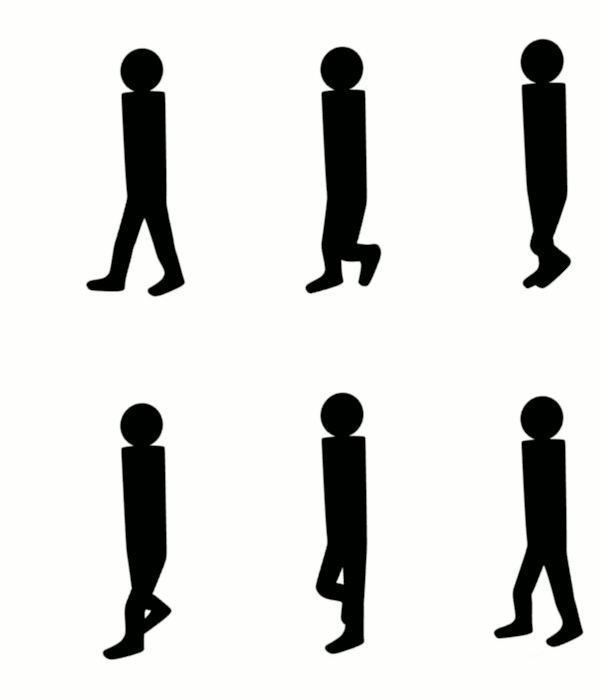
Walk cycles in games
Game walk cycles have a few special requirements:
- In-place animation: the character walks on the spot, and the game code moves it through the world. The animation speed must match the movement speed, or feet appear to slide.
- Root motion: in some 3D engines, the animation itself moves the character, keeping feet planted perfectly.
- Sprite sheets: 2D frames are arranged in a grid image that the engine plays in order.
- Transitions and blending: the walk must blend smoothly into idle, run and jump animations. Engines use state machines to switch between them.
- Directions: top-down and isometric games need walk cycles for four or eight directions.
In this project from the Scratch Team, a sprite switches through walking costumes in a loop. Click “See inside” to see how the cycle and the movement are coded, then remix it with your own drawings:
Alan Becker’s tutorial breaks down walk cycles pose by pose:
Common walk cycle mistakes
- Arms and legs on the same side moving together. Remember: left leg forward means right arm forward.
- No up-and-down motion. Without the down and up poses, the character glides like it is on wheels.
- A “pop” at the loop point. The last frame should be one step before the first frame, not a copy of it, or the loop will stutter.
- Feet sliding. The planted foot should stay fixed to the ground while the body moves over it.
- Stiff arms. Let the elbows bend slightly and the hands trail behind on arcs.
Example
For a side-scrolling game, a student animates an 8-frame walk cycle for a young fisher character: frame 1 contact (left foot forward), frame 2 down, frame 3 passing, frame 4 up, then frames 5–8 repeat the poses with the right foot forward. He exports the frames as a sprite sheet, sets the animation to play at 10 frames per second, and adjusts the character’s movement speed in the game until the feet no longer slide across the boardwalk. To show personality, he adds a slight bounce and lets her fishing hat bob one frame behind the head.
Exercise
- Draw the four key poses (contact, down, passing, up) for one step in profile, using stick figures or a simple character.
- Complete an 8- or 12-frame walk cycle that loops smoothly. Check it with onion skinning.
- Animate two walks with different personalities (for example happy and tired). Describe how you changed timing and poses.
- Put your walk cycle into Scratch or a game engine and match the movement speed so the feet do not slide.
Next: Stop-Motion Animation: Wire Bending, Armatures and Building Models for Scenes
Syllabus link: This post is relevant to the CAPE® Animation and Game Design Syllabus, Unit 2: Interactive Design and Game Development, Module 3: Animation for Games – Specific Objective 10 (“create basic walk cycles”).
Attributions to media used in this post:
4-frame-walk-cycle.gif – Ajay Karat – CC BY 3.0 (via Wikimedia Commons)

Blender3D NormalWalkCycle.gif – SoylentGreen – CC BY-SA 3.0 (via Wikimedia Commons)

© 2026 Vedesh Kungebeharry. All rights reserved.