Before anyone agrees to fund, build or even read your project, they want to know one thing: what is it about? A synopsis is a short written summary of the whole story of an animation or game, from beginning to end, including the ending. An elevator pitch is a spoken summary short enough to deliver in a lift ride (about 30 to 60 seconds) that makes the listener want to hear more. Both grow from a logline: a single sentence that captures the heart of your idea.
In Story Development and Scriptwriting we turned an idea into a premise. In this post you will turn a premise into a synopsis and a pitch you can use with teachers, teammates, funders and publishers.
Logline, elevator pitch, synopsis and treatment: what is the difference?
| Tool | Typical length | What it is for |
| Logline | 1 sentence (about 25–40 words) | The hook. Who the main character is, what they want and what stands in the way. |
| Elevator pitch | 30–60 seconds spoken (about 75–150 words) | Getting a busy person interested enough to ask for more. |
| Synopsis | Half a page to one page (about 150–500 words for a short project) | Showing the complete story, including the ending, so readers can judge whether it works. |
| Treatment | Several pages | A detailed, scene-by-scene prose version of the story, written before the script. |
What goes into a synopsis
- Title, format and genre – for example “a five-minute 3D comedy short” or “a 2D puzzle-platformer for mobile”.
- The protagonist and their goal – who we follow and what they want.
- The setting – where and when the story happens.
- The conflict – the problem, obstacle or antagonist that makes the goal hard to reach.
- The key turning points – the big events that change the direction of the story.
- The ending – a synopsis is not a teaser. Say how the story is resolved.
- Tone and theme – is it funny, spooky or heartwarming, and what is it really about?
Animation synopsis vs game synopsis
An animation synopsis describes one fixed sequence of events. A game synopsis must also explain the player’s role and how the story is experienced through play: what the player does most of the time (the core gameplay), how the story unfolds across levels or chapters, and whether choices lead to different endings. Game synopses often add the genre, platform and target audience (see Types of Video Games: Game Genres, Game Goals and Game Platforms).
How to write a synopsis, step by step
- Write your logline first. If you cannot say it in one sentence, the idea is not clear yet.
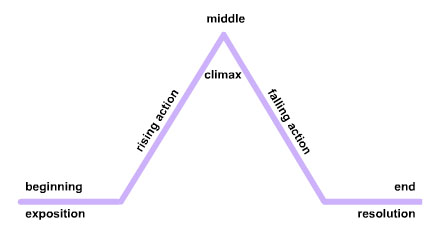
- List the big story beats: the beginning (the normal world and the problem), the middle (attempts, setbacks and a turning point) and the end (the climax and resolution).
- Turn the beats into paragraphs written in the present tense and the third person (“Maya finds a map…”, not “I found a map…”).
- Name only the most important characters and cut the sub-plots.
- Show cause and effect: each event should lead to the next.
- Read it aloud, cut unnecessary words and ask someone who does not know the story whether it makes sense.

The elevator pitch
A pitch is a performance, not a document. A simple formula for a game or animation pitch is:
- Hook – an opening line that sparks curiosity.
- Who and what – the main character (or the player’s role) and their goal.
- Obstacle – what stands in the way and why it matters.
- What makes it special – the unique twist, art style, mechanic or cultural setting.
- The ask – what you want from the listener: feedback, a meeting, funding or a place in a competition.
Keep it conversational, practise it until you do not need notes, and adapt it to your audience. A teacher, a publisher and a funding agency care about different things. For more on e-portfolios, proposals and funding, see How to Pitch and Fund an Animation or Game Project.
Example
Logline (animation): A gentle giant rabbit, bullied by three mischievous rodents, sets aside his peaceful nature to teach them a lesson they will never forget.
Synopsis (animation): Big Buck Bunny is a ten-minute 3D comedy short. On a sunny morning, Big Buck Bunny, a huge and kind-hearted rabbit, steps out of his burrow to enjoy the forest and admire the butterflies. Three bullies, Frank the flying squirrel and his sidekicks Rinky and Gimera, amuse themselves by pelting forest creatures with fruit, nuts and rocks. When they knock two butterflies out of the sky and then attack Bunny himself, the rabbit decides enough is enough. He builds a series of clever traps and deals with Rinky and Gimera one at a time. Frank, unaware, glides towards Bunny and sets off the final trap. In the end, a satisfied Bunny watches a butterfly fly past towing Frank on a string like a kite. The film is about standing up to bullies, told through slapstick comedy with no dialogue.

Elevator pitch (game): “Every year, thousands of baby leatherback turtles hatch on Grande Riviere beach in Trinidad, and only a tiny fraction survive to become adults. Hatchling Dash is a colourful mobile arcade game for ages six and up where you guide one tiny turtle from its nest to the ocean, dodging crabs, seabirds and plastic litter, then swim through three reef levels to reach the feeding grounds. Each level teaches a real fact about turtle conservation, and players can unlock a clean-up mode where they remove litter to help future hatchlings. We are looking for feedback on our first playable level. Can I show you?”
Watch this short TED video to learn how to build a pitch around your audience:
Exercise
- Write a logline for a film, cartoon or game you know well. Check that it names the main character, the goal and the obstacle.
- Create a synopsis (150–300 words) for an original animation based on a culturally relevant theme from your community, such as a festival, a folk tale or an environmental issue.
- Rewrite your idea as a game synopsis. Add the player’s role, the core gameplay, the number of levels or chapters and how the story ends.
- Turn one of your synopses into a 45-second elevator pitch using the five-step formula. Record yourself on a phone and time it.
- Swap pitches with a partner. Give each other one strength and one improvement, then revise.
Next: Story Arcs Explained: Five-Point, Eight-Point and Three-Act Structures for Games and Animation
Syllabus link: This post is relevant to the CAPE® Animation and Game Design Syllabus, Unit 1: Fundamentals of Animation and Game Design, Module 3: Story and Character Development – Specific Objective 1 (“create a synopsis for a game or animation”).
Attributions to media used in this post:
Big buck bunny poster big.jpg – Blender Foundation (peach.blender.org) – CC BY 3.0 (via Wikimedia Commons)
Big Buck Bunny – forest.jpg – Blender Foundation / Project Peach – CC BY 3.0 (via Wikimedia Commons)
© 2026 Vedesh Kungebeharry. All rights reserved.