Ethics, Copyright and Intellectual Property in Animation and Game Design

Ethics is about deciding what is right and wrong. In animation and game design, ethical questions come up all the time: Can I use this song in my game? Is it OK to copy this character? Can I download software I cannot afford? Closely linked are the legal risks, especially around intellectual property such as copyright and patents. Note: this post is general information for learners, not legal advice. Laws differ from country to country.

Ethical, moral and social issues

Here are some common situations. Each one may seem harmless, but each is wrong and often illegal:

  • Downloading expensive software from file-sharing networks instead of buying it. This is software piracy. It takes income from the developers and can also expose your computer to malware.
  • Copying a borrowed CD or a rented DVD before returning it. You are keeping a copy you have not paid for.
  • Stripping DRM (Digital Rights Management) protection from downloaded media to make an unprotected copy. In many countries, getting around DRM is illegal even if you bought the item.
Stack of compact discs
Figure 1 – A stack of CDs. Copying a borrowed or rented disc before returning it is an example of an unethical (and often illegal) action.

Plagiarism

Plagiarism is presenting someone else’s work or ideas as your own, for example tracing another artist’s character and calling it yours, or copying code without credit. Always credit your sources and create original work. See also: Information Protection and Misuse.

The Open Movement

The Open Movement is the idea that knowledge and creative work should be freely available to use, share and improve. It includes:

  • Open source – software whose source code is published under a licence that lets anyone use, study, change and share it (for example Blender and Godot).
  • Open data – data that anyone can freely use and share.
  • Open Educational Resources (OER) – teaching and learning materials that are free to use and adapt.
  • Creative Commons (CC) licensing – licences that let creators give the public permission to share and reuse their work under certain conditions.

Open source vs public domain

These are not the same. Open source work is still protected by copyright. The owner gives permission through a licence, and you must follow its terms. Public domain work has no copyright protection (for example because the copyright has expired or the creator gave up their rights), so anyone can use it for any purpose.

Creative Commons licence elements

SymbolMeaning
BY (Attribution)You must credit the creator.
SA (ShareAlike)If you change the work, you must share your version under the same licence.
NC (NonCommercial)You cannot use the work to make money.
ND (NoDerivatives)You can share the work but not change it.
CC0The creator has given up their rights as far as the law allows, similar to public domain.

Look at the “Attributions” sections at the end of our posts. They show how to credit Creative Commons images correctly.

Intellectual property, copyright and patents

Copyright symbol
Figure 2 – The copyright symbol ©, often used in copyright notices such as “© 2026 Your Name”.

Intellectual property (IP) means creations of the mind, such as art, music, stories, software, inventions, names and logos. IP laws give owners certain exclusive rights.

TypeWhat it protectsExamples in animation and games
CopyrightOriginal creative works: art, animation, music, scripts, code. It protects the expression, not the general idea.Character artwork, a game’s source code, a soundtrack
PatentNew inventions, such as a new technical process or device.A new type of motion controller
TrademarkNames, logos and slogans that identify a brand.A studio’s logo or a game series name

Why IP matters

IP protection lets creators earn from their work, encourages new ideas and investment, and stops others from copying and selling that work without permission.

Getting protection

  • Copyright usually applies automatically as soon as an original work is created and fixed (drawn, saved or recorded). Some countries also offer optional registration. Keep dated drafts and files as proof that you made the work.
  • Patents are not automatic. You must apply to a patent office, and the invention must be new and not obvious. Patents usually last for a limited time (commonly 20 years).
  • Check your own country’s intellectual property office for local rules.

Penalties for infringement

Using protected work without permission is called infringement. Depending on the country and how serious it is, penalties can include paying damages, court orders to stop, destruction of illegal copies, fines, and in serious cases (such as large-scale piracy) prison. Online stores can also remove infringing games and videos.

Authorised use of copyrighted material

  • Get permission or buy a licence (for example stock music or asset packs).
  • Use Creative Commons or public domain material and follow the licence terms.
  • Some countries allow limited use for purposes like education, criticism or news (“fair use” or “fair dealing”). The rules are narrow, so check before relying on them.

Reducing the risks

  • Quality control – check every asset (art, sound, code, fonts) and record where it came from and what licence it uses.
  • Copyright – keep evidence of your original work, and put copyright notices on your projects.
  • Patents and trademarks – protect genuinely new inventions and your brand name where it makes sense.
  • Contracts – agree in writing who owns work created by team members and contractors.
  • Make it yourself – original art, music and code avoid most problems.

Video

This short animation from Creative Commons Aotearoa New Zealand explains the four licence elements and the six Creative Commons licences.

Exercise

  1. Explain why each of the three situations under “Ethical, moral and social issues” is wrong.
  2. What is the difference between open source and public domain?
  3. Find a Creative Commons image on Wikimedia Commons. Write a correct attribution for it and state what its licence allows.
  4. Create an asset log (a table) for a small game listing each asset, its creator, its source and its licence.

Next: The Game Design Process: Brainstorming, Rapid Prototyping, Playtesting and RAD vs Waterfall

Syllabus link: This post is relevant to the CAPE® Animation and Game Design Syllabus, Unit 1: Fundamentals of Animation and Game Design, Module 1: Understanding Animation and Game Design – Specific Objective 18 (“outline ethical issues associated with animation and game design”); Specific Objective 19 (“identify risks associated with animation and game design”); Specific Objective 20 (“develop solutions to mitigate the risks associated with animation and game design”).

Attributions to media used in this post:

CD stack.jpg – mutednarayan – CC BY-SA 2.0 (via Wikimedia Commons)

Copyright.svg – Unknown author – Public domain (via Wikimedia Commons)

© 2026 Vedesh Kungebeharry. All rights reserved.

The 12 Principles of Animation – Plus Software, Programming Languages and Basic Sound Editing

The 12 principles of animation are a set of guidelines that help animators create movement that looks natural and full of life. They were developed by animators at Walt Disney Studios and described by Ollie Johnston and Frank Thomas in their 1981 book The Illusion of Life: Disney Animation. Game animators use them too.

In this post we explain all 12 principles, then look at the software, programming languages and basic sound editing skills that beginners need.

The 12 principles of animation

  1. Squash and stretch – objects squash when they hit something and stretch when they move fast. This gives a sense of weight and flexibility.
  2. Anticipation – a small movement that prepares the audience for a main action, for example bending the knees before a jump.
  3. Staging – presenting an idea clearly so the audience knows exactly where to look.
  4. Straight ahead action and pose to pose – two ways of animating: drawing each frame in order (straight ahead), or drawing the key poses first and filling in between (pose to pose).
  5. Follow through and overlapping action – parts of a character (hair, clothes, a tail) keep moving after the body stops, and different parts move at different times.
  6. Slow in and slow out – movements speed up gradually at the start and slow down at the end, with more frames near the start and end of an action.
  7. Arcs – most natural movements follow curved paths, not straight lines.
  8. Secondary action – smaller actions that support the main action, such as swinging arms while walking.
  9. Timing – the number of frames for an action. It controls speed, weight and mood.
  10. Exaggeration – pushing movements and expressions further than real life to make them clearer and more appealing.
  11. Solid drawing – drawing characters so they feel three-dimensional, with weight and balance.
  12. Appeal – making characters interesting and pleasant to watch (not only “cute”; villains need appeal too).
Bouncing ball with and without squash and stretch
Figure 1 – A bouncing ball without squash and stretch (A) and with squash and stretch (B).
Stroboscopic photo of a bouncing ball
Figure 2 – A real bouncing ball photographed with a strobe light. The spacing between the positions shows timing, and the ball follows arcs.
Animated bouncing ball with squash on impact
Figure 3 – A bouncing ball animation. The ball squashes when it hits the ground, and its speed changes as it rises and falls.
Animated bouncing ball without squash
Figure 4 – A weaker version of the same bounce. The ball stays perfectly round on impact, so the bounce feels stiff. Compare it with the previous figure.

Programming languages for game design

Games need code. Three popular languages are:

  • C# – the main scripting language of the Unity game engine.
  • Java – a general-purpose language used for desktop and Android apps and games.
  • Python – easy to learn. Used with libraries such as Pygame to make 2D games, and for scripting in tools such as Blender.

If you are new to programming, block-based tools like Scratch are a good first step. See A simple game!

Game development tools

Some tools let you build games with little or no code. Construct 2 and Stencyl are two examples. Both use visual, drag-and-drop logic for 2D games. Note: Construct 2 was discontinued by its developer, Scirra, in 2021. Its successor is Construct 3, which runs in a web browser.

Open source and proprietary software

Open source software can be used, studied, changed and shared freely under its licence. Proprietary software is owned by a company, which controls how it is used and often charges for it.

TaskOpen source examplesProprietary examples
3D modelling and animationBlenderAutodesk Maya, Cinema 4D
2D animationSynfig Studio, OpenToonz, Pencil2D, KritaAdobe Animate, Toon Boom Harmony
Image editing / paintingGIMP, KritaAdobe Photoshop
Game enginesGodot EngineUnity, Unreal Engine, GameMaker
Sound editingAudacityAdobe Audition

Basic sound editing techniques

Sound brings animation and games to life. The basic techniques are:

  • Recording – capturing audio with a microphone.
  • Capturing sound effects – recording everyday sounds (doors, footsteps, paper tearing) to use as effects.
  • Voice recording – recording dialogue or narration in a quiet room.
  • Editing – cutting, trimming and rearranging clips, and removing mistakes or silence.
  • Layering – placing several tracks on top of each other, such as voice, music and effects.
  • Fading – making sound gradually get louder (fade in) or quieter (fade out).
  • Exporting – saving the finished audio as a file such as WAV, MP3 or OGG.

Practical: a 20-second sound clip in Audacity

  1. Record a short sentence of narration.
  2. Delete any mistakes or long silences at the start and end.
  3. Import (or record) a sound effect and some background music on separate tracks, which is layering.
  4. Apply a fade in to the start of the music and a fade out to the end, using the fade effects in the Effect menu.
  5. Export the finished mix as an MP3 or WAV file.

Video

Animator Alan Becker demonstrates all 12 principles of animation with simple, clear examples.

Exercise

  1. Animate a bouncing ball (in any software, or as a flip book) using squash and stretch, slow in and slow out, and arcs.
  2. Watch a short animated clip and identify at least four of the 12 principles. Note the time where each one appears.
  3. Choose one open source and one proprietary tool from the table. Compare their cost, features and ease of use.
  4. Complete the Audacity practical above and share your file.

Next: Ethics, Copyright and Intellectual Property in Animation and Game Design

Syllabus link: This post is relevant to the CAPE® Animation and Game Design Syllabus, Unit 1: Fundamentals of Animation and Game Design, Module 1: Understanding Animation and Game Design – Specific Objective 16 (“identify concepts and skills required for animation and game design”); Specific Objective 17 (“demonstrate basic sound editing techniques”).

Attributions to media used in this post:

Squash and Stretch.svg – Lampman – CC BY-SA 3.0 (via Wikimedia Commons)

Bouncing ball strobe edit.jpg – MichaelMaggs, edited by Richard Bartz – CC BY-SA 3.0 (via Wikimedia Commons)

Bouncewiki.gif – AndyD at English Wikibooks – CC BY-SA 2.5 (via Wikimedia Commons)

Bouncebadwiki.gif – AndyD at English Wikibooks – CC BY-SA 3.0 (via Wikimedia Commons)

© 2026 Vedesh Kungebeharry. All rights reserved.

How to Pitch and Fund an Animation or Game Project: E-Portfolios, Proposals and Funding

A great idea for an animation or game is only the start. To turn it into a real project you usually need to show your skills, pitch your idea, write a project proposal and find funding. This post walks you through each step.

E-portfolios: showing what you can do

An e-portfolio (electronic portfolio or online portfolio) is a collection of your work that you keep online. It can include images, animations, game builds, videos, sketches, blog posts and links. There are three main types:

  • Developmental (working) portfolio – shows how your skills improve over time.
  • Assessment portfolio – shows your skill in a particular area, for example for a course or exam.
  • Showcase portfolio – shows only your best work, usually for employers or clients.

Tips for a good e-portfolio

  • Put your best and most relevant work first.
  • Add a short description for each piece: what it is, the tools you used and your role (especially for team projects).
  • Show your process too, for example sketches, storyboards and early prototypes.
  • Keep it up to date and easy to navigate. Include your contact details.
  • Only include work you have the right to share (see our post on ethics and copyright).

Pitching your idea

A pitch is a short, persuasive presentation of your idea to people who might fund, publish or approve it. For an animation, a pitch focuses on the main characters, the conflict and the genre. For a game, it also explains the gameplay and what makes it special. Pitches can be very short (an “elevator pitch” lasting a minute or two) or longer presentations.

Speaker giving a presentation with slides
Figure 1 – A speaker presenting with visual aids. Good slides and clear delivery support a strong pitch.

Structure of a pitch

  1. Beginning – open with a hook to grab attention. Common hooks include an interesting statistic, a quote, a question or a short story. (Always use real, checked facts.)
  2. Middle – explain the idea: story, characters, gameplay, target audience and why it will succeed.
  3. End – say clearly what you are asking for (funding, approval, a partner) and finish with a memorable line.

Effective written and oral communication

  • Know your audience – choose your diction (choice of words) to suit them. Investors may want business details. A class may need simpler language.
  • Know your purpose – are you trying to inform, persuade, instruct or entertain?
  • Use correct grammar and clear sentences, especially in written proposals.
  • Tone and pitch of voice – speak clearly, vary your voice and sound confident.
  • Body language and movement – stand tall, make eye contact and avoid distracting habits.
  • Visual aids – use multimedia such as concept art, a short animated clip or a playable demo.
  • Equipment and room check – test the projector, sound and files before you start.
  • Edit – rehearse, time yourself and cut anything that does not help your message.

Writing a project proposal

A project proposal is a document that explains your plan and tries to convince the reader to approve or support it. A proposal commonly has five parts:

  1. Introduction – what the project is.
  2. Background – why it is needed and who it is for.
  3. Strategy – how you will make it: the team, tools and schedule (key milestones and deadlines).
  4. Budgeting or financing – what it will cost and where the money will come from.
  5. Outcome – what will be delivered and how success will be measured.

Preparing a good proposal needs research, time management and clear communication. If people will be hired, contracts should set out who does what, when, for how much, and who owns the finished work.

Our video brief post shows a similar planning document for video: The Video Brief – Professional Video Creation (Part 2).

Funding your project

Glass jar used as a savings bank with coins and notes
Figure 2 – Every project needs a realistic budget and a plan for where the money will come from.

There are two main types of funding:

  • Loans – money that must be paid back, usually with interest.
  • Grants – money given for a specific purpose that usually does not have to be paid back, but often comes with conditions and reporting.

Common sources of funding include:

SourceHow it worksThings to consider
CrowdfundingMany members of the public each give a small amount, often through a website, usually in return for rewards or early access.Needs a strong pitch and marketing. Rewards must be delivered.
Angel investorsWealthy individuals invest their own money in early-stage projects or businesses.Usually want a share of the business or profits.
Venture capitalistsFirms that invest larger amounts in businesses they believe can grow quickly.Expect high growth and may want a say in decisions.
Investors (general)People or companies who provide money in return for a share of future profits.Agree clearly on what they get in return.
Lending institutionsBanks and credit unions provide loans.Must be repaid with interest. May need security or a business plan.

Evaluating funding options

When comparing options, ask: How much money do we need? Do we have to pay it back? How much ownership or control do we give away? What are the deadlines and conditions? What happens if the project is late or fails? A realistic budget and schedule make these questions much easier to answer.

Video

Extra Credits gives practical advice on shaping a game idea, including writing a short elevator pitch and identifying your unique selling point.

Exercise

  1. Create a simple e-portfolio page (for example using a free website builder) with at least three pieces of your work and a short description of each.
  2. Write a one-minute elevator pitch for an original game or animated short. Start with a hook.
  3. Draft a one-page project proposal using the five parts above.
  4. Compare crowdfunding and a bank loan for a small indie game. Which would you choose, and why?

Next: The 12 Principles of Animation – Plus Software, Programming Languages and Basic Sound Editing

Syllabus link: This post is relevant to the CAPE® Animation and Game Design Syllabus, Unit 1: Fundamentals of Animation and Game Design, Module 1: Understanding Animation and Game Design – Specific Objective 12 (“demonstrate the use of e-portfolios and use of pitching”); Specific Objective 13 (“identify project funding opportunities for animation and game design”); Specific Objective 14 (“evaluate project funding opportunities available for animation and game design”); Specific Objective 15 (“present project proposals”).

Attributions to media used in this post:

Snjezana Kordic keynote presentation Hokkaido University.jpg – Mozel W. – CC BY-SA 4.0 (via Wikimedia Commons)

Piggy-bank-968302.jpg – stevepb – CC0 (via Wikimedia Commons)

© 2026 Vedesh Kungebeharry. All rights reserved.

Jobs in Animation and Game Design: Roles, Skills and Entrepreneurship

Making an animation or a video game is a team effort. Many different people, each with their own role and responsibilities, work together to take an idea and turn it into something that reaches an audience. In this post we look at who does what, the skills that help you get work, and how animation and games create opportunities for entrepreneurs.

Roles in creating animation and games

These are the people and companies involved in planning and making a game or animation:

RoleMain responsibilities
DesignerPlans the game or animation: the idea, goals, rules, levels, characters and overall experience.
AnimatorCreates the movement of characters and objects, frame by frame or using keyframes.
ScriptwriterWrites the story, dialogue and narration.
Sound engineerRecords, edits and mixes voices, music and sound effects.
Software developerWrites the code that makes the game or animation software work.
Tool developerBuilds the software tools (for example editors, plug-ins and game engines) that other team members use.
Console developerCompanies that make game consoles and the systems that games run on.
Contract service providerAn outside company or freelancer hired to do a specific job, such as art, animation, testing or sound.
Quirino Cristiani working on an animated film
Figure 1 – Animation pioneer Quirino Cristiani working on a film in his studio in Buenos Aires.
Men recording sound effects in the 1930s
Figure 2 – Recording sound effects for radio (Finland, estimated 1930s). Sound engineers still capture everyday sounds for animation and games.

On a big project there may be hundreds of people. On a small independent (“indie”) project, one person may be the designer, animator and programmer.

Roles after the product is made

Once a game or animation is finished, other people help it reach its audience:

  • Publishers – often fund the project and handle marketing and release.
  • Distributors – get the product to shops, cinemas, TV channels or online stores.
  • Retailers – sell the product to the public, in physical shops or online.
  • Consumers and players – the audience who buy, watch and play. Their feedback, reviews and sales decide whether a product succeeds.

Skills that support employment

Artistic and technical skills are important, but employers also look for:

  • Teamwork and collaboration – working well with artists, programmers, writers and managers.
  • Working in virtual teams – many teams never meet in person. Members work online from different places using video calls, shared files and chat tools.
  • Project management – planning tasks, meeting deadlines and keeping within a budget.
  • Communication – explaining ideas clearly and accepting feedback.
Team members discussing ideas in a workshop
Figure 3 – A team workshop. Collaboration and communication skills matter as much as technical skills.

Team or individual?

Some creators work as individuals, for example a freelance animator or a solo indie game developer. This gives full creative control, but one person must do everything. Working in a team (including a virtual team) shares the workload and brings together different skills, but needs good communication and management.

Animation and games as a business

Animation and game design can lead to employment (working for a studio) or entrepreneurship (starting your own business). Some ways people earn a living include:

  • Creating and selling their own games, animated series or short films.
  • Outsourcing / contract services – doing work for other companies, for example animating scenes, drawing backgrounds or testing games. Because the work can be sent over the internet, a small studio can serve clients in other countries.
  • Making adverts, explainer videos and educational content for businesses, schools and governments.

Why this matters for regions like the Caribbean

Animation and games can bring economic value to small countries, including those in the Caribbean. Creative work can be sold to clients around the world without shipping physical goods, which helps create jobs and earn income from overseas. Games and animation also have educational value: they can be used as instructional materials to explain difficult ideas, and as assessment tools such as quizzes and interactive challenges. They are also a way to tell local stories and share local culture with a worldwide audience.

Example

A three-person indie team working online might split the work like this: one person designs the game and writes the story, one creates the art and animation, and one programs the game and handles sound. They might use a shared task board to manage the project and hire a contract musician for the soundtrack.

For more on general ICT careers, see Careers in ICT.

Video

Veteran game developer Timothy Cain (co-creator of Fallout) explains the main roles in a typical game development team.

Exercise

  1. Pick three roles from the tables above and describe what each person would do on a small mobile game project.
  2. List two advantages and two disadvantages of working in a virtual team.
  3. Explain what outsourcing is and how it could help a small animation studio.
  4. Suggest one way a game or animation could be used to teach a topic in another school subject.

Next: Types of Video Games: Game Genres, Game Goals and Game Platforms Explained

Syllabus link: This post is relevant to the CAPE® Animation and Game Design Syllabus, Unit 1: Fundamentals of Animation and Game Design, Module 1: Understanding Animation and Game Design – Specific Objective 3 (“identify the roles and responsibilities of persons in the animation and game design industry”); Specific Objective 9 (“outline the role and impact of the Animation and Gaming Industry on the Caribbean region”); Specific Objective 10 (“discuss the skills that support employment and entrepreneurship in animation and game design”); Specific Objective 11 (“explain the relevance of animation and game designs to entrepreneurship”).

Attributions to media used in this post:

Quirino Cristiani animation pioneer.jpg – Unknown photographer – Public domain (via Wikimedia Commons)

A man is recording sound effects, 1930s.jpg – Archives of the Finnish Broadcasting Company Yle – Public domain (via Wikimedia Commons)

Team workshop.jpg – UCT MOOCs – CC BY-SA 4.0 (via Wikimedia Commons)

© 2026 Vedesh Kungebeharry. All rights reserved.

History of Animation and Video Games – From Flip Books to Virtual Reality

The history of animation goes back to simple optical toys from the 1800s, long before computers existed. The history of video games is much shorter. It began with computer experiments in the 1950s and 1960s. Today both industries use many of the same tools, and new technologies such as virtual reality and augmented reality are changing them again.

Below is a short timeline of some key moments. It is not a complete list, but it gives you the big picture.

A short history of animation

Optical toys (1800s)

Before film, inventors made toys that used spinning discs, drums or pages to create the illusion of movement:

  • Phenakistiscope (early 1830s) – a spinning disc of pictures viewed through slits or in a mirror.
  • Zoetrope (1830s, popular from the 1860s) – a spinning drum with slits and a strip of pictures inside.
  • Flip book (kineograph) – a small book of pictures that appear to move when the pages are flipped.
Phenakistiscope disc
Figure 1 – A phenakistiscope disc. When the disc spins and is viewed through the slits, the figures appear to move.
Animated phenakistiscope disc showing a dancing man
Figure 2 – A phenakistiscope disc by Simon Stampfer (about 1835), animated to show the moving figure a viewer would see.
Animated simulation of a spinning zoetrope
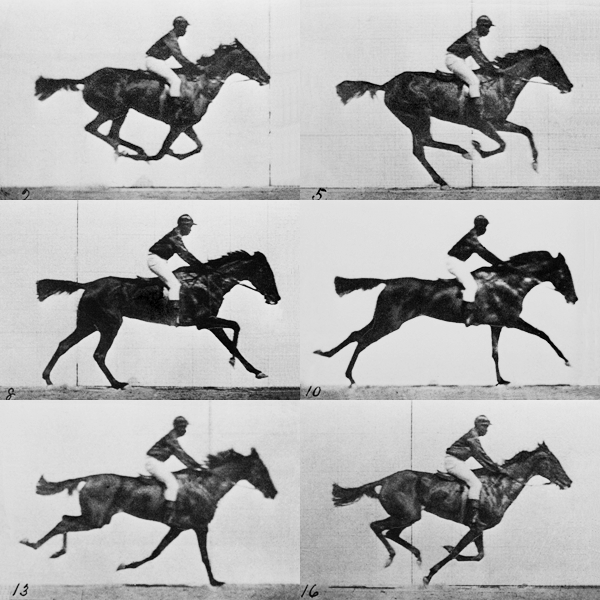
Figure 3 – A simulated zoetrope using Eadweard Muybridge’s race horse photographs. Looking through the slits as the drum spins, you see the horse gallop.

Early animated films (1890s–1930s)

  • 1892 – Émile Reynaud shows hand-painted moving pictures to audiences in Paris with his Théâtre Optique.
  • 1908 – Émile Cohl’s Fantasmagorie, often described as one of the first fully hand-drawn animated films.
  • 1914 – Winsor McCay’s Gertie the Dinosaur shows a character with a real personality.
  • 1928 – Disney’s Steamboat Willie, starring Mickey Mouse, becomes famous for its synchronised sound.
  • 1937 – Snow White and the Seven Dwarfs, Disney’s first feature-length animated film.

Television and computers (1960s–today)

  • From the 1960s, animated series became a regular part of television around the world, including Japanese anime such as Astro Boy (1963).
  • 1995 – Pixar’s Toy Story, the first feature film made entirely with computer animation.
  • Today, animation is used in films, TV series, streaming content, adverts, music videos, websites, education, medicine, architecture and, of course, video games. Free tools such as Blender mean anyone with a computer can start animating.

A short history of video games

  • 1958 – Tennis for Two, a tennis game displayed on an oscilloscope at Brookhaven National Laboratory in the USA.
  • 1962 – Spacewar! is created at MIT on a PDP-1 computer.
  • 1972 – the Magnavox Odyssey, the first commercial home video game console, is released. The same year Atari releases the arcade game Pong.
  • Late 1970s–early 1980s – the golden age of arcade games such as Space Invaders (1978) and Pac-Man (1980).
  • 1980s – home consoles such as the Nintendo Entertainment System (Famicom in Japan) and handhelds such as the Game Boy (1989) bring games into homes and pockets.
  • 1990s – 3D graphics become common on consoles such as the Sony PlayStation and Nintendo 64, and on PCs.
  • 2000s – faster internet makes online multiplayer games popular.
  • 2008 onwards – app stores make it easy to sell games for smartphones, and mobile gaming grows quickly. Digital stores also help small “indie” teams publish their own games.
Tennis for Two game on an oscilloscope screen
Figure 4 – Tennis for Two (1958) displayed on an oscilloscope.
Pong arcade cabinet
Figure 5 – A Pong arcade cabinet.

Where are animation and games today?

Animation and games are now global industries. Games are played on computers, consoles, phones and in web browsers. Animation appears everywhere from cinema to social media. Many projects are made by teams spread across different countries who work together online.

Future trends in animation and game design

Virtual reality (VR)

Virtual reality replaces the real world with a simulated one. The player wears a headset that shows a 3D world which moves as they turn their head. Consumer VR headsets such as the Oculus Rift (2016) brought VR gaming into homes.

Oculus Rift CV1 VR headset
Figure 6 – The Oculus Rift CV1 virtual reality headset, released in 2016.

Augmented reality (AR)

Augmented reality adds computer-generated images, sound or information on top of the real world, usually through a phone camera or smart glasses. Pokémon GO (2016) is a well-known AR game where players find virtual creatures in real places.

Gesture-based computing

Gesture-based systems let players control a game with body movements instead of a keyboard, mouse or controller. The Nintendo Wii (2006) used motion-sensing controllers, and Microsoft’s Kinect (2010) tracked the player’s body with a camera, with no controller at all.

Designers are still exploring how VR, AR and gesture control can be used for entertainment, training, education and even exercise.

Videos

Watch the National Science and Media Museum demonstrate Victorian optical toys, the devices that first created the illusion of movement.

Then see Brookhaven National Laboratory’s short film about Tennis for Two (1958), one of the first video games.

Exercise

  1. Create a timeline (on paper or digitally) showing at least 8 important events in the history of animation or video games. Add a picture for each event.
  2. Choose one event from this post and research it further. Present what you found to your class in 2–3 minutes.
  3. Explain the difference between virtual reality and augmented reality, giving one example of each.
  4. Predict one way that games or animation might change in the next 10 years. Give a reason.

Next: Jobs in Animation and Game Design: Roles, Skills and Entrepreneurship

Syllabus link: This post is relevant to the CAPE® Animation and Game Design Syllabus, Unit 1: Fundamentals of Animation and Game Design, Module 1: Understanding Animation and Game Design – Specific Objective 2 (“outline the history and present use of animation and game design”); Specific Objective 4 (“discuss future trends in animation and game design”).

Attributions to media used in this post:

Phenakistoscope 3g07690u.jpg – Unknown author – Public domain (via Wikimedia Commons)

Optical Toy, Phenakistiscope Disc with Dancing Man, ca. 1835-Animated.gif – Simon Stampfer – Public domain (via Wikimedia Commons)

Muybridge zoetrope.gif – cmglee – CC BY-SA 4.0 (via Wikimedia Commons)

Tennis For Two on a DuMont Lab Oscilloscope Type 304-A.jpg – Brookhaven National Laboratory (BNL) – Public domain (via Wikimedia Commons)

Signed Pong Cabinet.jpg – Chris Rand – CC BY-SA 3.0 (via Wikimedia Commons)

Oculus-Rift-CV1-Headset-Front.jpg – Evan-Amos – Public domain (via Wikimedia Commons)

© 2026 Vedesh Kungebeharry. All rights reserved.

What Is Animation? What Is Game Design? Key Terms for Beginners

Animation is the process of making still images appear to move. A series of pictures (called frames), each slightly different from the one before, is shown one after the other very quickly. Our eyes and brain blend the pictures together and we see motion.

Game design is the art of planning how a game works. It covers the goals, rules and challenges that players face, so that playing the game is fun, interesting or useful.

In this post we will look at both ideas and some of the key terms you will meet when you start learning animation and game design.

What is animation?

Every animation, from a pencil flip book to a big-budget 3D movie, works on the same idea: show a sequence of images fast enough and they look like one moving picture.

The number of images shown each second is called the frame rate. It is measured in frames per second (fps). Film has traditionally used 24 frames per second. Many video games aim for 30 or 60 frames per second so that movement looks smooth.

Early kineograph flip book
Figure 1 – An early kineograph (flip book). Flipping the pages quickly makes the pictures appear to move.
Animated sequence of a galloping race horse
Figure 2 – Photographs of a galloping horse taken by Eadweard Muybridge (published 1887), played one after the other as an animation.

Common types of animation

  • 2D animation – flat drawings that move up, down, left and right. It can be drawn by hand or created on a computer.
  • 3D animation – characters and objects are built as 3D models in a virtual world, then “filmed” with a virtual camera and rendered into frames.
  • Stop-motion animation – real objects (for example clay figures or puppets) are moved a tiny bit and photographed one frame at a time.
  • Motion graphics – animated text, shapes and logos, often used in adverts, title sequences and explainer videos.

What is game design?

A game designer decides what the player does and why. For example: What is the goal? What are the rules? How does the player win or lose? How hard should it be? What choices does the player get?

Game design is not the same as programming. A programmer writes the code that makes the game run. A game designer plans the experience. On a small team, one person may do both jobs. Game design also applies to board games, card games and sports, not just video games.

Other key terms in animation and game design

TermMeaning
FrameOne single image in an animation.
Frame rate (fps)How many frames are shown every second.
KeyframeAn important frame that marks the start or end of a movement. The animator sets the keyframes first.
In-betweens (tweening)The frames between two keyframes that make the movement smooth. Software can often create these automatically.
StoryboardA sequence of drawings, usually with notes and dialogue, that plans the shots of an animation or video.
CharacterA fictional person, animal or creature in a story, animation or game.
SpriteA 2D image or character that can be moved around the screen in a game.
AvatarAn icon or figure that represents a player in a game.
EnvironmentThe surroundings (world, level or scene) where the characters exist.
Game mechanicsThe rules and actions that make a game work, for example jumping, collecting coins or scoring points.
Game engineThe core software a game runs on. It handles things like graphics, physics and sound.
PlatformThe device or system a game is played on, for example a PC, a console or a mobile phone.
PrototypeAn early playable version of a game (or part of a game) used to test ideas.
PlaytestTesting a game with real players to find bugs and design problems.
GenreA category of game or animation, for example puzzle, action or role-play game.
Animated ball moving along an arc while changing colour
Figure 3 – Tweening: the software creates the in-between frames that move the ball along its path and change its colour from one keyframe to the next.
Animated walking character sprite
Figure 4 – An animated game sprite: a character walking, made from a sequence of frames played in a loop.

Example: animation and game design in Scratch

If you have used Scratch, you have already done both! When a sprite switches between costumes inside a loop, each costume is a frame, and the wait time controls the frame rate. See: NCSE ICT – Scratch Programming – Animating Sprites using loops and the Broadcast system.

When you decide that touching an enemy ends the game, or that collecting a star adds 10 points, you are doing game design. A full example is in A simple game!

Exercise

  1. Make a flip book with at least 12 pages in the corner of a notebook. Draw a ball that falls and bounces. Flip it quickly and watch it move.
  2. In your own words, explain the difference between a frame and the frame rate.
  3. Choose a game you know well (video game, board game or sport). Write down its goal, three of its rules and the platform it is played on.
  4. Explain the difference between a game designer and a game programmer.

Next: History of Animation and Video Games – From Flip Books to Virtual Reality

Syllabus link: This post is relevant to the CAPE® Animation and Game Design Syllabus, Unit 1: Fundamentals of Animation and Game Design, Module 1: Understanding Animation and Game Design – Specific Objective 1 (“define terms associated with animation and game design”).

Attributions to media used in this post:

Linnet kineograph 1886.jpg – John Barnes Linnet – Public domain (via Wikimedia Commons)

Muybridge race horse animated.gif – Eadweard Muybridge – Public domain (via Wikimedia Commons)

Tweening.gif – Oicumayberight (author assumed on Commons) – Public domain (via Wikimedia Commons)

Barbarian Forward Walk.gif – Kurt Kaiser – CC0 (via Wikimedia Commons)

© 2026 Vedesh Kungebeharry. All rights reserved.