2019 U2 Q5

Part a

Non Pre-emptive scheduling runs processes on a first come first serve basis,  pre-emptive scheduling determines the length of time  the processes will take to be executed , and then executes the shortest process first, followed by the next shortest and so on. Pre-emptive scheduling can also be accomplished by other algorithms , e.g round robin.

(See this note1)

Part b(i)

The process’s instruction from it’s local program counter is placed on the CPU and executed one after the other until an interrupt is generated.

Part b(ii)

The process scheduler prepares to move the process of the CPU. The process’ updated program counter and state information is saved to its process control block, the process is now in the “ready” queue.

Part b(iii)

The process is interrupted by an I/O or event interrupt. The process’ updated program counter and state information is saved to its process control block, it is placed in the “waiting” queue  to wait for an I/0 or event completion.

Part b(iii)

The process is moved to the ready queue from the  waiting queue.  If the process was waiting on an I/O operation, it’s PCB and local memory would be  updated before it was moved to the ready queue.

Part c

The interrupt is a scheduling one, P5’s program counter and other information is saved to its PCB.  P5 is put into  a “ready” state since it was not blocked by IO or another event.

P2’s instruction from its Program counter is put on the cpu for execution, P2’s  PCB is updated to “running” . P2 will run to completion assuming no error interrupts are generated. When P2 is complete, it’s state is set to terminated. Assuming that there are no other high priority tasks to be run than P5, P5 will be go from ready to running, and it’s instructions are executed from it’s program counter until it terminates and enters a terminated state.

Part d

R0 is locked to P0, it cannot be accessed.

P1 wants to access R1, because it is locked to P0.

For P1 to access R0, P0 must run to completion and terminate.

However, P0 is waiting on P1 to complete in order to access R1  (Which is locked to P1 in the diagram)

Thus both processes cannot run to completion since the resources they need are locked  either one.  This produces a deadlock.

Part e

Advantages:

Advanced operations can be performed at the command line.

For an advanced user, It is faster than using a gui

It is uses comparatively less system resources.

Disadvantages:

It is difficult to learn and use for an inexperienced user.

Unable to perform multitasking.

Part f

Encrypt the files.

Password protect the files.

Employ the use of access permissions to the sender and receiver only to be able to access the file.

Send over a reliable medium which can verify and ensure that the file was sent I.e the use of an application layer protocol running over a connection oriented protocol, e.g using an email client which implements SMTP which in turn uses the IP TCP. 

Table of Contents

  1. Part a
  2. Part b(i)
  3. Part b(ii)
  4. Part b(iii)
  5. Part b(iii)
  6. Part c
  7. Part d
  8. Part e
  9. Part f
  10. Table of Contents
  11. Footnotes

Footnotes

  1. https://islandclass.wordpress.com/2021/05/12/scheduling-algorithms/ ↩︎

© 2023  Vedesh Kungebeharry. All rights reserved. 

2019 U2 Q6

Part a(i)

Handles Host to host communication on the subnet (subnetwork to subnetwork, thus implementing a wide area network) level occurs here using packets. Packets are routed from host to host across the subnets or within a single subnet. Separate subnets may be implemented with differing protocols, the network layer will overcome these challenges by modifying packets to conform to the various protocols.

Feedback to students from class notes

  • Analogy: Sending a large quantity of flour from one country to the next with varying units (kg vs llbs) and customs rules

  • Logical addressing occurs at this protocol (ip addresses , IP protocol suite)

Part a(ii)

Here is  where raw data is transferred over the physical mediums which make up the network, protocol example : RS-232-C

Feedback to students from class notes

(See this video1)

Part a(iii)

The application layer is where applications communicate with each other through high level protocols e.g HTTP, FTP.  The application itself is only responsible for adhering to those protocols and not responsible for routing, sequencing etc that is required to send information through the lower layers which make up the network infrastructure.

Part b

Difficult to guess

Contains a combination of Uppercase and lowercase letters

Contains Special Characters

Is sufficiently long

Can be remembered easily by its creator even though it is difficult to guess.

(See this note2)

Part c

Any of the 3 responses below:

  • By using a network repeater to rebroadcast the signal.
  • By using a network boosters to amplify wireless signals
  • By upgrading the medium to one with less signal attenuation, e.g coaxial to fibre optic.

Part d

Router with access to internet, all other devices connected to the router similar to the diagram below

Footnotes

  1. https://www.youtube.com/watch?v=eo9dbnrpspM ↩︎
  2. https://islandclass.org/2021/01/20/creating-and-managing-passwords-online/ ↩︎

© 2023  Vedesh Kungebeharry. All rights reserved. 
2009 U1 Q1

  1. Part a)
  2. Part b)
    1. Explanation
  3. Part c)
  4. Part d) i)
    1. Explanation/Working:
  5. Part d) ii)
  6. Part d) iii)
  7. Part d) iv)
  8. Links to Notes
    1. Attributions to media used in this post
  9. Footnotes

Part a)

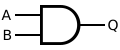
AND Gate:

AND ANSI Labelled
  A | B | A AND B
  ---------------
  0 | 0 |    0
  0 | 1 |    0
  1 | 0 |    0
  1 | 1 |    1

Or Gate:

OR ANSI Labelled
  A | B | A OR B
  ---------------
  0 | 0 |    0
  0 | 1 |    1
  1 | 0 |    1
  1 | 1 |    1

Not Gate:

NOT ANSI Labelled
  A | NOT A
  ---------
  0 |   1
  1 |   0

See this note1

Part b)

Suggested response:

XOR truth table:

ABA XOR B
000
011
101
110

Output is 1 in XOR for (NOT A AND B) OR (A AND NOT B)

Circuit:

XOR implemented with NOT gates (Inverters) and AND gates (Sum of products form)

Explanation


Assume we want to use an AND gate as a building block for our resulting circuit. Wherever we have an output of 1  it means that the inputs to that and gate should also be 1 .

If we imagine an AND gate being the last gate before the output, wherever there is a 1 we need to understand that the inputs to that gate would have to be 1.

ABA XOR B
000
011
101
110


-For each output that produces a 1, we modify the variable input to match  the modded input listed in the specific row of the table:

Row numberABA XOR BDesired output using AND Gate
i000 
ii011NOT A AND B
iii101A AND NOT B
iv110 

We see that either row ii) OR row iii)  produces a 1, i.e

(NOT A AND B) OR (A AND NOT B)

From this expression, we draw the circuit as shown in the suggested response above.

Part c)

4-to-1 multiplexer

Data Lines (Input) are denoted as x1…x4, select line are denoted as s1 and s2, Output is denoted as f

Alternative Diagram in ASCII :

        _______________________
       |        4-to-1         |
D0 ----|      Multiplexer      |
       |                       |
D1 ----|                       |---> Output
       |                       |
D2 ----|                       |
       |                       |
D3 ----|_______________________|
              |         |
              |         |
              |         |
              |         |
              S1        S0
Data Lines (Input) are denoted as D0...D3, select line are denoted as S0 and S1.

See Note2

Part d) i)

16+8+0+2+1 =27

Explanation/Working:

(0×27)+(0×26)+(0×25)+(1×24)+(1×23)+(0×22)+(1×21)+(1×20)

0+0+0+16+8+0+2+1=27

Part d) ii)


  0111 +
  1110
———-
10101 ← this result cannot be stored in 4 bits.

Part d) iii)


Largest number = 0111 =7 (Show conversion)
Smallest number= 1111= -ve 7 (Show conversion)

Part d) iv)

Suggestion solution 1:


Algorithm, copy all numbers from LSB to MSB up to and including the first 1, then flip remaining bits in that order, i.e
5= 0101

Applying algorithm : 1011

Suggestion solution 2:

+5= 0101
Ones = 0101+1 = 1010
Twos = 1010+1 = 1011

Attributions to media used in this post

Inductiveload, Public domain, via Wikimedia Commons


Footnotes

  1. https://islandclass.org/2021/10/20/logic-gates-formal-introduction/ ↩︎
  2. https://islandclass.org/2021/10/21/multiplexers/ ↩︎

© 2023  Vedesh Kungebeharry. All rights reserved. 

2013 U1 Q1

  1. Part a) i)
  2. Part a) ii)
  3. Part a) iii)
  4. Part b) i)
  5. Part b) ii)
  6. Part b) iii)
  7. Part c)
  8. Part d) i)
  9. Part d) ii)
  10. Part d) iii)

Part a) i)

        _______________________
       |        4-to-1         |
D0 ----|      Multiplexer      |
       |                       |
D1 ----|                       |---> Output
       |                       |
D2 ----|                       |
       |                       |
D3 ----|_______________________|
              |         |
              |         |
              |         |
              |         |
              S1        S0


Part a) ii)

Set the select inputlines to 01 to select the 2nd line, and when input from the 4th line is needed after 1 second (i.e i3), set the select input lines to 11

Part a) iii)

– It always exists in 1 of 2 stable states.
-It can retain its state to achieve storage (in the case the set goes from 1 to 0)

Can be used in RAM Arrays (to implement 1 bit storage) or to Implement a Ripple Counter

Part b) i)


1101

(First bit is 1 for to represent a negative value,

working for 510 to binary :

       2 | 5  

       2 |2  remainder 1

       2 |1  remainder 0 

            0  remainder 1

i.e 510  = 1012

combining the result we get 11012

)

Part b) ii)


1010 (flipped bits of 0101)

Part b) iii)

1010 +1 = 1011

Part c)

(Show binary-decimal conversions)

For an unbiased exponent and unnormalized mantissa:

sign is -ve, Exponent = 2, Mantissa= 0101

i.e -0.0101 x 2­2 = -1.01

-1.012   =  (-1 x 20)+ (0 x 2-1)+ (1 x 2-2)

          = -1 + 0+ ¼

          = -1.25

Part d) i)


Not (Unary operator)

xNot X
01
10

Part d) ii)

AND

xYX AND Y
000
010
100
111

Part d) iii)

OR

xyX OR Y
000
011
101
111

© 2023  Vedesh Kungebeharry. All rights reserved. 

2022 U2 Q1

Part a)

The main difference between a stack and a queue is how data is inserted and removed from each of them. In a stack, the last element inserted is the first to be removed as compared to a queue where the first element inserted is the first to be removed.

Part b) i)

The enqueue(element) adds an element to the end of  the list of elements which represent the queue. If the list of elements is empty, it adds it at the first location or head of the queue.

Part b) ii)

The dequeue(element) removes an element to the front of  the list of elements which represent the queue. If the list of elements is empty, no element is removed.

Part c)

//Assumptions: The following state is used
#define MAX_SIZE 100
int stack[MAX_SIZE];
int top = -1;

void push(int *stack, int value) {
    if (top >= MAX_SIZE - 1) {
        // Stack is full
        printf("Stack is full, element was not added!\n");
        return;
    }
    top++;
    stack[top] = value;
}

© 2023  Vedesh Kungebeharry. All rights reserved. 

2017 U2 Q5

Part a)

Client server

Part b)

  1. The user clicks on a link to a webpage from a previous webpage.
  2. The browser resolves the ip address from the server name and sets up a tcp connection to the server (usually on port 80 or 8080)
  3. The browser sends a http request to the server containing the requested resource and information about itself, e.g browser type, supported language etc
  4. The server generates a response which contains header information as well as HTML code for the browser to render.
  5. The browser interprets the code and displays the page to the user.

Part c)

The url https://www.buythings.com  would be preferred since this http protocol includes SSL (Secure sockets layer) or TLS (Transport layer security) which encrypts all HTTP information such that only the sender and the receiver can decipher the information. This is more secure, especially in the case where the http information can be intercepted by malicious entities on the network, they won’t be able to read the sensitive payment information that can be used defraud the online shopper.

Part d)

A process is a running program.

The PCB stores metadata necessary for  managing the process, e.g. process id, process state, memory allocation addresses, scheduling info (priority, time slice), pointers to it’s resources (files, other processes).

Part e)

  1. New
  2. Running
  3. Ready
  4. Waiting
  • Terminated

Part f)

Paging is were each process in an OS is allocated memory in units called pages for easier coordination and management by the operating system. The pages can be stored physically in memory , or stored on the hard disk (in the case that the process is not running at that time). If a process is stored on the disk and needs to be run, a page fault is generated so that the process is swapped back into the physical memory for processing.

Part g)

Thrashing occurs when memory resources become limited by the amount of running processes. The need for physical memory can be exceeded, thus multiple processes that are in waiting state are stored as pages on disk. For continued running of the system, processes are constantly swapped in and out of physical memory, an execution which spends a lot of time on the cpu when compared to running the processes themselves.

Part h)

  1. Because of the frequent process swapping by page faults, the system becomes inefficient and can run slowly.  (The solution is to inefficiency increase the size of physical memory by upgrading the ram size, or configure/manage the system to run less processes.)

  2. The system can become overwhelmed to the point of “crashing”, i.e stop working or responding altogether.

Part i)

Too little physical memory is available for a system that needs to run a lot of processes.


© 2023  Vedesh Kungebeharry. All rights reserved. 

2022 Jan P02 IT CSEC Q3a

Start
    // Initialization of variables....
    price = -999.99
    totalPrice = -999.99
    discountAmount = -999.99
    discountRate = 0.25
    quantity = -999
    
    // Prompt the user for input....
    output "Input Price"
    input price
    output "Input quantity"
    input quantity
    totalPrice = price * quantity
    
    // Determine the discount....
    if totalPrice > 1800 then
        discountAmount = totalPrice * discountRate
    else
        discountAmount = 0.00
    end If
    
    // output results....
    output "the Discount is " + discountAmount
Stop

Alternate solution

Note: In this solution , our selection statement does not contain an else branch, since the discountAmount is initialized to 0.

Start
    // Initialization of variables....
    price = -999.99
    totalPrice = -999.99
    
    // here, discount is set to 0.
    discountAmount = 0
    discountRate = 0.25
    quantity = -999
    
    // Prompt the user for input....
    output "Input Price"
    input price
    output "Input quantity"
    input quantity
    totalPrice = price * quantity
    
    // Determine the discount....
    if totalPrice > 1800 then
        discountAmount = totalPrice * discountRate
    else
        
        // because the discount was initialized to 0, we don't need an else section for our selection construct.
    end If
    
    // output results....
    output "the Discount is " + discountAmount
Stop

Additional resources

See flowcharts and solution in flowgorithm here:

https://drive.google.com/drive/folders/1pLQq5N6fqzs7wlFdUaehraZxkhGv2oke?usp=sharing

© 2022  Vedesh Kungebeharry. All rights reserved. 

2019 U1 Q5

Part A

i) Debugging is the process of detecting removing and/or correcting errors in code.

ii) Coded is indented every time a control structure is entered. i.e.  thus isolating blocks of logic which is easier to read and understand.

Comments are used to explain what the code is intended to accomplish, thus making it easier understand and modify

Descriptive variable names explains the purpose of each variable making code easier to understand and maintain.

Part B

//this is a complete program, but starting from main() would be sufficient.
#include <stdio.h>
#include <stdlib.h>
#include <stdbool.h>

int main()
{
    //Start:declare and initialize all variables
    double redTime     =   -999.99;
    double greenTime   =   -999.99;
    double orangeTime  =   -999.99;
    bool valid=false;//used to signify that no
                    //valid inpuha been enterd
                    //at the start of execution

    //End:declare and initialize all variables

    //while input is not valid
    while(valid==false)
    {
        //ASSUMPTION: the usere only enters positive values
        //get input from user
        puts("Please enter a value for Redtime");
        scanf("%lf",&redTime);
        puts("Please enter a value for greenTime");
        scanf("%lf",&greenTime);
        puts("Please enter a value for orangeTime");
        scanf("%lf",&orangeTime);
        //evaluate each condition, and check that they are all true.
        valid = (redTime>=greenTime+orangeTime)&&
                (orangeTime>=5)&&
                (greenTime>4*orangeTime);

        //if input is invalid
        if(valid==false)
        {
            //prompt user
            puts("Invalid timings: Please re-enter\n");
        }
        //continue looping if valid == false
    }
    //if we have exited the loop, then timings are valid
    puts("Timings are valid\n");
    return 0;
}


Part C(i)

    /*Code presented in question
    int i j;
    for (i=1;<= 3;i++)
        for (j=1;j<i;j=j+1)
            printf("%d" j);
        printf(\n);
    */

//Corrected code
    int i, j;  //comma was missing between i and j
    for (i=1;i<= 3;i++)//no left operand for comparison, "i" dentifier missing
        for (j=1;j<i;j=j+1)
            printf("%d", j);//comma missing between format string and parameter
        printf("\n");  //String was not in quotes

/*Note that this code seems to contain a logical error , 
as implied by the indentation of the code.  
It seems that the 2nd for loop and the printf statement are 
2 lines of code that are meant to be executed within the first for loop, 
and should be enclosed in curly braces. 
This question asks us to correct the syntax errors only. 
One may feel the need to fix the logical error also,  
but it is not required.  */


Part C(ii)

Answer:

112

Note, if you assumed a logical error and fixed it, the output would be

1

12

Based on the code:

#include <stdio.h>

int main() {
        //Corrected code
    int i, j;  //comma was missing between i and j
    for (i=1;i<= 3;i++)//no left operand for comparison, "i" dentifier missing
    {    
        for (j=1;j<i;j=j+1)
            printf("%d", j);//comma missing between format string and parameter
        printf("\n");  //String was not in quotes
    }
    
    return 0;
}


This fix however, would render your response incorrect.

© 2021  Vedesh Kungebeharry. All rights reserved. 

CS U1 2009 U1 Q4


Part A

Identifying and evaluating possible solutions involves generating different approaches to solving the problem.  Solutions will include different methods of solving the problem, e.g contrasting data structures :  one solution may use arrays only, another will use a mixture of arrays and structs.  Each solution is compared against each other to determine individual advantages and disadvantages when compared to each other in terms of efficiency and how well it solves the problem.[1]


[1] https://islandclass.org/2020/02/17/stages-in-problem-solving/

Part B

Strategy – keep track of all variables in a trace table, draw output as you go along.

Table – write all variables in the order of its logical use within main control structures, use 1 variable per column:

SIZEj
108
 7
 6
 5


Answer:

----------* 
---------**
--------*-*
-------*--*
------*---*
-----*----*
----*-----*
---*------*
--*-------*
-*--------*
***********

Part C

START
Sum&lt;--0
For i&lt;--14 to 126 DO
	If i%7 ==  0  Then
		Sum&lt;--sum +i
	Endif
Endfor
PRINT Sum
END

Coded solution:

#include <stdio.h>
#include <stdlib.h>

int main()
{
   
    int sum = 0;
    for (int i= 14; i<=126; i++)
        if (i%7==0)
            sum+=i;
    printf("The sum is : %d", sum);

    return 0;
}

© 2021  Vedesh Kungebeharry. All rights reserved. 

2009 U1 Q3

Part a

An algorithm is a well-defined, precise, finite set  of steps for solving a problem.[1]

Part b

Sequence (procedure), Selection (if-then-else) , Iteration (Looping)

Part c

Note:  j goes from 2,4,6,… 96,98 during looping and is output to the screen. Odd numbers are not output. See the attached flowgorithm file here:

https://drive.google.com/file/d/1H21gL4E0YGtgzXgwUD-1cFuEHsmC8IY0/view?usp=sharing

Image:

https://drive.google.com/file/d/1smeXp9ArthIPi7ZY1NfnJqJrYKIJx4rK/view?usp=sharing


Part C(i)

J = 100, C=50

Part c(ii)

2. J=1
3. C=1

Note, for this part we arrive at a solution that solves the problem exactly as stated (only numbers from odd numbers from 1 to 99 and the count.  See flowgorithm file for the corrected algorithm:

Flowgorithm file

Image

Displaying 2009Q3Cii.png


Part c(iii)

c=50

Part  d

Use “Start” instead of main.  See Files Below:

Flowgorithm

Image


[1] VK. Blogged at https://islandclass.org/2020/02/10/what-is-an-algorithm-definition/

© 2021  Vedesh Kungebeharry. All rights reserved.